Prompt
362 wordsSubject:
In the Middle of Leaf Shadows
Main Subject:
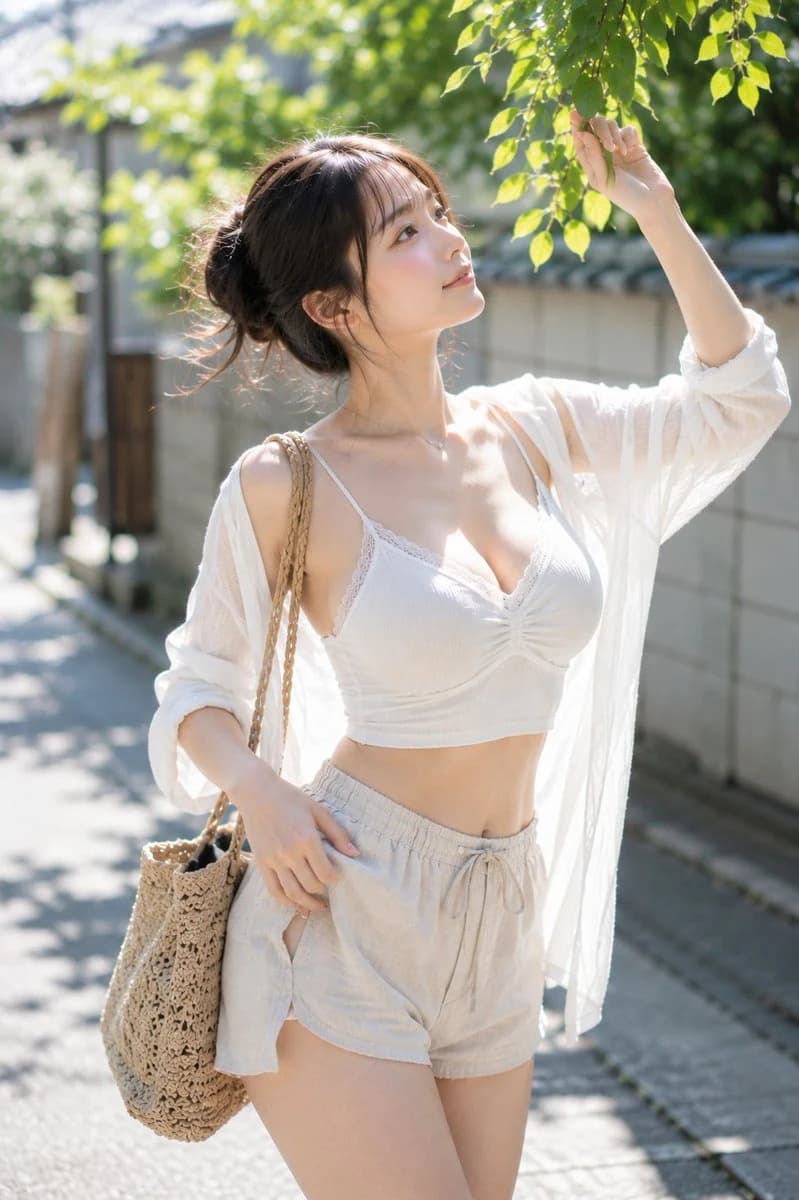
A {argument name="subject" default="single woman"} in a {argument name="setting" default="quiet tree-lined path near a summer residential area"} reaching out gently toward the leaf tips above. The subject is positioned slightly left of the center, in a vertical composition showing from the upper body to mid-thigh. The subject occupies about 65% of the frame, with wide margins and green bokeh in the background.
Person/Expression:
A woman with a natural adult atmosphere. Soft oval facial contour, small bridge of the nose, transparent skin, and calm, large eyes. Her gaze is directed toward the leaves at the top right, with a modest smile on her lips. Hair is tied in a loose low bun with fine stray hairs falling on the cheeks and neck. Natural brown-toned makeup, light coral pink lips, and small catchlights in the eyes.
Clothing/Pose:
{argument name="clothing" default="White ribbed camisole top"} with a thin, sheer white summer shirt draped over the shoulders. Bottoms are light beige linen shorts. Right arm raised touching the branch tips, left hand resting naturally near the waist. A rattan woven bag hangs from the shoulder. Overall light and cool summer holiday coordination.
Background/Light:
Narrow tree-lined path in a Japanese residential area. Low concrete walls, distant houses, soft green plantings. Midsummer morning sunlight filters through the trees, casting shadows on the ground, shoulders, and arms. Light enters from the top left, creating warm highlights on cheeks, collarbones, and arms. The background is heavily blurred with refreshing green and white tones.
Composition/Camera:
Vertical portrait composition, 85mm equivalent, medium telephoto lens expression. Camera position at chest height, slightly low angle. Shallow depth of field with large background blur, focusing accurately on the subject's eyes and face. Diagonal composition formed by the leaves on the top right and the bag on the bottom left.
Texture/Style:
High-quality photographic expression. Natural skin texture, soft contrast, and the transparency unique to summer sunlight. Calm gradations and atmosphere like film photography. Realistic depiction avoiding excessive sharpness or HDR processing.
Negative:
Unnatural face, unnatural gaze, extra fingers, missing fingers, fused limbs, broken joints, floating, unnatural gravity, incorrect perspective, garbled text, logos, watermarks, excessive skin smoothing, plastic-looking skin.About this prompt
Japanese Summer Portrait Under Leaf Shadows is a ready-to-use portrait prompt for GPT Image 2 on Image 2. Copy the 362 words below, paste them into the Create form, and you will get a result close to the preview above. Tweak the Portrait, Fashion, Beauty tag if you want to push it somewhere new.
Use it as a starting point, then adjust the subject, lighting, or composition to suit your idea. The credit cost stays the same whether you use it as written or customize it.
Use case
A strong starting point for Portrait
Start here when you want a portrait image inspired by Japanese Summer Portrait Under Leaf Shadows. The prompt already sets the look and composition; replace the subject, product, colors, or scene details to match your project.
Easy places to tweak
- Subject Swap in your person, product, place, or object without changing the overall composition.
- Look and mood Tune the lighting, palette, camera angle, or materials so the image fits your brand.
- Final format Set the aspect ratio, background, text, or layout notes before you generate.
More prompt paths to explore
Find more GPT Image 2 prompts with a similar style, use case, or subject.
How to use it
- Step 1
Copy the prompt
Hit the Copy button above to grab the full text.
- Step 2
Open Image 2 Create
Head to the Create form and paste it in.
- Step 3
Generate
Hit Generate. Your version lands in seconds.
Make it yours
Load the prompt into the Create form with one click, then start tweaking.