Prompt
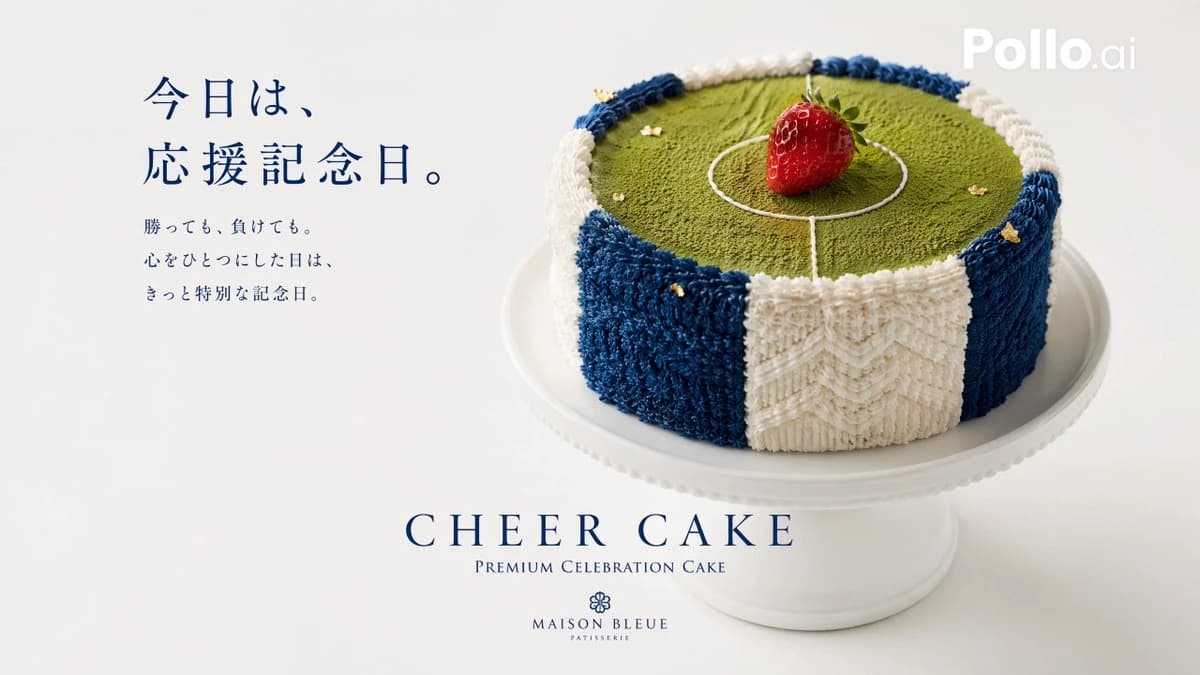
363 wordsGoal: Create a premium Japanese patisserie advertising visual for a soccer supporter celebration cake, combining realistic food photography with elegant editorial typography.
Canvas: Wide horizontal 16:9 composition on a warm off-white studio background with soft natural light, minimal shadows, and lots of negative space.
Layout: Place the cake on the right half of the image, sitting on a white ceramic pedestal cake stand. Place Japanese advertising copy on the left in dark navy serif type. Put the product name and brand centered near the bottom. Add a small semi-transparent white “Pollo.ai” watermark in the upper-right corner.
Main subject: A round celebration cake designed like a Japanese soccer cheering towel. The top surface is green matcha powder, textured like a soccer field. Draw thin white icing lines for a center circle and midfield line. Place exactly 1 glossy red strawberry upright at the center of the field, representing the Japanese flag’s red circle. Decorate the outer side of the cake with fluffy piped cream that looks like terry-cloth towel fabric, alternating vertical navy blue and white panels. Use exactly 6 visible side panels around the front: navy blue, white, navy blue, white, navy blue, and a darker navy edge panel. Add small edible gold flakes scattered sparingly on the blue-and-white cream and on the matcha surface. Keep the blue accents balanced so the cake still feels refined and not overly blue.
Text content: On the left, set the headline in Japanese: {argument name="headline text" default="今日は、\n応援記念日。"} Below it, add three smaller Japanese lines: {argument name="body copy" default="勝っても、負けても。\n心をひとつにした日は、\nきっと特別な記念日。"} At the bottom center, set the large English product title: {argument name="product name" default="CHEER CAKE"}. Under it, add small caps text: “PREMIUM CELEBRATION CAKE”. Below that, add a small floral emblem and the brand name: {argument name="brand name" default="MAISON BLEUE"}, with “PATISSERIE” beneath.
Visual style: Hyper-realistic commercial food photography, high-end Japanese confectionery campaign, clean luxury aesthetic, navy typography, shallow depth of field, crisp cake texture, appetizing strawberry shine, soft off-white background, refined spacing.
Constraints: Use exactly 1 cake, 1 strawberry, 1 pedestal stand, 6 visible side panels, and 1 top soccer-field design. Do not add people, utensils, plates of slices, extra fruit, candles, confetti, or busy background elements.About this prompt
Japanese Soccer Cheer Cake Ad is a ready-to-use ad creative prompt for GPT Image 2 on Image 2. Copy the 363 words below, paste them into the Create form, and you will get a result close to the preview above. Tweak the Product Ad, Ad Creative, Storyboard tag if you want to push it somewhere new.
Use it as a starting point and keep iterating: change the subject, lighting, or composition until it looks right. The credit cost stays the same whether you run it as-is or remix it.
Use case
A strong starting point for Ad Creative
Start here when you want a ad creative image in the same direction as Japanese Soccer Cheer Cake Ad. The prompt already sets the look and structure; swap in your own subject, product, colors, or scene details for the brief you have in mind.
Easy places to tweak
- Subject Swap in your person, product, place, or object without changing the overall composition.
- Look and mood Tune the lighting, palette, camera angle, or materials so the image fits your brand.
- Final format Set the aspect ratio, background, text, or layout notes before you generate.
More prompt paths to explore
Find more GPT Image 2 prompts with a similar style, use case, or subject.
How to use it
- Step 1
Copy the prompt
Hit the Copy button above to grab the full text.
- Step 2
Open Image 2 Create
Head to the Create form and paste it in.
- Step 3
Generate
Hit Generate. Your version lands in seconds.
Make it yours
Load the prompt into the Create form with one click, then start tweaking.