Prompt
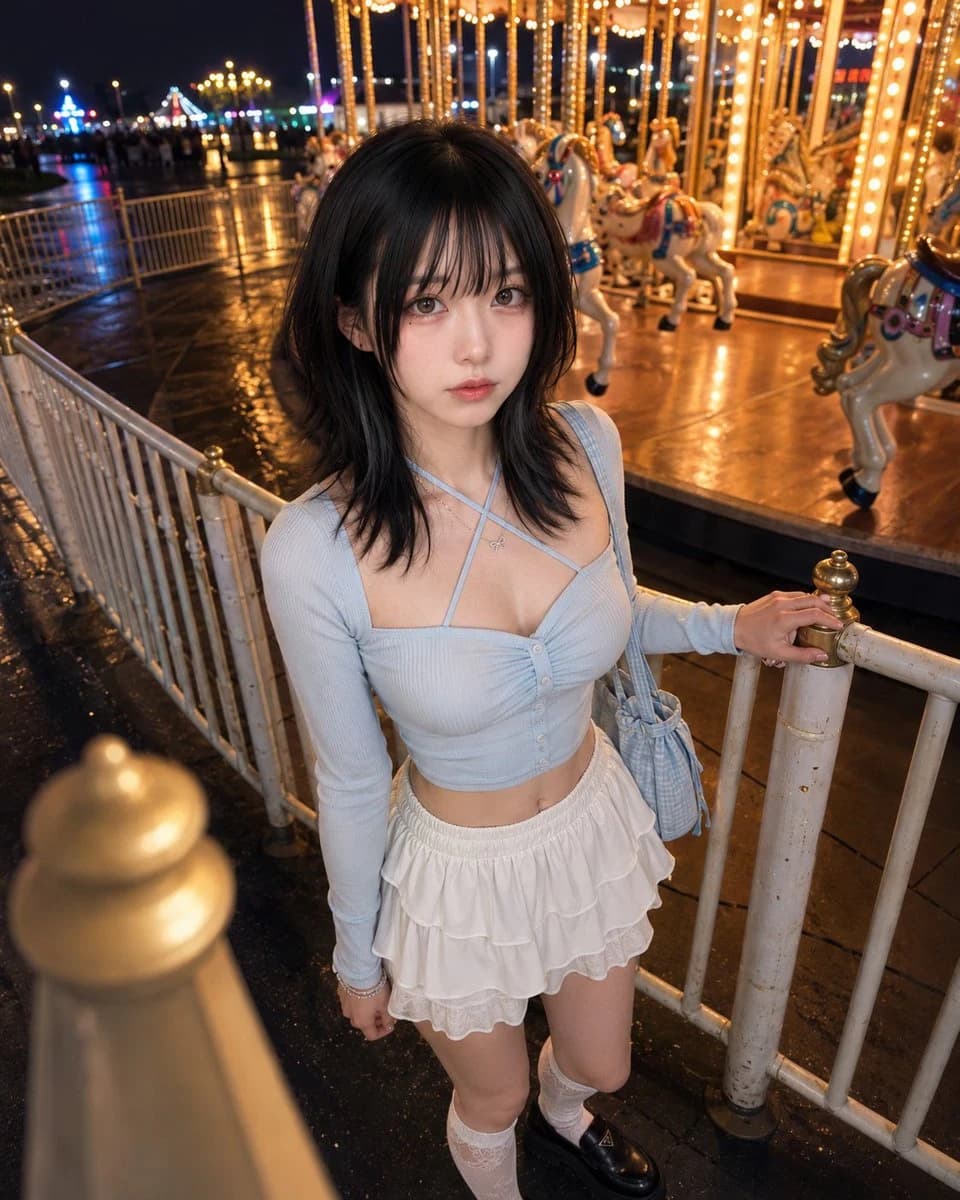
451 wordsPhotorealistic true first-person boyfriend-perspective amusement-park date scene featuring an adult woman.
Image logic: this image is literally viewed from the taller boyfriend’s eyes. She is making direct eye contact with him through the high lens, and the visible upward gaze is created by the real {argument name="height difference" default="30 cm"} height difference.
Background identity: a night amusement-park carousel plaza with an illuminated merry-go-round covered in warm golden bulbs, painted horses, glossy platform reflections, decorative poles, a low metal fence, colorful ride lights, distant amusement-park bokeh, and a dark blue night sky. The carousel should feel layered, luminous, romantic, and dimensional rather than like a flat wall of lights.
Depth lock: in the foreground, a {argument name="foreground element" default="softly blurred fence post, carousel-light flare, or glossy pavement reflection"} enters near the lens. In the middle ground, the subject stands close beside the low carousel fence. In the background, multiple layers of carousel horses, illuminated poles, rotating platform details, distant park lights, and the night sky recede behind her.
True boyfriend-eye camera lock: place the lens exactly at her boyfriend’s natural eye level, approximately 30 cm above her eye line and 40–55 cm from her face. Use a clearly downward angle of approximately 18–24 degrees. Position the camera slightly in front of her near shoulder, not beside her profile. Point the optical axis directly toward the center between her eyes. Frame from the upper waist or lower chest to slightly above the head. Her eyes must remain clearly below the lens.
Pose lock: her pelvis remains angled toward the carousel at approximately 35–45 degrees. Both feet remain naturally grounded. One hand rests simply on the top of the low fence. The other arm stays relaxed beside the body and may be partially cropped. Her upper torso rotates slightly toward her boyfriend without becoming a frontal portrait. Keep the near shoulder subtly closer to the lens and the shoulders relaxed.
Head-direction lock: turn her head toward the lens far enough for both eyes to be fully readable. Retain a soft three-quarter face angle, with the nose direction approximately 15–25 degrees away from full frontal. Do not keep her face pointed toward the carousel.
Direct boyfriend-eye-contact lock: both pupils and irises point directly into the center of the camera lens, as though she is looking into her boyfriend’s eyes. She is not looking at the carousel, a horse, beside the camera, or beyond the lens. The higher lens causes a clearly upward eye angle. Keep the chin level or slightly tucked.
Expression lock: a {argument name="expression" default="sweet, affectionate, gently spoiled"} expression, as if she wants him to ride again or stay close for another moment. Softened eyelids, slightly lifted inner brows, relaxed cheeks, softly closedAbout this prompt
Boyfriend Perspective Carousel Date is a ready-to-use social media prompt for GPT Image 2 on Image 2. Copy the 451 words below, paste them into the Create form, and you will get a result close to the preview above. Tweak the Social Media tag if you want to push it somewhere new.
Use it as a starting point, then adjust the subject, lighting, or composition to suit your idea. The credit cost stays the same whether you use it as written or customize it.
Use case
A strong starting point for Social Media
Start here when you want a social media image inspired by Boyfriend Perspective Carousel Date. The prompt already sets the look and composition; replace the subject, product, colors, or scene details to match your project.
Easy places to tweak
- Subject Swap in your person, product, place, or object without changing the overall composition.
- Look and mood Tune the lighting, palette, camera angle, or materials so the image fits your brand.
- Final format Set the aspect ratio, background, text, or layout notes before you generate.
More prompt paths to explore
Find more GPT Image 2 prompts with a similar style, use case, or subject.
How to use it
- Step 1
Copy the prompt
Hit the Copy button above to grab the full text.
- Step 2
Open Image 2 Create
Head to the Create form and paste it in.
- Step 3
Generate
Hit Generate. Your version lands in seconds.
Make it yours
Load the prompt into the Create form with one click, then start tweaking.