Prompt
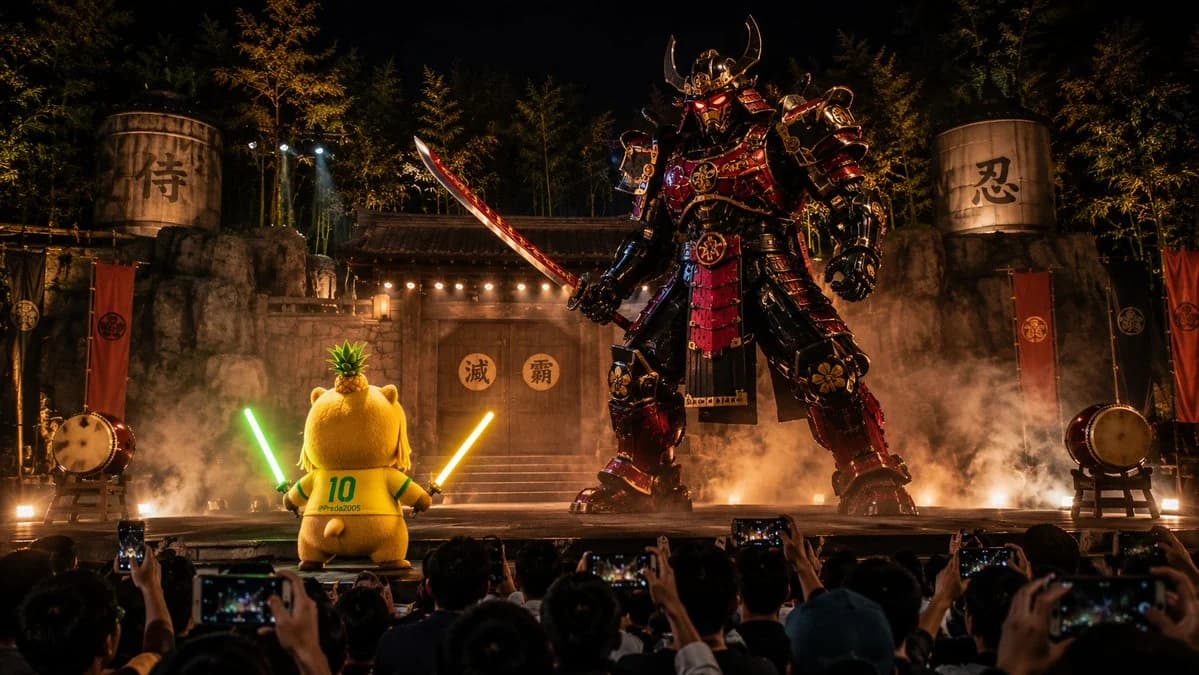
163 wordsCreate a cinematic 16:9 wide image from the audience POV at a nighttime outdoor Japanese theater performance. The camera feels like a handheld smartphone recording from the crowd, with silhouetted audience heads and raised phones in the foreground. On stage, a cute plush capybara mascot girl named Capychan stands small but heroic, with a round chubby body, huge capybara hood, pineapple crown, yellow number 10 jersey, blonde-and-green hair, heterochromia eyes, and two glowing energy swords, one green and one gold. She faces a colossal original samurai robot with black, red and gold armor, glowing red eyes, and a massive mechanical katana. The stage has a traditional Japanese village gate, bamboo forest, lanterns, taiko drums, smoke, sparks, explosions, dramatic spotlights, and a realistic live performance atmosphere. Make the image dynamic, as if captured during a fast battle scene, with motion energy, smoke trails, impact sparks, and epic scale contrast. No copyrighted characters, no logos, no subtitles. Cinematic, high detail, realistic audience-recorded viral video frame.
About this prompt
Nighttime Japanese Theater Cinematic is a ready-to-use poster prompt for GPT Image 2 on Image 2. Copy the 163 words below, paste them into the Create form, and you will get a result close to the preview above. Tweak the Poster, Cinematic, Sticker tag if you want to push it somewhere new.
Use it as a starting point and keep iterating: change the subject, lighting, or composition until it looks right. The credit cost stays the same whether you run it as-is or remix it.
Use case
A strong starting point for Poster
Start here when you want a poster image in the same direction as Nighttime Japanese Theater Cinematic. The prompt already sets the look and structure; swap in your own subject, product, colors, or scene details for the brief you have in mind.
Easy places to tweak
- Subject Swap in your person, product, place, or object without changing the overall composition.
- Look and mood Tune the lighting, palette, camera angle, or materials so the image fits your brand.
- Final format Set the aspect ratio, background, text, or layout notes before you generate.
More prompt paths to explore
Find more GPT Image 2 prompts with a similar style, use case, or subject.
How to use it
- Step 1
Copy the prompt
Hit the Copy button above to grab the full text.
- Step 2
Open Image 2 Create
Head to the Create form and paste it in.
- Step 3
Generate
Hit Generate. Your version lands in seconds.
Make it yours
Load the prompt into the Create form with one click, then start tweaking.