Prompt
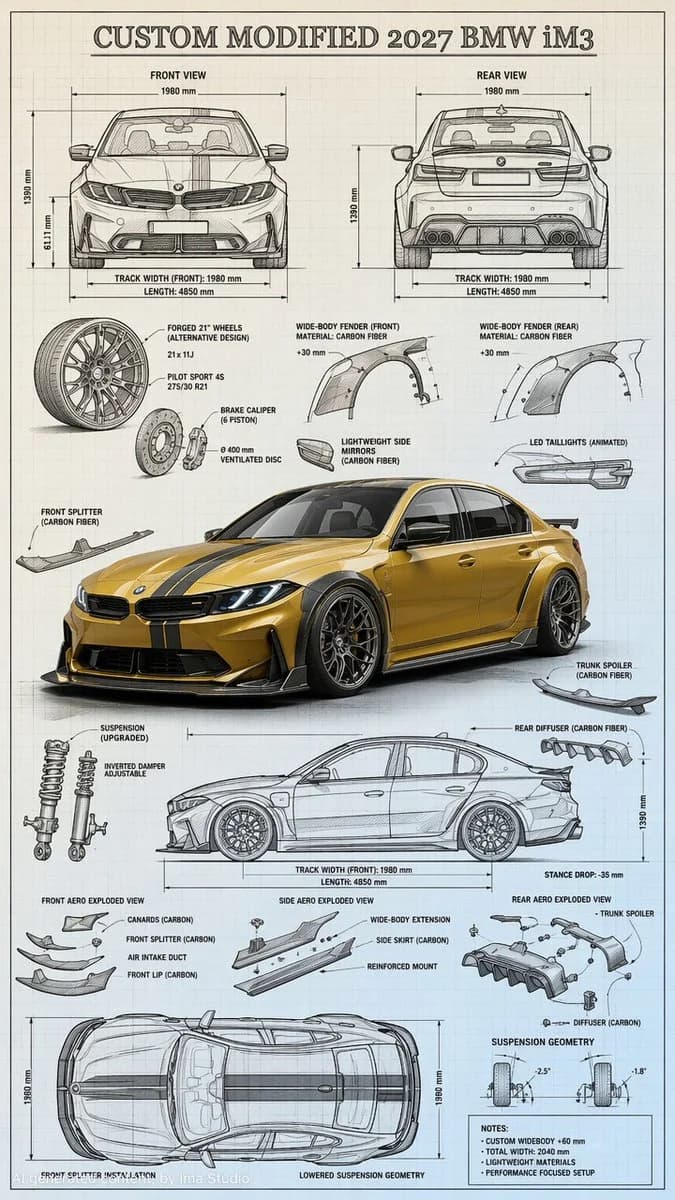
166 words“Highly detailed technical blueprint sketch and realistic 3D–render fusion of a custom modified car 2027 BMW iM3. Transform the car into a tuned concept blueprint with an aggressive lowered stance, wide-body aesthetic (adapted to match the real car’s form), and bold racing stripe accents matching or enhancing the original photo colors. Add large aftermarket-style wheels inspired by the car in the photo (accurate spoke design & size), sharp LED-like lighting details, and sporty aerodynamic additions such as front spoiler, side skirts, rear diffuser, and small spoiler — all adjusted realistically to the BMW iM3’s geometry. Surround the main render with precise engineering-style blueprint elements: multiple orthographic views (front, rear, side, top) derived from the reference photo, construction lines, mm-dimensions, exploded-view details for wheels, suspension, and body kit components. Art style combines pencil/ink drafting with fine cross-hatching, clean annotations, and a photorealistic shaded center render. Blueprint background in soft light-blue or sepia technical-paper texture, ultra-detailed, professional automotive concept-design composition. --ar 9:16 --stylize 300 --v 6 --q 2”
About this prompt
Custom Car Blueprint Sketch Render is a ready-to-use ui mockup prompt for GPT Image 2 on Image 2. Copy the 166 words below, paste them into the Create form, and you will get a result close to the preview above. Tweak the UI, Mockup, 3D tag if you want to push it somewhere new.
Use it as a starting point and keep iterating: change the subject, lighting, or composition until it looks right. The credit cost stays the same whether you run it as-is or remix it.
Use case
A strong starting point for UI Mockup
Start here when you want a ui mockup image in the same direction as Custom Car Blueprint Sketch Render. The prompt already sets the look and structure; swap in your own subject, product, colors, or scene details for the brief you have in mind.
Easy places to tweak
- Subject Swap in your person, product, place, or object without changing the overall composition.
- Look and mood Tune the lighting, palette, camera angle, or materials so the image fits your brand.
- Final format Set the aspect ratio, background, text, or layout notes before you generate.
More prompt paths to explore
Find more GPT Image 2 prompts with a similar style, use case, or subject.
How to use it
- Step 1
Copy the prompt
Hit the Copy button above to grab the full text.
- Step 2
Open Image 2 Create
Head to the Create form and paste it in.
- Step 3
Generate
Hit Generate. Your version lands in seconds.
Make it yours
Load the prompt into the Create form with one click, then start tweaking.