Prompt
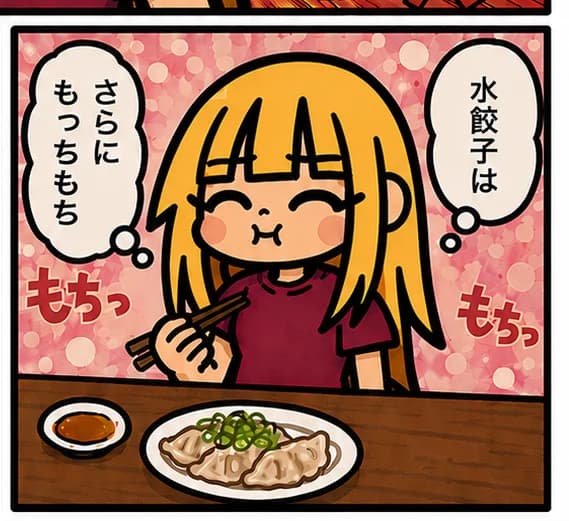
195 wordsCreate a square single-panel manga illustration with thick black comic borders and a warm cute style. Show a chibi blonde girl with straight shoulder-length hair and blunt bangs sitting at a wooden restaurant table, smiling with closed happy eyes and puffed cheeks as if chewing. She wears a dark burgundy short-sleeve shirt and holds brown chopsticks in her right hand near her mouth. On the table in front of her is exactly 1 white oval plate of gyoza dumplings topped with chopped green onions and sauce, plus exactly 1 small white dipping-sauce dish on the left filled with reddish-brown sauce. The background is a pink bubbly bokeh pattern. Add exactly 2 white speech bubbles with black outlines: the left vertical bubble says {argument name="left speech bubble text" default="さらに\nもっちもち"}, and the right vertical bubble says {argument name="right speech bubble text" default="水餃子は"}. Add exactly 2 red-orange sound-effect captions with cream outlines: one at lower left says {argument name="left sound effect" default="もちっ"}, and one at lower right says {argument name="right sound effect" default="もちっ"}. Use clean legible Japanese lettering, expressive rounded chibi proportions, rosy cheeks, simple flat shading, a cozy food-comic mood, and no extra panels or extra text.About this prompt
Chibi Gyoza Manga Panel is a ready-to-use storyboard prompt for GPT Image 2 on Image 2. Copy the 195 words below, paste them into the Create form, and you will get a result close to the preview above. Tweak the Comic, Storyboard, Food tag if you want to push it somewhere new.
Use it as a starting point and keep iterating: change the subject, lighting, or composition until it looks right. The credit cost stays the same whether you run it as-is or remix it.
Use case
A strong starting point for Storyboard
Start here when you want a storyboard image in the same direction as Chibi Gyoza Manga Panel. The prompt already sets the look and structure; swap in your own subject, product, colors, or scene details for the brief you have in mind.
Easy places to tweak
- Subject Swap in your person, product, place, or object without changing the overall composition.
- Look and mood Tune the lighting, palette, camera angle, or materials so the image fits your brand.
- Final format Set the aspect ratio, background, text, or layout notes before you generate.
More prompt paths to explore
Find more GPT Image 2 prompts with a similar style, use case, or subject.
How to use it
- Step 1
Copy the prompt
Hit the Copy button above to grab the full text.
- Step 2
Open Image 2 Create
Head to the Create form and paste it in.
- Step 3
Generate
Hit Generate. Your version lands in seconds.
Make it yours
Load the prompt into the Create form with one click, then start tweaking.