Prompt
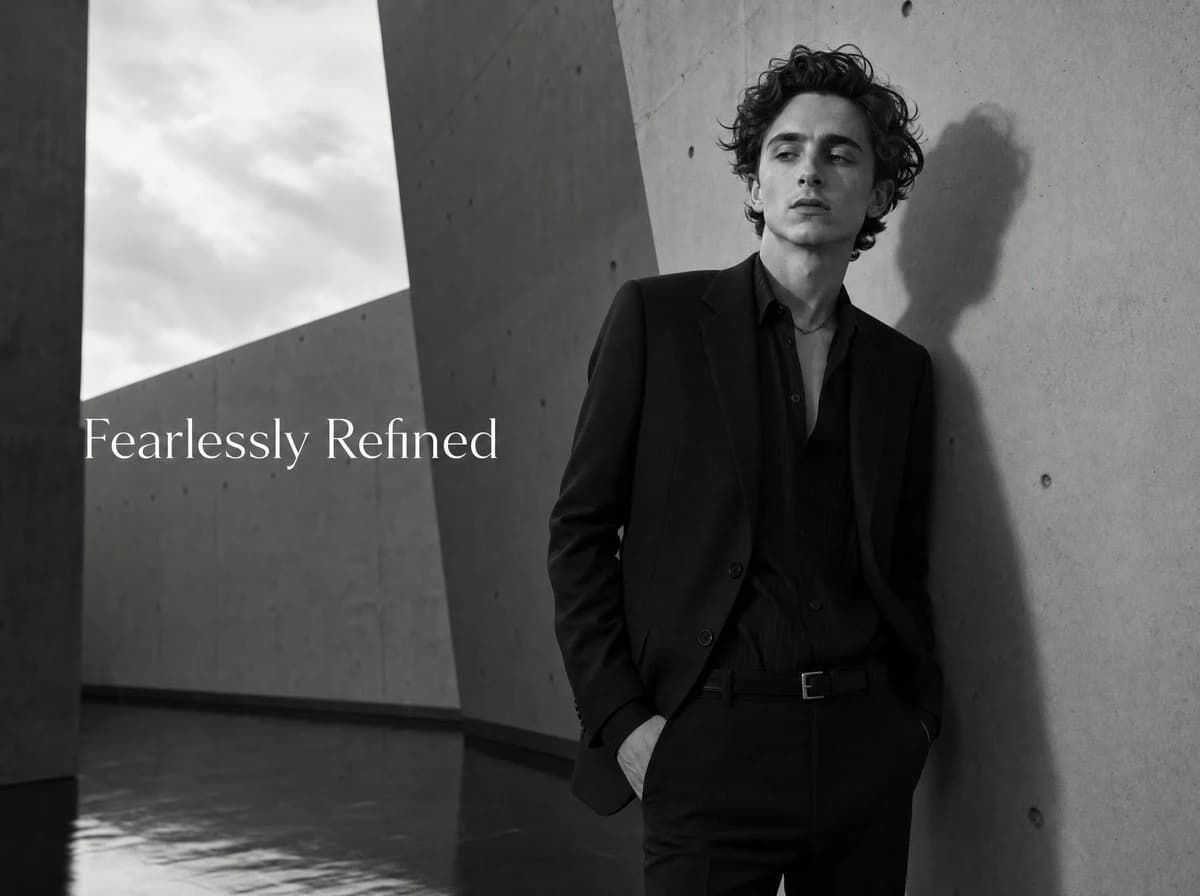
167 wordsCreate a cinematic black-and-white luxury fashion advertisement featuring a slim young male model with pale skin and wavy dark curly hair, resembling a refined editorial menswear campaign. He stands on the right side of a wide horizontal frame, leaning casually against a tall smooth concrete wall, one hand in his trouser pocket, wearing an all-black tailored suit, black open-collar dress shirt, black belt, and subtle necklace. His expression is calm, aloof, and confident, looking slightly off-camera. The setting is a minimalist brutalist concrete architectural corridor with towering angular walls, sharp diagonal openings, visible concrete bolt holes, a cloudy sky visible through the left opening, and a reflective wet floor. Use dramatic natural side lighting so the model casts a distinct shadow on the wall behind him. Place elegant white serif typography on the left-center reading {argument name="headline text" default="Fearlessly Refined"}. Keep the composition spacious and high-fashion, with deep grayscale contrast, film grain, soft editorial lighting, crisp tailoring detail, no extra logos, no watermark, and no additional text.About this prompt
Black and White Menswear Ad is a ready-to-use ad creative prompt for GPT Image 2 on Image 2. Copy the 167 words below, paste them into the Create form, and you will get a result close to the preview above. Tweak the Product Ad, Ad Creative, Fashion tag if you want to push it somewhere new.
Use it as a starting point and keep iterating: change the subject, lighting, or composition until it looks right. The credit cost stays the same whether you run it as-is or remix it.
Use case
A strong starting point for Ad Creative
Start here when you want a ad creative image in the same direction as Black and White Menswear Ad. The prompt already sets the look and structure; swap in your own subject, product, colors, or scene details for the brief you have in mind.
Easy places to tweak
- Subject Swap in your person, product, place, or object without changing the overall composition.
- Look and mood Tune the lighting, palette, camera angle, or materials so the image fits your brand.
- Final format Set the aspect ratio, background, text, or layout notes before you generate.
More prompt paths to explore
Find more GPT Image 2 prompts with a similar style, use case, or subject.
How to use it
- Step 1
Copy the prompt
Hit the Copy button above to grab the full text.
- Step 2
Open Image 2 Create
Head to the Create form and paste it in.
- Step 3
Generate
Hit Generate. Your version lands in seconds.
Make it yours
Load the prompt into the Create form with one click, then start tweaking.