Prompt
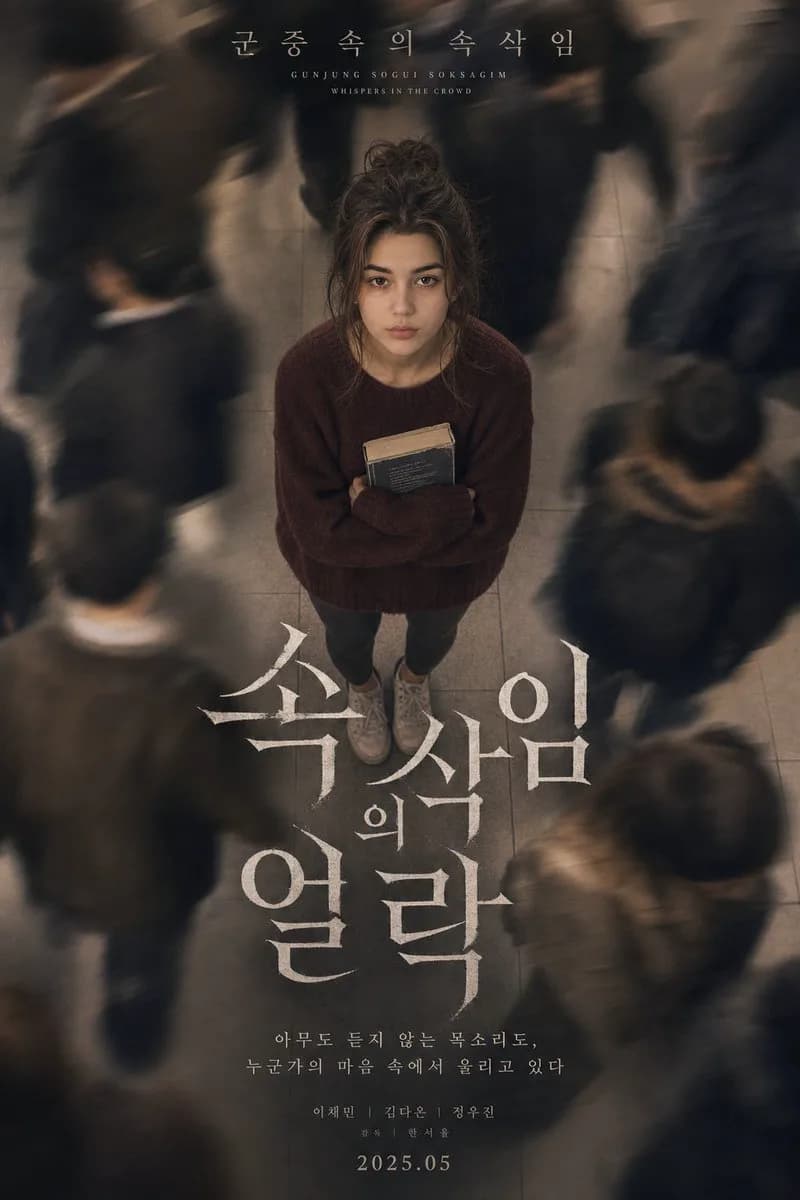
178 wordsA sorrowful Korean psychological drama movie poster depicting a beautiful young woman photographed from a dramatic overhead angle, camera pointing straight down at her face as she gazes upward. Her long dark hair is loosely gathered in an undone bun with loose strands framing her face. Pale complexion, an expression of quiet emotional exhaustion. She is dressed in an oversized burgundy wool sweater, dark grey leggings, and scuffed white sneakers, holding a worn paperback book tightly against her chest. Surrounding her, a busy subway station where commuters stream past in long-exposure motion blur, their figures becoming ghostly streaks of movement against cold grey platform tiles. The contrast between her stillness and their motion creates a powerful sense of solitude. Korean title text at the top reads: "군중 속의 속삭임 (Gunjung Sogui Soksagim - Whispers in the Crowd)". Bold white serif typography fills the center of the composition. Visual style: warm-beige film grade, fine analog grain, shallow depth of field, soft tungsten underground lighting, subtle atmospheric haze, cinematic K-drama mood. Shot on Sony A7R IV, 50mm, slow shutter speed.
About this prompt
Whispers in the Crowd Poster is a ready-to-use poster prompt for GPT Image 2 on Image 2. Copy the 178 words below, paste them into the Create form, and you will get a result close to the preview above. Tweak the Poster, Portrait, Product tag if you want to push it somewhere new.
Use it as a starting point and keep iterating: change the subject, lighting, or composition until it looks right. The credit cost stays the same whether you run it as-is or remix it.
Use case
A strong starting point for Poster
Start here when you want a poster image in the same direction as Whispers in the Crowd Poster. The prompt already sets the look and structure; swap in your own subject, product, colors, or scene details for the brief you have in mind.
Easy places to tweak
- Subject Swap in your person, product, place, or object without changing the overall composition.
- Look and mood Tune the lighting, palette, camera angle, or materials so the image fits your brand.
- Final format Set the aspect ratio, background, text, or layout notes before you generate.
More prompt paths to explore
Find more GPT Image 2 prompts with a similar style, use case, or subject.
How to use it
- Step 1
Copy the prompt
Hit the Copy button above to grab the full text.
- Step 2
Open Image 2 Create
Head to the Create form and paste it in.
- Step 3
Generate
Hit Generate. Your version lands in seconds.
Make it yours
Load the prompt into the Create form with one click, then start tweaking.