Prompt
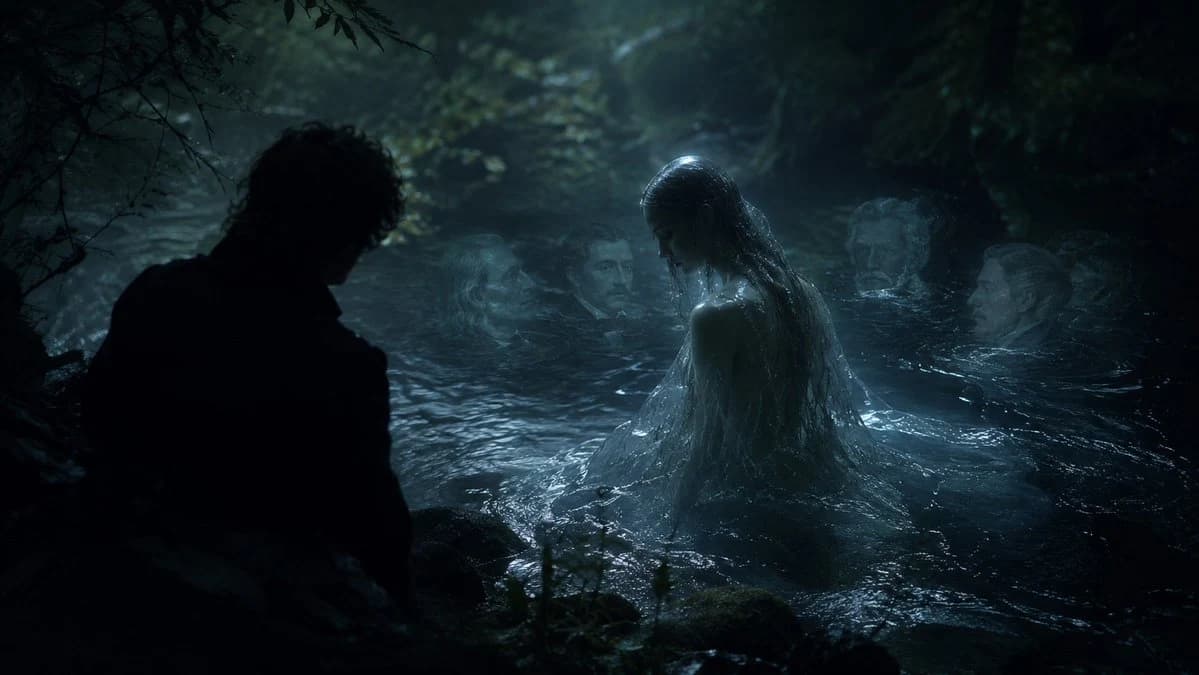
207 wordsCreate a dark cinematic fantasy scene inspired by {argument name="musical work" default="Carl Reinecke's Undine sonata"}: a moonlit German forest pool at night, with black trees and tangled branches enclosing a cold lake. Show exactly five human figures: one male figure in the left foreground seen only as a near-black silhouette from behind, crouched or standing at the water's edge; one central water nymph rising waist-deep from the lake with long soaked dark hair, pale wet skin, and a translucent drenched gown clinging to her body; and three ghostly pale faces or heads partially submerged in the water behind her, spaced across the middle and right background like drowned witnesses. The central nymph should be the brightest focal point, lit by cool blue moonlight and mist, while the man remains almost completely unlit. The water should look black, rippling, reflective, and protective, with small waves around the nymph and dim highlights on mossy rocks in the foreground. Use a realistic film-still style, gothic romantic atmosphere, low-key lighting, teal-blue color grading, heavy shadows, fog, wet textures, shallow depth of field, and a sense of betrayal and quiet menace. Keep the composition wide and horizontal, like a dramatic movie frame, with no text, no modern objects, and no visible instruments.About this prompt
Moonlit Undine Forest Scene is a ready-to-use poster prompt for GPT Image 2 on Image 2. Copy the 207 words below, paste them into the Create form, and you will get a result close to the preview above. Tweak the Poster, 3D, Cinematic tag if you want to push it somewhere new.
Use it as a starting point and keep iterating: change the subject, lighting, or composition until it looks right. The credit cost stays the same whether you run it as-is or remix it.
Use case
A strong starting point for Poster
Start here when you want a poster image in the same direction as Moonlit Undine Forest Scene. The prompt already sets the look and structure; swap in your own subject, product, colors, or scene details for the brief you have in mind.
Easy places to tweak
- Subject Swap in your person, product, place, or object without changing the overall composition.
- Look and mood Tune the lighting, palette, camera angle, or materials so the image fits your brand.
- Final format Set the aspect ratio, background, text, or layout notes before you generate.
More prompt paths to explore
Find more GPT Image 2 prompts with a similar style, use case, or subject.
How to use it
- Step 1
Copy the prompt
Hit the Copy button above to grab the full text.
- Step 2
Open Image 2 Create
Head to the Create form and paste it in.
- Step 3
Generate
Hit Generate. Your version lands in seconds.
Make it yours
Load the prompt into the Create form with one click, then start tweaking.