Prompt
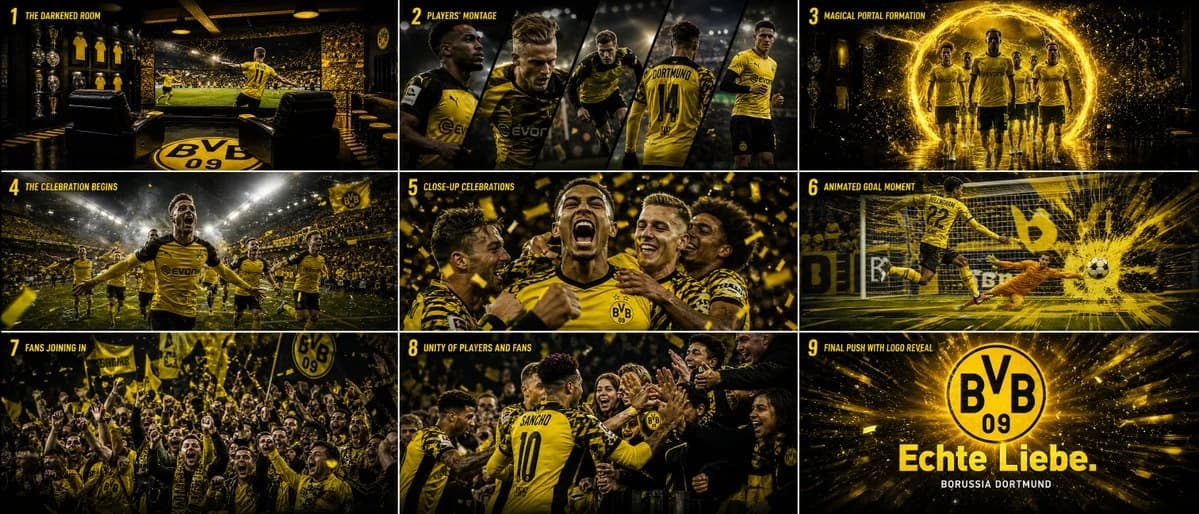
129 wordsCreate a 9-shot cinematic storyboard for a Borussia Dortmund match intro TV broadcast animation. The sequence should feel like a high-end sports commercial blended with fantasy VFX and explosive motion design energy. Players appear inside the television broadcast graphics, then in a magical, reality-breaking moment, they burst out of the screen into the real world. The transition feels powerful, emotional, and larger than life, as glowing particles, stadium lights, and dynamic camera movements transform the scene into an epic celebration. As the players emerge, they interact with the fans in a euphoric post-goal moment, celebrating together with raw energy and passion. Every shot should feel premium, fast-paced, and cinematic, combining dramatic lighting, immersive crowd atmosphere, intense action, and world-class commercial aesthetics inspired by modern UEFA Champions League broadcast intros.
About this prompt
Borussia Storyboard Intro is a ready-to-use ui mockup prompt for GPT Image 2 on Image 2. Copy the 129 words below, paste them into the Create form, and you will get a result close to the preview above. Tweak the Product Ad, UI, Mockup tag if you want to push it somewhere new.
Use it as a starting point and keep iterating: change the subject, lighting, or composition until it looks right. The credit cost stays the same whether you run it as-is or remix it.
Use case
A strong starting point for UI Mockup
Start here when you want a ui mockup image in the same direction as Borussia Storyboard Intro. The prompt already sets the look and structure; swap in your own subject, product, colors, or scene details for the brief you have in mind.
Easy places to tweak
- Subject Swap in your person, product, place, or object without changing the overall composition.
- Look and mood Tune the lighting, palette, camera angle, or materials so the image fits your brand.
- Final format Set the aspect ratio, background, text, or layout notes before you generate.
More prompt paths to explore
Find more GPT Image 2 prompts with a similar style, use case, or subject.
How to use it
- Step 1
Copy the prompt
Hit the Copy button above to grab the full text.
- Step 2
Open Image 2 Create
Head to the Create form and paste it in.
- Step 3
Generate
Hit Generate. Your version lands in seconds.
Make it yours
Load the prompt into the Create form with one click, then start tweaking.