Prompt
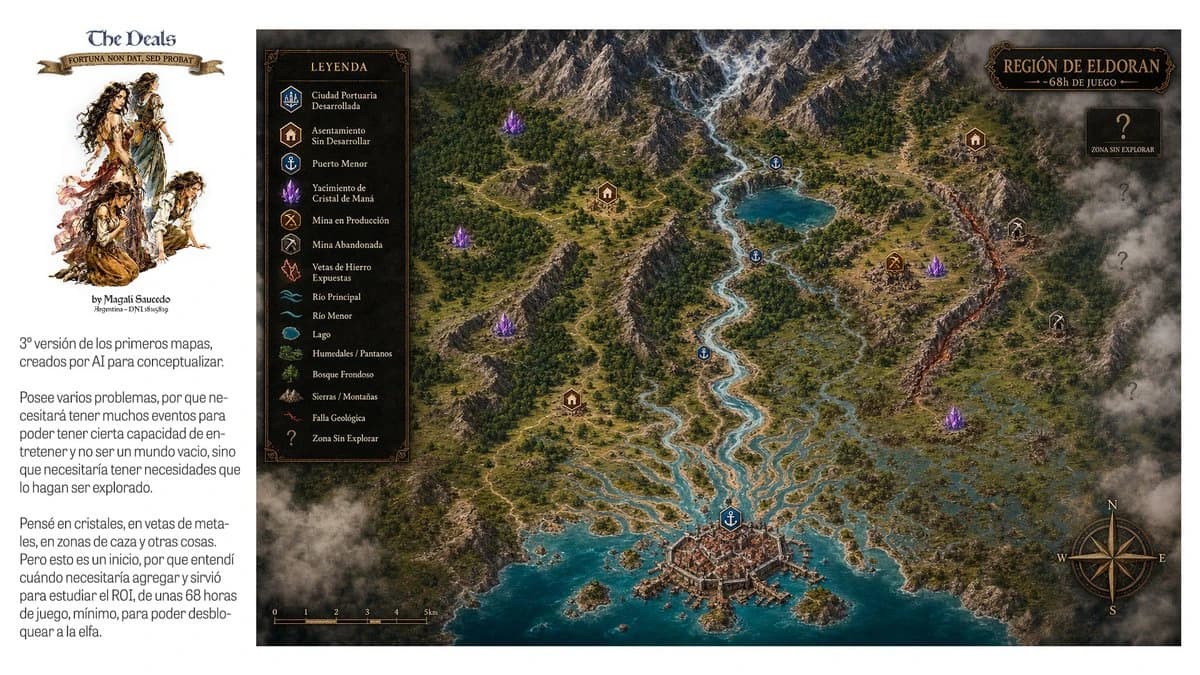
524 wordsGoal: Create a wide fantasy worldbuilding presentation sheet for an open-world RPG region, combining a left editorial note panel and a large illustrated top-down map.
Canvas: 16:9 horizontal image, clean white background. The left 20% is a white sidebar; the right 80% is a detailed parchment-dark fantasy map framed edge-to-edge.
Left sidebar: At the top, place the logo text {argument name="project title" default="The Deals"} in a medieval serif font, with a small ribbon beneath reading {argument name="motto text" default="FORTUNA NON DAT, SED PROBAT"}. Under it, add a painterly fantasy character cluster: exactly 4 ragged adventurer/elf-like figures in sepia watercolor, arranged vertically. Below the illustration add a small byline. Then add two Spanish explanatory paragraphs in a narrow column, modern sans-serif, dark gray, resembling a design note about a third version of early AI concept maps, gameplay events, crystals, ore veins, hunting zones, and needing about 68 hours of gameplay.
Main map: An isometric/top-down high-detail fantasy region map titled {argument name="region title" default="REGIÓN DE ELDORAN"} with subtitle {argument name="subtitle" default="~68h DE JUEGO"} in an ornate dark plaque at the top right. The region has a snowy mountain range across the top, dense green forests, winding rivers, a turquoise lake, wetlands and marshes on the right, rocky hills, a glowing orange geological fault running vertically near the right side, and a fortified harbor city at the bottom center opening into a teal sea with small islands and docks. Use dramatic clouds and fog around the edges, especially the bottom left and right border, for an unexplored-map feeling.
Legend: Add a dark rectangular ornate legend box near the upper left of the map titled “LEYENDA”. It must contain exactly 15 labeled rows with small icons: 1 Ciudad Portuaria Desarrollada, 2 Asentamiento Sin Desarrollar, 3 Puerto Menor, 4 Yacimiento de Cristal de Maná, 5 Mina en Producción, 6 Mina Abandonada, 7 Vetas de Hierro Expuestas, 8 Río Principal, 9 Río Menor, 10 Lago, 11 Humedales / Pantanos, 12 Bosque Frondoso, 13 Sierras / Montañas, 14 Falla Geológica, 15 Zona Sin Explorar.
Map markers: Place exactly 1 developed port city marker at the bottom city, exactly 4 minor port anchor markers along rivers/lake/coast, exactly 4 settlement house markers, exactly 5 glowing purple mana crystal clusters, exactly 1 active mine marker, exactly 2 abandoned mine markers, and exactly 4 large question marks in smoky unexplored zones on the right side. Keep marker colors consistent with the legend: blue for ports/water, brown for settlements, purple for crystals, gold for active mine, gray for abandoned mine, red/orange for fault.
Extra map details: Add a compass rose at the bottom right with N, E, S, W letters; add a small black scale bar at the bottom left marked from 0 to 5 km; use thin roads and trails connecting settlements, mines, ports, and the main city. The map should feel like a polished game-design concept board, with realistic terrain textures, ornate fantasy UI frames, warm gold typography, and no modern UI elements.
Constraints: Preserve the Spanish labels and medieval-fantasy atmosphere. Do not add extra legend categories, extra character figures, or extra major title plaques. Keep the composition clean and readable at presentation size.About this prompt
Fantasy RPG Region Map Sheet is a ready-to-use infographic prompt for GPT Image 2 on Image 2. Copy the 524 words below, paste them into the Create form, and you will get a result close to the preview above. Tweak the Design, Infographic, UI tag if you want to push it somewhere new.
Use it as a starting point and keep iterating: change the subject, lighting, or composition until it looks right. The credit cost stays the same whether you run it as-is or remix it.
Use case
A strong starting point for Infographic
Start here when you want a infographic image in the same direction as Fantasy RPG Region Map Sheet. The prompt already sets the look and structure; swap in your own subject, product, colors, or scene details for the brief you have in mind.
Easy places to tweak
- Subject Swap in your person, product, place, or object without changing the overall composition.
- Look and mood Tune the lighting, palette, camera angle, or materials so the image fits your brand.
- Final format Set the aspect ratio, background, text, or layout notes before you generate.
More prompt paths to explore
Find more GPT Image 2 prompts with a similar style, use case, or subject.
How to use it
- Step 1
Copy the prompt
Hit the Copy button above to grab the full text.
- Step 2
Open Image 2 Create
Head to the Create form and paste it in.
- Step 3
Generate
Hit Generate. Your version lands in seconds.
Make it yours
Load the prompt into the Create form with one click, then start tweaking.