Prompt
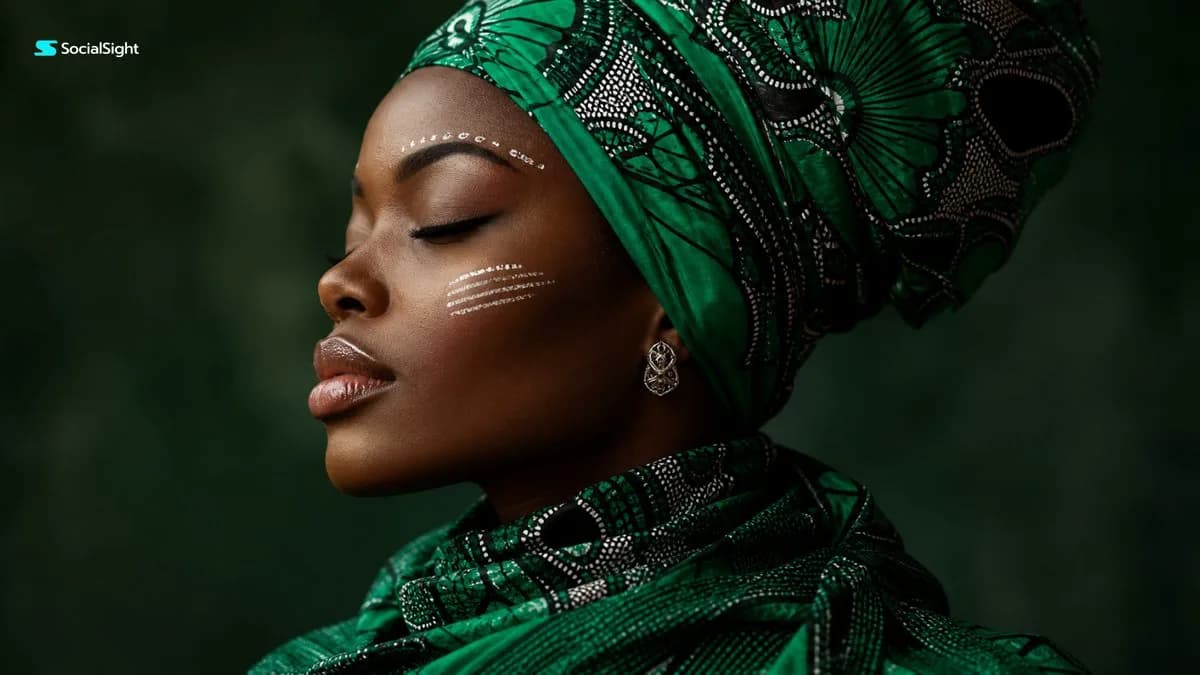
129 wordsA cinematic close up side profile portrait of a beautiful Black woman with deep glowing skin, eyes closed peacefully, wearing a bold emerald green and black patterned headwrap and matching scarf. Minimal elegant white face paint strokes above the eyebrow and across the cheek, glossy natural lips, small silver earring. Dark muted green studio background with soft atmospheric bokeh, premium fashion editorial lighting, smooth skin texture, dramatic yet calm mood, African inspired beauty portrait, high end magazine cover aesthetic, ultra-realistic photography, shallow depth of field, soft rim light, rich contrast, 85mm lens, f/1.8, 8k detail. Negative Prompt: text, logo, watermark, extra face paint, messy fabric, distorted face, bad anatomy, harsh shadows, overexposed skin, blurry eyes, plastic skin, low resolution, cartoon, CGI, unrealistic jewelry, extra earrings, deformed nose, asymmetrical lips.
About this prompt
Emerald Headwrap Editorial Portrait is a ready-to-use portrait prompt for GPT Image 2 on Image 2. Copy the 129 words below, paste them into the Create form, and you will get a result close to the preview above. Tweak the Portrait, Fashion, Beauty tag if you want to push it somewhere new.
Use it as a starting point and keep iterating: change the subject, lighting, or composition until it looks right. The credit cost stays the same whether you run it as-is or remix it.
Use case
A strong starting point for Portrait
Start here when you want a portrait image in the same direction as Emerald Headwrap Editorial Portrait. The prompt already sets the look and structure; swap in your own subject, product, colors, or scene details for the brief you have in mind.
Easy places to tweak
- Subject Swap in your person, product, place, or object without changing the overall composition.
- Look and mood Tune the lighting, palette, camera angle, or materials so the image fits your brand.
- Final format Set the aspect ratio, background, text, or layout notes before you generate.
More prompt paths to explore
Find more GPT Image 2 prompts with a similar style, use case, or subject.
How to use it
- Step 1
Copy the prompt
Hit the Copy button above to grab the full text.
- Step 2
Open Image 2 Create
Head to the Create form and paste it in.
- Step 3
Generate
Hit Generate. Your version lands in seconds.
Make it yours
Load the prompt into the Create form with one click, then start tweaking.