Prompt
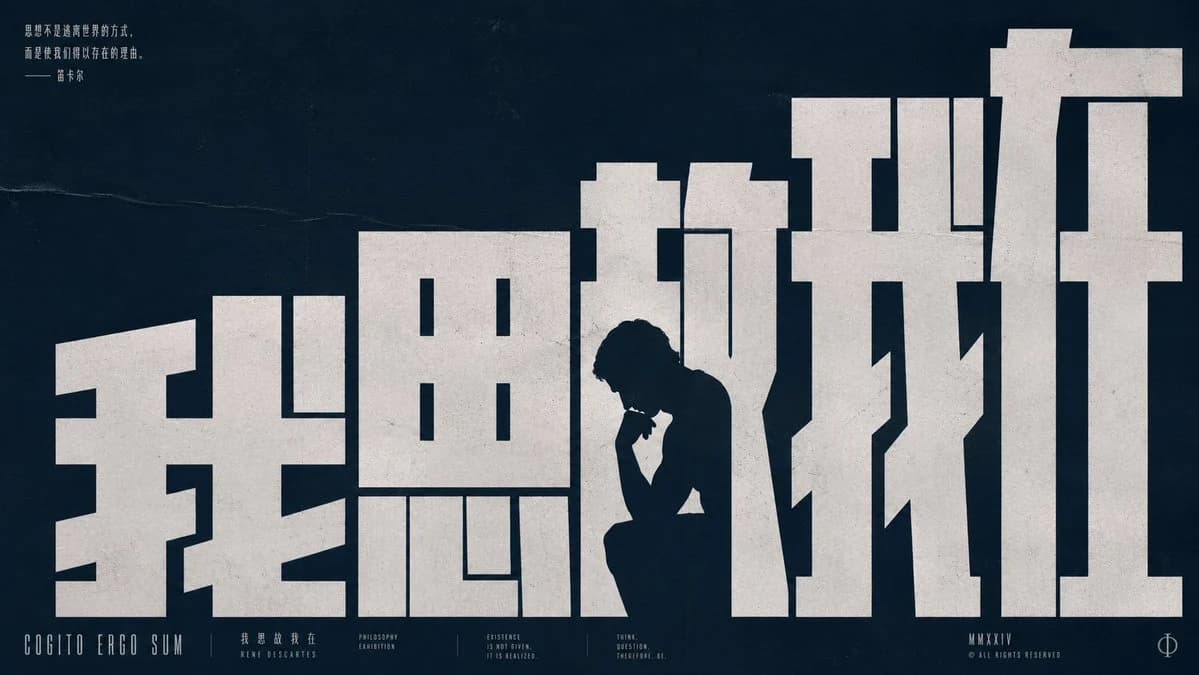
432 wordsGoal: Create a widescreen philosophical typography poster in a bold Chinese big-character-poster style, where the typography itself forms an ascending staircase-like composition and integrates a human silhouette.
Canvas: 16:9 horizontal poster, dark navy-black textured paper background with subtle scratches, grain, faded fold lines, and vintage print wear. Use an off-white ink color for all main type, slightly distressed and roughened like screen-printed paper.
Main typography: Fill most of the canvas with exactly 5 enormous blocky Chinese characters reading {argument name="main phrase" default="我思故我在"}. The characters should be custom geometric slab forms, extremely heavy, angular, architectural, and arranged from left to right with a gradual rising step rhythm: the first character lower and wide, the second taller, the middle characters higher, and the final character towering at the far right. Make the characters look like massive concrete structures or stairs, with rectilinear cutouts and negative spaces. The layout should feel intelligent and intentional, not standard font rendering.
Figure integration: Place exactly 1 dark silhouette of a seated thinker inside the negative space between the third and fourth large characters, roughly lower center-right. The person sits hunched forward with one elbow on a knee and hand near the chin, evoking Rodin’s thinker pose. The silhouette should be the same dark color as the background, appearing carved out of the white typography.
Small text elements: Add exactly 9 small typographic text groups around the poster: 1 small Chinese quote in the upper left reading {argument name="quote text" default="思想不是被肯定明的方式,而是使我们得以存在的理由。——笛卡尔"}; 1 bottom-left English title reading “COGITO ERGO SUM”; 1 small bottom Chinese translation group reading “我 思 故 我 在” and “RENE DESCARTES”; 1 bottom label reading “PHILOSOPHY EXHIBITION”; 1 bottom label reading “EXISTENCE IS NOT GIVEN. IT IS REALIZED.”; 1 bottom label reading “THINK. QUESTION. THEREFORE. BE.”; 1 bottom-right roman code reading {argument name="roman code" default="MMXXIV"}; 1 bottom-right copyright line reading “© ALL RIGHTS RESERVED”; and 1 minimalist phi-like circular symbol at the far bottom right. Keep all small text in condensed uppercase sans serif with wide tracking, thin strokes, and careful baseline alignment.
Visual style: Minimalist brutalist graphic design, East Asian poster aesthetics, Bauhaus-inspired grid discipline, high contrast, cinematic negative space, off-white ink on deep blue-black, subtle paper texture, aged edges, no gradients except natural texture. The poster should feel like an art exhibition announcement about René Descartes and the phrase “I think, therefore I am.”
Constraints: Use exactly the 5 large Chinese characters and exactly 1 seated silhouette. Do not add extra figures, icons, illustrations, or decorative objects beyond the 9 small text groups. Preserve the stark poster composition, monumental typography, and ascending stair-step structure.About this prompt
Cogito Ergo Sum Chinese Typography Poster is a ready-to-use poster prompt for GPT Image 2 on Image 2. Copy the 432 words below, paste them into the Create form, and you will get a result close to the preview above. Tweak the Poster, Product, Architecture tag if you want to push it somewhere new.
Use it as a starting point and keep iterating: change the subject, lighting, or composition until it looks right. The credit cost stays the same whether you run it as-is or remix it.
Use case
A strong starting point for Poster
Start here when you want a poster image in the same direction as Cogito Ergo Sum Chinese Typography Poster. The prompt already sets the look and structure; swap in your own subject, product, colors, or scene details for the brief you have in mind.
Easy places to tweak
- Subject Swap in your person, product, place, or object without changing the overall composition.
- Look and mood Tune the lighting, palette, camera angle, or materials so the image fits your brand.
- Final format Set the aspect ratio, background, text, or layout notes before you generate.
More prompt paths to explore
Find more GPT Image 2 prompts with a similar style, use case, or subject.
How to use it
- Step 1
Copy the prompt
Hit the Copy button above to grab the full text.
- Step 2
Open Image 2 Create
Head to the Create form and paste it in.
- Step 3
Generate
Hit Generate. Your version lands in seconds.
Make it yours
Load the prompt into the Create form with one click, then start tweaking.