Prompt
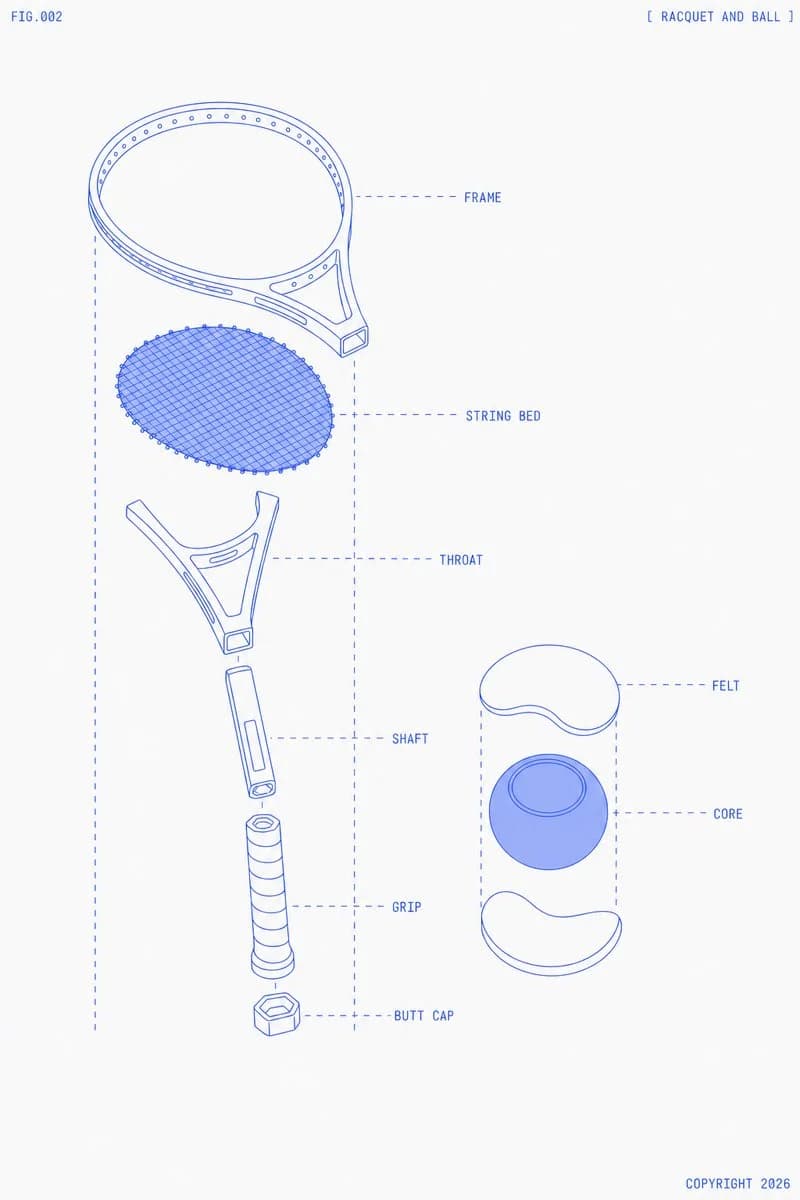
480 wordsGoal: Create a clean technical blueprint-style exploded diagram of {argument name="sports equipment" default="a tennis racquet and ball"}, labeled like an instruction manual figure.
Canvas: Portrait 3:4 composition on an off-white paper background with lots of negative space. Use thin cobalt-blue line art, monoline drafting strokes, pale blue translucent fills only where needed, and subtle print texture. No shadows except very light flat blue fill on the ball core.
Layout: Place the exploded tennis racquet vertically on the left two-thirds of the canvas, with parts separated along a central vertical axis. Place the exploded tennis ball cross-section on the right-middle. Add dashed vertical guide lines framing each exploded assembly and dashed horizontal callout lines leading to labels on the right of each part. Use small all-caps monospaced blueprint lettering.
Header and footer text: Put "FIG.002" in the top-left corner. Put "[ RACQUET AND BALL ]" in the top-right corner. Put "COPYRIGHT 2026" in the bottom-right corner.
Discrete elements: Show exactly 13 main visible components total: 7 racquet components and 6 ball/callout-related components. The 7 racquet components, from top to bottom, are: 1) FRAME, an oval racquet head rim with small evenly spaced holes around the inner edge and a partial yoke connection; 2) STRING BED, a separate oval mesh insert made of dense diagonal crisscross strings with tiny perimeter nodes; 3) THROAT, a forked triangular bridge piece with open cutouts; 4) SHAFT, a short cylindrical handle connector with a rectangular inset detail and a circular end opening; 5) GRIP, a longer wrapped cylindrical grip with spiral bands; 6) BUTT CAP, a small hexagonal end cap below the grip; 7) dashed alignment box and callout construction lines surrounding the racquet assembly. The 6 ball/callout-related components are: 1) top white curved FELT shell piece; 2) central blue spherical CORE with a circular ring contour on top; 3) bottom white curved FELT shell piece; 4) dashed vertical guide lines around the ball assembly; 5) dashed horizontal label line to FELT; 6) dashed horizontal label line to CORE.
Labels: Add exactly 7 callout labels in blue uppercase text: FRAME, STRING BED, THROAT, SHAFT, GRIP, BUTT CAP, FELT, and CORE. Place racquet labels to the right of the racquet parts and ball labels to the right of the ball parts. Keep labels aligned and minimal.
Visual style: Minimal futuristic technical illustration, exploded product schematic, precise vector-like geometry, thin blue outlines, light blue hatching/mesh for the string bed, no photorealism, no people, no court, no extra decorations.
Constraints: Keep the racquet head slightly tilted in perspective at the top, the string bed floating below it, and all handle parts stacked downward with visible gaps. The ball should appear as a simple cutaway with two separated felt shell halves and one blue core. Use {argument name="line color" default="cobalt blue"} linework on {argument name="background color" default="warm off-white"} paper, with {argument name="figure number" default="FIG.002"} and {argument name="copyright text" default="COPYRIGHT 2026"}.About this prompt
Exploded Tennis Racquet Blueprint is a ready-to-use infographic prompt for GPT Image 2 on Image 2. Copy the 480 words below, paste them into the Create form, and you will get a result close to the preview above. Tweak the Infographic, Poster, Product tag if you want to push it somewhere new.
Use it as a starting point and keep iterating: change the subject, lighting, or composition until it looks right. The credit cost stays the same whether you run it as-is or remix it.
Use case
A strong starting point for Infographic
Start here when you want a infographic image in the same direction as Exploded Tennis Racquet Blueprint. The prompt already sets the look and structure; swap in your own subject, product, colors, or scene details for the brief you have in mind.
Easy places to tweak
- Subject Swap in your person, product, place, or object without changing the overall composition.
- Look and mood Tune the lighting, palette, camera angle, or materials so the image fits your brand.
- Final format Set the aspect ratio, background, text, or layout notes before you generate.
More prompt paths to explore
Find more GPT Image 2 prompts with a similar style, use case, or subject.
How to use it
- Step 1
Copy the prompt
Hit the Copy button above to grab the full text.
- Step 2
Open Image 2 Create
Head to the Create form and paste it in.
- Step 3
Generate
Hit Generate. Your version lands in seconds.
Make it yours
Load the prompt into the Create form with one click, then start tweaking.