Prompt
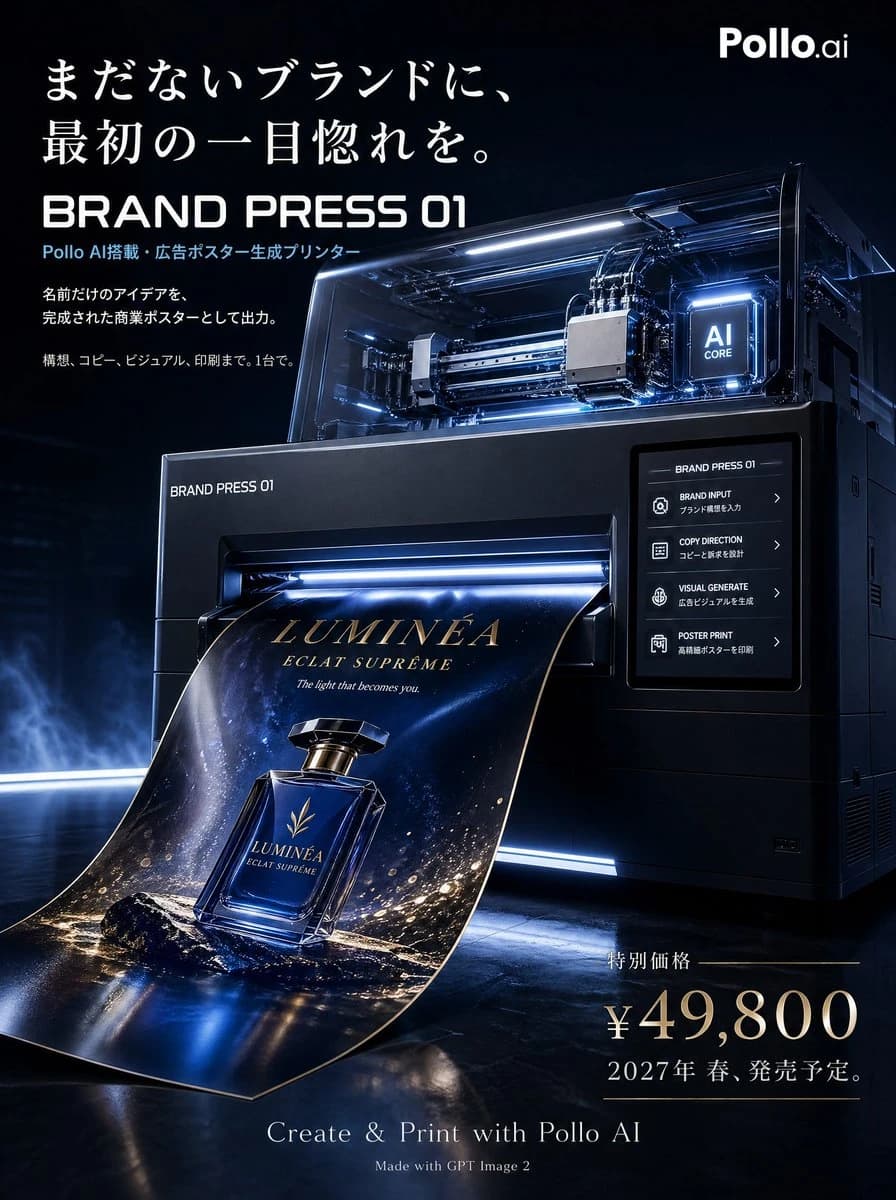
30 words縦型3:4の、高級商業ポスターを制作してください。 テーマは、架空の新商品広告です。商品は「BRAND PRESS 01(ブランドプレス・ゼロワン)」という、Pollo AIを搭載した架空の広告ポスター生成プリンターです。 この商品は、まだ存在しないブランド名・商品ジャンル・世界観・ターゲット層を入力すると、Pollo AIがコピー、ビジュアル、レイアウトまで完成された商業広告ポスターを自動生成し、高精細な印刷物としてその場で出力する未来型プリンターです。単なるAIサービスの概念広告ではなく、実際に販売されていそうな架空商品の広告として成立させてください。 メインコンセプト: 「まだないブランドに、最初の一目惚れを。」 商品ビジュアル: 画面中央に実物の商品「BRAND PRESS 01」を大きく配置。未来型の高級プロ用印刷デバイスとして、黒い金属筐体、シルバーのエッジ、透明カバー、青白く発光するAIコア、精密な印刷ヘッド、ローラー、タッチパネル、排紙スロット、ポスター受けトレイを備える。排紙スロットから、架空の高級香水ブランド広告ポスターが紙として大きく出力されている構図。 構図: ややローアングル、斜め45度。背景は暗いネイビーから黒の高級広告制作スタジオ。映画的でドラマチックな高級プロダクト広告。 広告レイアウト: 上部に大きなキャッチコピー、中央にプリンター本体と排出中のポスター、右側に機能説明、左下に価格と発売日、下部にCTA。 入れる文字: 「まだないブランドに、最初の一目惚れを。」 / BRAND PRESS 01 / 「Pollo AI搭載・広告ポスター生成プリンター」 / 「名前だけのアイデアを、完成された商業ポスターとして出力。」 / 「構想、コピー、ビジュアル、印刷まで。1台で。」
About this prompt
Luxury poster for fictional AI ad printer is a ready-to-use ad creative prompt for GPT Image 2 on Image 2. Copy the 30 words below, paste them into the Create form, and you will get a result close to the preview above. Tweak the Product Ad, Ad Creative, Luxury tag if you want to push it somewhere new.
Use it as a starting point and keep iterating: change the subject, lighting, or composition until it looks right. The credit cost stays the same whether you run it as-is or remix it.
Use case
A strong starting point for Ad Creative
Start here when you want a ad creative image in the same direction as Luxury poster for fictional AI ad printer. The prompt already sets the look and structure; swap in your own subject, product, colors, or scene details for the brief you have in mind.
Easy places to tweak
- Subject Swap in your person, product, place, or object without changing the overall composition.
- Look and mood Tune the lighting, palette, camera angle, or materials so the image fits your brand.
- Final format Set the aspect ratio, background, text, or layout notes before you generate.
More prompt paths to explore
Find more GPT Image 2 prompts with a similar style, use case, or subject.
How to use it
- Step 1
Copy the prompt
Hit the Copy button above to grab the full text.
- Step 2
Open Image 2 Create
Head to the Create form and paste it in.
- Step 3
Generate
Hit Generate. Your version lands in seconds.
Make it yours
Load the prompt into the Create form with one click, then start tweaking.