프롬프트
2484자{
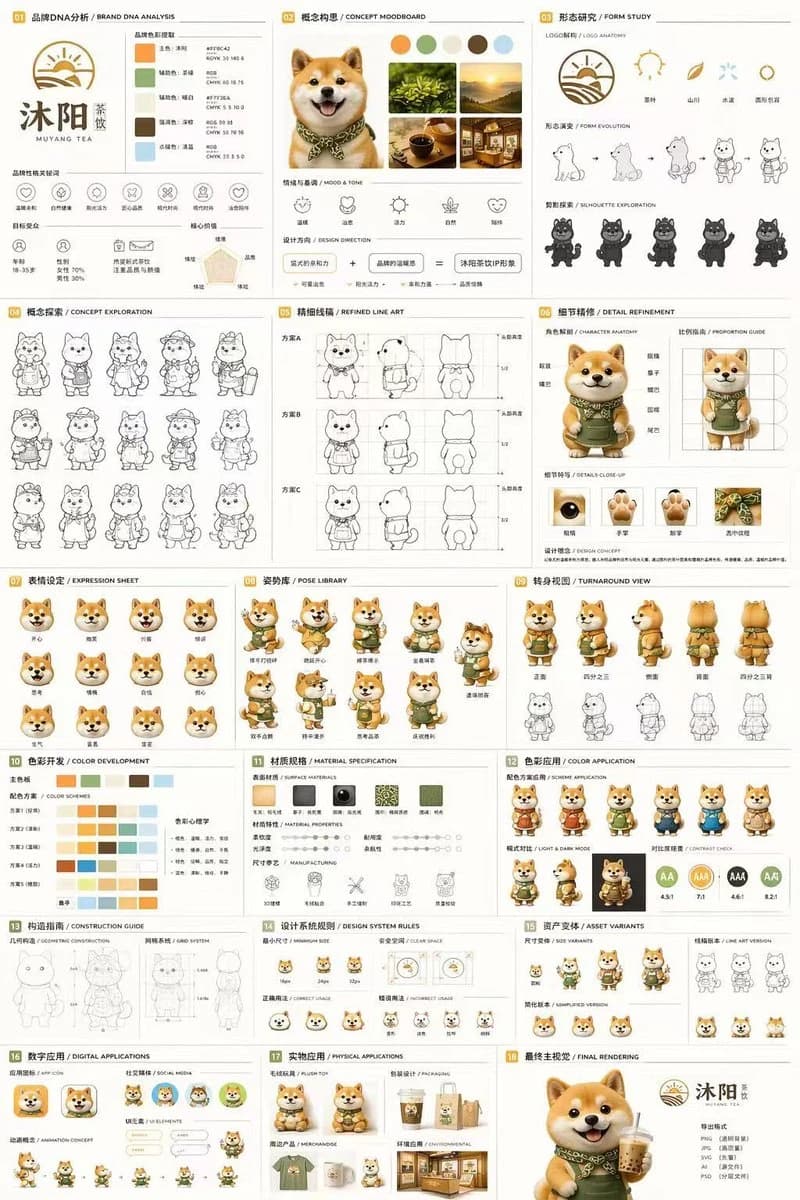
"type": "18-section complete brand identity and mascot design sheet",
"brand": {
"name": "{argument name=\"brand name\" default=\"MUYANG TEA\"}",
"industry": "{argument name=\"industry\" default=\"tea shop\"}",
"colors": ["{argument name=\"primary color\" default=\"yellow\"}", "{argument name=\"secondary color\" default=\"green\"}", "white", "brown", "dark green"]
},
"subject": "{argument name=\"character description\" default=\"3D rendered cute Shiba Inu mascot wearing a green apron\"}",
"layout": {
"grid": "3-column by 6-row grid layout",
"sections": [
{
"title": "01 BRAND DNA ANALYSIS",
"elements": ["brand logo", "5 color swatches", "6 brand icons", "target audience charts"]
},
{
"title": "02 CONCEPT MOODBOARD",
"elements": ["5 reference photos", "4 mood icons", "design concept equation"]
},
{
"title": "03 FORM STUDY",
"elements": ["4 logo anatomy icons", "4 design evolution steps", "4 character silhouettes"]
},
{
"title": "04 CONCEPT EXPLORATION",
"elements": ["12 line-art character concept sketches"]
},
{
"title": "05 REFINED LINE ART",
"elements": ["3 rows of front and side view line art with proportion guides"]
},
{
"title": "06 DETAIL REFINEMENT",
"elements": ["2 full-body renders with annotation labels", "4 circular close-up views"]
},
{
"title": "07 EXPRESSION SHEET",
"elements": ["11 3D rendered facial expressions"]
},
{
"title": "08 POSE LIBRARY",
"elements": ["9 full-body 3D rendered character poses"]
},
{
"title": "09 TURNAROUND VIEW",
"elements": ["5 full-body 3D renders from multiple angles", "5 matching line-art views"]
},
{
"title": "10 COLOR DEVELOPMENT",
"elements": ["5 rows of 5-color palette options", "color psychology explanations"]
},
{
"title": "11 MATERIAL SPECIFICATION",
"elements": ["5 surface texture swatches", "material property sliders", "4 manufacturing process icons"]
},
{
"title": "12 COLOR APPLICATION",
"elements": ["4 color scheme variant renders", "2 light and dark mode renders", "4 contrast rating indicators"]
},
{
"title": "13 CONSTRUCTION GUIDE",
"elements": ["2 line-art technical diagrams for geometry and grid system"]
},
{
"title": "14 DESIGN SYSTEM RULES",
"elements": ["minimum size icons", "clear space diagram", "4 correct and incorrect usage examples"]
},
{
"title": "15 ASSET VARIANTS",
"elements": ["3 scaled size variants", "3 line-art style variants", "3 simplified flat icon heads"]
},
{
"title": "16 DIGITAL APPLICATIONS",
"elements": ["1 app icon design", "2 social media avatar versions", "UI component elements", "3-frame animation cycle"]
},
{
"title": "17 PHYSICAL APPLICATIONS",
"elements": ["plush toy product mockup", "product packaging mockup", "branded merchandise mockup", "retail storefront mockup"]
},
{
"title": "18 FINAL RENDERING",
"elements": ["large high-resolution 3D mascot render holding tea cup", "finalized logo", "deliverable file format list"]
}
]
}
}이 프롬프트 소개
Image 2에서 GPT Image 2에 바로 사용할 수 있는 UI 목업 프롬프트 ‘마스코트 브랜드 아이덴티티 시트’입니다. 아래 2484자를 복사해 Create 폼에 붙여 넣으면 위 미리보기와 비슷한 이미지를 만들 수 있습니다. 소셜 미디어, 인포그래픽, UI 태그를 조정하면 새로운 방향으로 확장할 수 있습니다.
먼저 그대로 사용해 본 뒤 피사체, 조명, 구도를 작업에 맞게 조정해 보세요. 원문을 그대로 쓰거나 수정해도 생성 비용은 같습니다.
사용 사례
UI 목업 작업의 좋은 출발점
‘마스코트 브랜드 아이덴티티 시트’처럼 표현한 UI 목업 이미지를 만들고 싶다면 이 GPT Image 2 프롬프트로 시작해 보세요. 스타일과 구도는 이미 잡혀 있으므로 인물, 제품, 색상, 장면 요소만 작업에 맞게 바꾸면 됩니다.
먼저 손보기 좋은 부분
- 피사체 인물, 제품, 장소, 오브젝트를 내 내용으로 바꾸고 전체 구도는 유지합니다.
- 분위기 조명, 색감, 카메라 각도, 소재 디테일을 브랜드나 용도에 맞춥니다.
- 결과 형식 생성 전에 비율, 배경, 텍스트, 레이아웃 지시를 정리합니다.
비슷한 프롬프트 더 보기
스타일, 용도, 피사체가 가까운 GPT Image 2 프롬프트를 이어서 확인해 보세요.
사용 방법
- 1단계
프롬프트 복사
위의 복사 버튼을 눌러 전체 텍스트를 가져옵니다.
- 2단계
Image 2 Create 열기
Create 폼으로 이동해 붙여 넣습니다.
- 3단계
생성
Generate를 누르면 몇 초 안에 내 버전이 완성됩니다.
내 버전으로 만들기
한 번의 클릭으로 Create 폼에 불러오고 바로 조정하세요.