提示词
2484 个字{
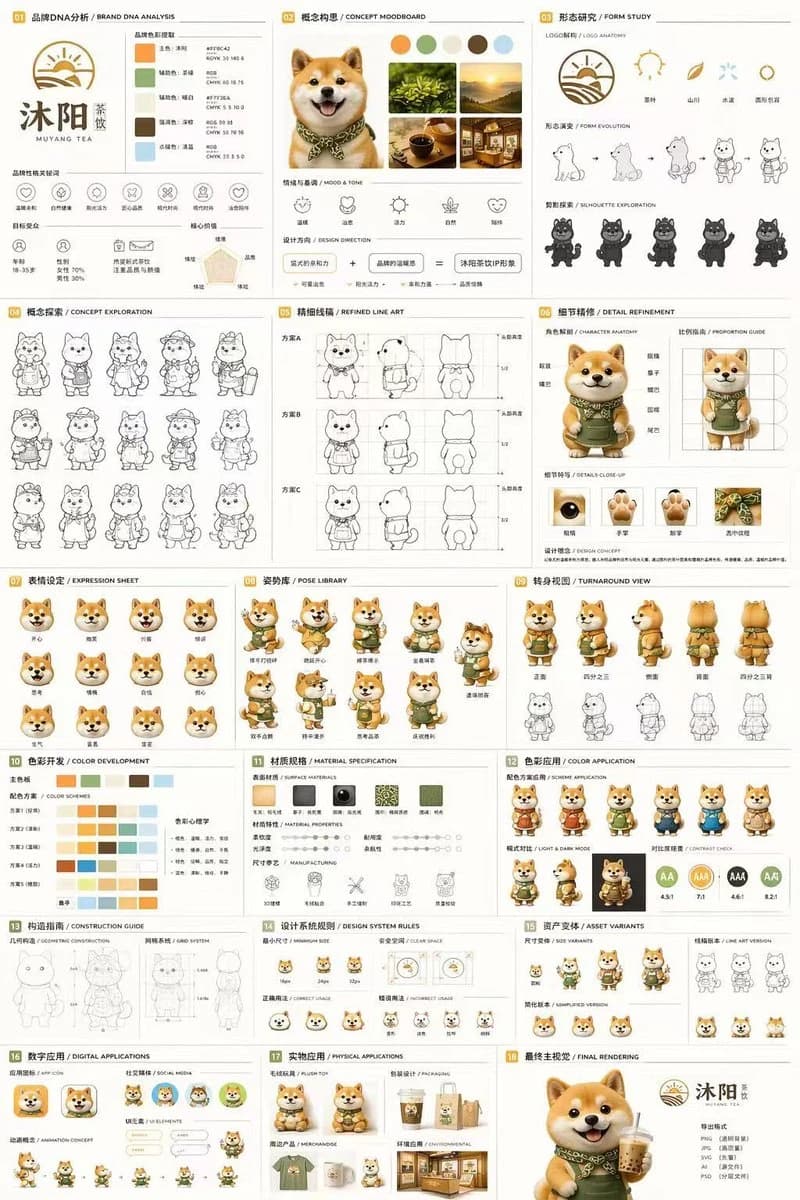
"type": "18-section complete brand identity and mascot design sheet",
"brand": {
"name": "{argument name=\"brand name\" default=\"MUYANG TEA\"}",
"industry": "{argument name=\"industry\" default=\"tea shop\"}",
"colors": ["{argument name=\"primary color\" default=\"yellow\"}", "{argument name=\"secondary color\" default=\"green\"}", "white", "brown", "dark green"]
},
"subject": "{argument name=\"character description\" default=\"3D rendered cute Shiba Inu mascot wearing a green apron\"}",
"layout": {
"grid": "3-column by 6-row grid layout",
"sections": [
{
"title": "01 BRAND DNA ANALYSIS",
"elements": ["brand logo", "5 color swatches", "6 brand icons", "target audience charts"]
},
{
"title": "02 CONCEPT MOODBOARD",
"elements": ["5 reference photos", "4 mood icons", "design concept equation"]
},
{
"title": "03 FORM STUDY",
"elements": ["4 logo anatomy icons", "4 design evolution steps", "4 character silhouettes"]
},
{
"title": "04 CONCEPT EXPLORATION",
"elements": ["12 line-art character concept sketches"]
},
{
"title": "05 REFINED LINE ART",
"elements": ["3 rows of front and side view line art with proportion guides"]
},
{
"title": "06 DETAIL REFINEMENT",
"elements": ["2 full-body renders with annotation labels", "4 circular close-up views"]
},
{
"title": "07 EXPRESSION SHEET",
"elements": ["11 3D rendered facial expressions"]
},
{
"title": "08 POSE LIBRARY",
"elements": ["9 full-body 3D rendered character poses"]
},
{
"title": "09 TURNAROUND VIEW",
"elements": ["5 full-body 3D renders from multiple angles", "5 matching line-art views"]
},
{
"title": "10 COLOR DEVELOPMENT",
"elements": ["5 rows of 5-color palette options", "color psychology explanations"]
},
{
"title": "11 MATERIAL SPECIFICATION",
"elements": ["5 surface texture swatches", "material property sliders", "4 manufacturing process icons"]
},
{
"title": "12 COLOR APPLICATION",
"elements": ["4 color scheme variant renders", "2 light and dark mode renders", "4 contrast rating indicators"]
},
{
"title": "13 CONSTRUCTION GUIDE",
"elements": ["2 line-art technical diagrams for geometry and grid system"]
},
{
"title": "14 DESIGN SYSTEM RULES",
"elements": ["minimum size icons", "clear space diagram", "4 correct and incorrect usage examples"]
},
{
"title": "15 ASSET VARIANTS",
"elements": ["3 scaled size variants", "3 line-art style variants", "3 simplified flat icon heads"]
},
{
"title": "16 DIGITAL APPLICATIONS",
"elements": ["1 app icon design", "2 social media avatar versions", "UI component elements", "3-frame animation cycle"]
},
{
"title": "17 PHYSICAL APPLICATIONS",
"elements": ["plush toy product mockup", "product packaging mockup", "branded merchandise mockup", "retail storefront mockup"]
},
{
"title": "18 FINAL RENDERING",
"elements": ["large high-resolution 3D mascot render holding tea cup", "finalized logo", "deliverable file format list"]
}
]
}
}关于这个提示词
吉祥物品牌识别稿 是一条可直接使用的 GPT Image 2 UI 样机提示词。复制下方 2484 个字,粘贴到创建表单,即可生成接近预览图的效果。 你也可以调整 社交媒体, 信息图, UI 标签,让结果走向新的风格。
可以先用它生成初稿,再按需要调整主体、光线或构图。直接使用或自行改写,生成消耗保持一致。
适用场景
适合作为UI 样机创作起点
想生成接近 吉祥物品牌识别稿 的UI 样机画面时,可以直接从这条 GPT Image 2 提示词开始。它已经设定好构图和风格,只需替换主体、产品、颜色或场景细节。
最适合先改的地方
- 主体 把人物、产品、地点或物体换成自己的内容,整体构图先保留。
- 画面氛围 按品牌或用途调整光线、配色、镜头角度和材质细节。
- 输出形式 生成前先定好比例、背景、文字和版式要求。
如何使用
- 第 1 步
复制提示词
点击上方复制按钮,获取完整提示词。
- 第 2 步
打开 Image 2 创建页
进入创建表单,并把提示词粘贴进去。
- 第 3 步
生成图像
点击生成,几秒后即可得到你的版本。
改成你的版本
一键把提示词载入创建表单,然后开始调整。