プロンプト
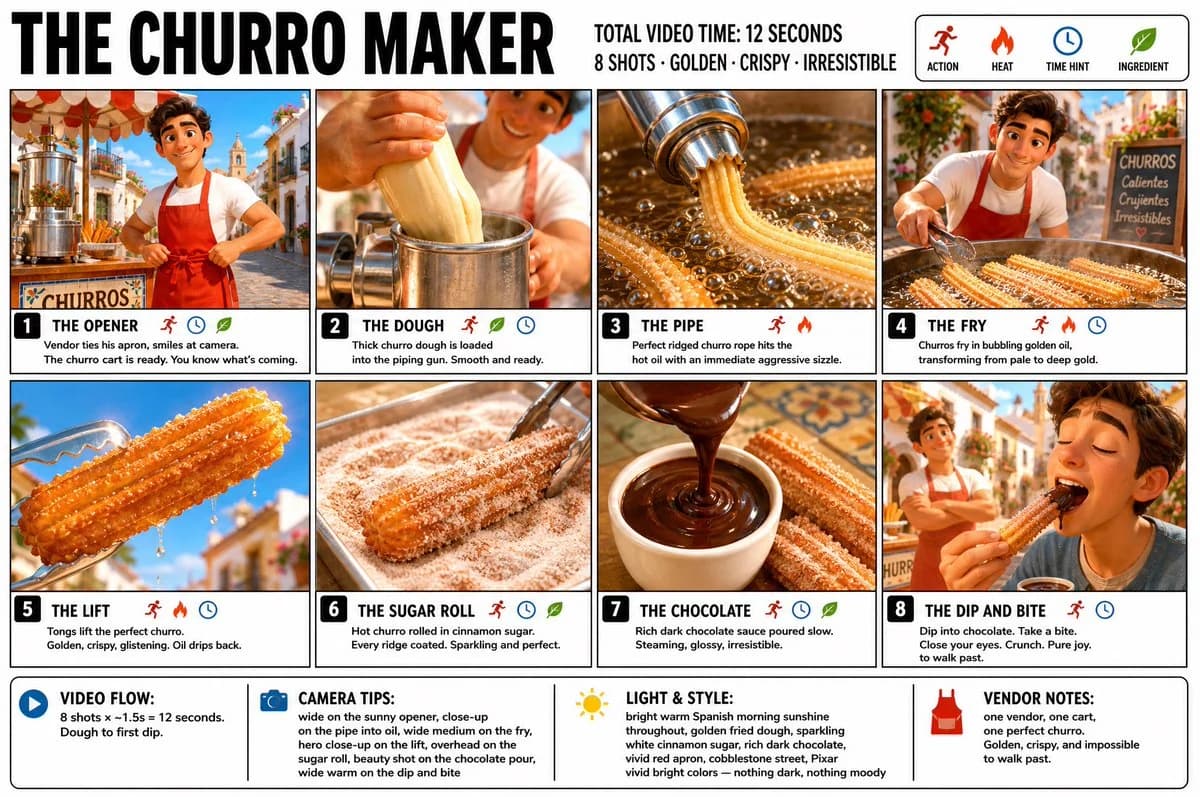
3047 文字“Create a crisp, clean infographic storyboard poster for THE CHURRO MAKER. Wide 16:9 layout, white background, black borders, bold black typography, premium Pixar 3D stylized rendering, bright vivid colors — golden fried dough, sparkling white cinnamon sugar, rich dark chocolate sauce, vivid warm Spanish street food energy throughout. Top header: •THE CHURRO MAKER •TOTAL VIDEO TIME: 12 SECONDS • 8 SHOTS · GOLDEN · CRISPY · IRRESISTIBLE •Legend icons: ACTION, HEAT, TIME HINT, INGREDIENT Same Pixar-style young Spanish male street vendor throughout — warm smile, white t-shirt, red apron, small bright outdoor churro cart, morning sunshine, cobblestone street, warm golden light everywhere. Fresh, bright, joyful — nothing dark, nothing moody. 8 panels: Panel 1 — THE OPENER: Wide shot. Young vendor stands behind his bright churro cart on a sunny cobblestone street, morning light flooding everything. He ties his red apron with a warm confident smile, looks up at the camera. The churro machine gleaming beside him. Bright blue sky above. You know exactly what’s coming. Panel 2 — THE DOUGH: Close-up. Thick churro dough being loaded into the piping gun — smooth, pale, creamy. Vendor’s hands pressing it in firmly. Steam rising slightly. The dough is alive and ready. Panel 3 — THE PIPE: The most satisfying panel. Close-up dramatic shot — vendor squeezes the piping gun over hot golden oil, a perfect ridged churro rope emerging in a long straight line, the star-shaped ridges crisp and defined. The dough hits the oil with an immediate aggressive sizzle. Bright and energetic. Panel 4 — THE FRY: Wide medium shot with vendor visible. Churros frying in vivid golden oil — bubbling vigorously all around them, the color deepening from pale to rich gold before your eyes. Vendor watches with a satisfied expression, tongs ready. The transformation happening live. Panel 5 — THE LIFT: Close-up hero shot. Tongs lifting a perfectly fried churro from the oil — golden, crispy, glistening, held up against the bright morning sky. Oil dripping back into the fryer below. The most beautiful single churro you have ever seen. Panel 6 — THE SUGAR ROLL: The scroll-stopper. Close-up overhead. The hot churro rolled through a tray of cinnamon sugar — white sugar and cinnamon coating every ridge perfectly, sparkling in the morning light, the heat making the sugar cling and glisten. The most textural and satisfying panel. Panel 7 — THE CHOCOLATE: Beauty shot. Dark glossy chocolate dipping sauce poured into a small white ceramic cup in a slow arc — rich, dark, steaming. The churro resting beside it, golden and sugar-coated. The contrast of deep dark chocolate against bright golden churro. Irresistible. Panel 8 — THE DIP AND BITE: Wide warm shot. A customer’s hand dips the churro into the chocolate sauce — it comes out coated and glossy — then takes a bite. The crunch implied in every pixel. Eyes close. Pure street food joy. Vendor visible in the background, arms crossed, warm proud smile. Morning sunshine all around. Footer: •VIDEO FLOW: 8 shots × ~1.5s = 12 seconds. Dough to first dip. •CAMERA TIPS: wide on the sunny opener, close-up on the pipe into oil, wide medium on the fry, hero close-up on the lift, overhead on the sugar roll, beauty shot on the chocolate pour, wide warm on the dip and bite •LIGHT & STYLE: bright warm Spanish morning sunshine throughout, golden fried dough, sparkling white cinnamon sugar, rich dark chocolate, vivid red apron, cobblestone street, Pixar vivid bright colors — nothing dark, nothing moody •VENDOR NOTES: one vendor, one cart, one perfect churro. Golden, crispy, and impossible to walk past.”
このプロンプトについて
チュロス作り絵コンテポスター は、Image 2でGPT Image 2にそのまま使える比較プロンプトです。下の3047文字をコピーして作成フォームに貼り付けると、上のプレビューに近い画像を生成できます。 インフォグラフィック, 比較, ストーリーボード タグを調整すると、別の方向性にも展開できます。
出発点として使い、被写体、ライティング、構図を変えながら仕上げてください。そのまま使ってもリミックスしても、生成コストは同じです。
用途
比較制作の起点に使いやすいプロンプト
チュロス作り絵コンテポスター に近い 比較 の画像を作りたいときは、この GPT Image 2 プロンプトから始めるとスムーズです。画面の方向性と構成はすでに整っているので、被写体、商品、色、シーンの細部だけを自分の内容に差し替えられます。
まず調整しやすいところ
- 被写体 人物、商品、場所、オブジェクトを自分の内容に差し替え、構図はそのまま活かします。
- 雰囲気 ライティング、配色、カメラ角度、質感をブランドや用途に合わせます。
- 仕上がり 生成前にアスペクト比、背景、文字、レイアウト指定を整えます。
近いテーマのプロンプトを探す
スタイル、用途、テーマが近い GPT Image 2 プロンプトを続けて確認できます。
使い方
- ステップ 1
プロンプトをコピー
上のコピー ボタンで全文を取得します。
- ステップ 2
Image 2 Create を開く
作成フォームに移動して貼り付けます。
- ステップ 3
生成する
Generate を押すと、数秒であなたのバージョンが完成します。
自分用に調整
ワンクリックで作成フォームに読み込み、すぐに調整を始められます。