프롬프트
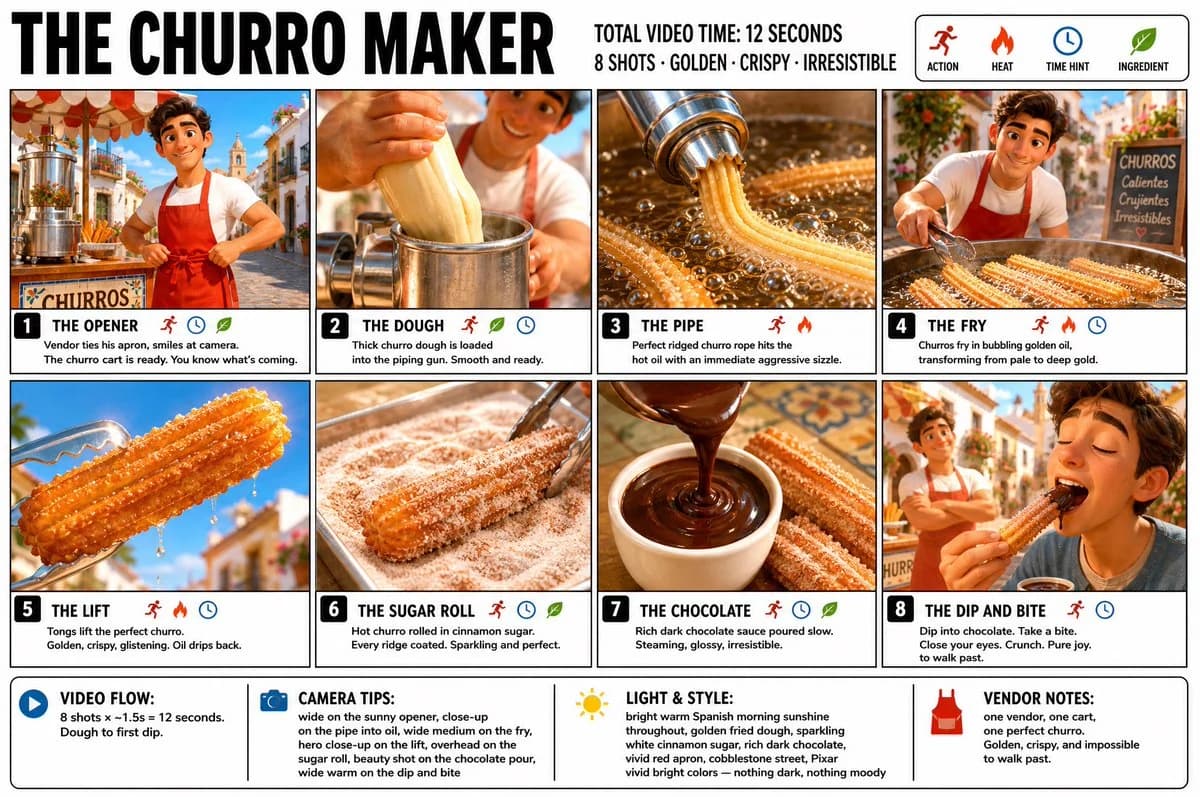
3047자“Create a crisp, clean infographic storyboard poster for THE CHURRO MAKER. Wide 16:9 layout, white background, black borders, bold black typography, premium Pixar 3D stylized rendering, bright vivid colors — golden fried dough, sparkling white cinnamon sugar, rich dark chocolate sauce, vivid warm Spanish street food energy throughout. Top header: •THE CHURRO MAKER •TOTAL VIDEO TIME: 12 SECONDS • 8 SHOTS · GOLDEN · CRISPY · IRRESISTIBLE •Legend icons: ACTION, HEAT, TIME HINT, INGREDIENT Same Pixar-style young Spanish male street vendor throughout — warm smile, white t-shirt, red apron, small bright outdoor churro cart, morning sunshine, cobblestone street, warm golden light everywhere. Fresh, bright, joyful — nothing dark, nothing moody. 8 panels: Panel 1 — THE OPENER: Wide shot. Young vendor stands behind his bright churro cart on a sunny cobblestone street, morning light flooding everything. He ties his red apron with a warm confident smile, looks up at the camera. The churro machine gleaming beside him. Bright blue sky above. You know exactly what’s coming. Panel 2 — THE DOUGH: Close-up. Thick churro dough being loaded into the piping gun — smooth, pale, creamy. Vendor’s hands pressing it in firmly. Steam rising slightly. The dough is alive and ready. Panel 3 — THE PIPE: The most satisfying panel. Close-up dramatic shot — vendor squeezes the piping gun over hot golden oil, a perfect ridged churro rope emerging in a long straight line, the star-shaped ridges crisp and defined. The dough hits the oil with an immediate aggressive sizzle. Bright and energetic. Panel 4 — THE FRY: Wide medium shot with vendor visible. Churros frying in vivid golden oil — bubbling vigorously all around them, the color deepening from pale to rich gold before your eyes. Vendor watches with a satisfied expression, tongs ready. The transformation happening live. Panel 5 — THE LIFT: Close-up hero shot. Tongs lifting a perfectly fried churro from the oil — golden, crispy, glistening, held up against the bright morning sky. Oil dripping back into the fryer below. The most beautiful single churro you have ever seen. Panel 6 — THE SUGAR ROLL: The scroll-stopper. Close-up overhead. The hot churro rolled through a tray of cinnamon sugar — white sugar and cinnamon coating every ridge perfectly, sparkling in the morning light, the heat making the sugar cling and glisten. The most textural and satisfying panel. Panel 7 — THE CHOCOLATE: Beauty shot. Dark glossy chocolate dipping sauce poured into a small white ceramic cup in a slow arc — rich, dark, steaming. The churro resting beside it, golden and sugar-coated. The contrast of deep dark chocolate against bright golden churro. Irresistible. Panel 8 — THE DIP AND BITE: Wide warm shot. A customer’s hand dips the churro into the chocolate sauce — it comes out coated and glossy — then takes a bite. The crunch implied in every pixel. Eyes close. Pure street food joy. Vendor visible in the background, arms crossed, warm proud smile. Morning sunshine all around. Footer: •VIDEO FLOW: 8 shots × ~1.5s = 12 seconds. Dough to first dip. •CAMERA TIPS: wide on the sunny opener, close-up on the pipe into oil, wide medium on the fry, hero close-up on the lift, overhead on the sugar roll, beauty shot on the chocolate pour, wide warm on the dip and bite •LIGHT & STYLE: bright warm Spanish morning sunshine throughout, golden fried dough, sparkling white cinnamon sugar, rich dark chocolate, vivid red apron, cobblestone street, Pixar vivid bright colors — nothing dark, nothing moody •VENDOR NOTES: one vendor, one cart, one perfect churro. Golden, crispy, and impossible to walk past.”
이 프롬프트 소개
Image 2에서 GPT Image 2에 바로 사용할 수 있는 비교 프롬프트 ‘추로스 제작 스토리보드 포스터’입니다. 아래 3047자를 복사해 Create 폼에 붙여 넣으면 위 미리보기와 비슷한 이미지를 만들 수 있습니다. 인포그래픽, 비교, 스토리보드 태그를 조정하면 새로운 방향으로 확장할 수 있습니다.
먼저 그대로 사용해 본 뒤 피사체, 조명, 구도를 작업에 맞게 조정해 보세요. 원문을 그대로 쓰거나 수정해도 생성 비용은 같습니다.
사용 사례
비교 작업의 좋은 출발점
‘추로스 제작 스토리보드 포스터’처럼 표현한 비교 이미지를 만들고 싶다면 이 GPT Image 2 프롬프트로 시작해 보세요. 스타일과 구도는 이미 잡혀 있으므로 인물, 제품, 색상, 장면 요소만 작업에 맞게 바꾸면 됩니다.
먼저 손보기 좋은 부분
- 피사체 인물, 제품, 장소, 오브젝트를 내 내용으로 바꾸고 전체 구도는 유지합니다.
- 분위기 조명, 색감, 카메라 각도, 소재 디테일을 브랜드나 용도에 맞춥니다.
- 결과 형식 생성 전에 비율, 배경, 텍스트, 레이아웃 지시를 정리합니다.
비슷한 프롬프트 더 보기
스타일, 용도, 피사체가 가까운 GPT Image 2 프롬프트를 이어서 확인해 보세요.
사용 방법
- 1단계
프롬프트 복사
위의 복사 버튼을 눌러 전체 텍스트를 가져옵니다.
- 2단계
Image 2 Create 열기
Create 폼으로 이동해 붙여 넣습니다.
- 3단계
생성
Generate를 누르면 몇 초 안에 내 버전이 완성됩니다.
내 버전으로 만들기
한 번의 클릭으로 Create 폼에 불러오고 바로 조정하세요.