프롬프트
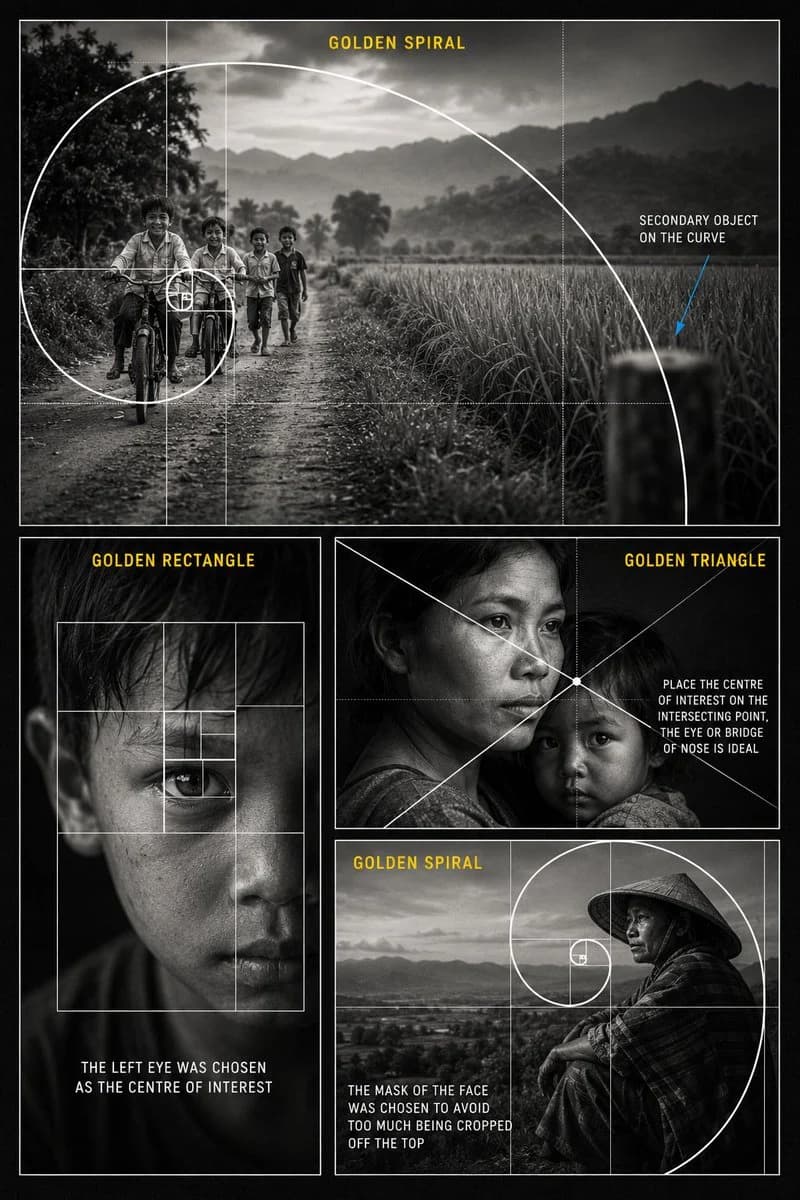
1105자{argument name="subject" default="시각적 스토리텔링 속 황금비"}에 관한 {argument name="style" default="프리미엄 흑백 사진 구도 교육용 포스터"}를 만들어 주세요. 포스터는 어두운 차콜 배경, 얇은 흰색 테두리, 사실적인 다큐멘터리 사진, 부드러운 필름 그레인, 고대비 흑백 조명, 깔끔한 에디토리얼 타이포그래피를 갖춘 세로형 시네마틱 콜라주로 디자인하세요. 사진 패널은 4개를 사용합니다. 상단 큰 패널: 들판, 나무, 산, 부드럽게 구름 낀 하늘을 배경으로 시골 흙길에서 자전거를 타거나 걸어가는 아이들을 보여 주세요. 아이들은 프레임 왼쪽에 배치합니다. 크고 깔끔한 흰색 황금 나선과 황금비 그리드를 겹치고, 나선이 주요 초점인 아이들 쪽으로 감겨 들어가게 하세요. 노란색 제목 텍스트를 추가하세요: “GOLDEN SPIRAL”. 오른쪽에 흰색 주석 텍스트 “SECONDARY OBJECT ON THE CURVE”를 넣고, 가는 파란 화살표로 나선 곡선 위의 흐릿한 물체를 가리키세요. 왼쪽 아래 패널: 극적인 조명 아래 한쪽 눈에 초점을 맞춘 어린 소년의 흑백 얼굴 클로즈업 사진을 보여 주세요. 눈 주위에 중첩된 사각형으로 이루어진 흰색 황금 사각형 그리드를 겹치세요. 노란색 제목 텍스트를 추가하세요: “GOLDEN RECTANGLE”. 흰색 캡션 텍스트를 추가하세요: “THE LEFT EYE WAS CHOSEN AS THE CENTRE OF INTEREST”. 오른쪽 아래의 위쪽 패널: 아이를 안은 어머니의 감성적인 흑백 인물 사진을 보여 주세요. 시네마틱한 다큐멘터리 조명을 사용하세요. 어머니의 눈이나 콧등 근처에서 교차하는 흰색 대각선 황금 삼각형 구도선을 겹치세요. 노란색 제목 텍스트를 추가하세요: “GOLDEN TRIANGLE”. 흰색 주석 텍스트를 추가하세요: “PLACE THE CENTRE OF INTEREST ON THE INTERSECTING POINT, THE EYE OR BRIDGE OF NOSE IS IDEAL”. 오른쪽 아래의 아래쪽 패널: 전통 원뿔형 모자(삿갓)를 쓰고 풍경이나 탁 트인 계곡 근처에 앉아 있는 사람의 흑백 인물 사진을 보여 주세요. 얼굴은 황금 나선의 초점 근처에 배치하세요. 흰색 황금 나선과 황금비 그리드를 겹치세요. 노란색 제목 텍스트를 추가하세요: “GOLDEN SPIRAL”. 흰색 캡션 텍스트를 추가하세요: “THE FACE WAS PLACED INSIDE THE SPIRAL TO AVOID CROPPING TOO MUCH OFF THE TOP”. 전체 스타일: 전문 사진 마스터클래스 포스터, 사실적인 흑백 사진, 깔끔한 흰색 구도 오버레이, 노란색 섹션 제목, 읽기 쉬운 교육용 텍스트, 가는 그리드 선, 우아한 레이아웃, 로고 없음, 워터마크 없음, 고해상도 포스터 디자인.이 프롬프트 소개
Image 2에서 GPT Image 2에 바로 사용할 수 있는 인포그래픽 프롬프트 ‘황금 비율 사진 구성 포스터’입니다. 아래 1105자를 복사해 Create 폼에 붙여 넣으면 위 미리보기와 비슷한 이미지를 만들 수 있습니다. 인포그래픽, 포스터, 스토리보드 태그를 조정하면 새로운 방향으로 확장할 수 있습니다.
먼저 그대로 사용해 본 뒤 피사체, 조명, 구도를 작업에 맞게 조정해 보세요. 원문을 그대로 쓰거나 수정해도 생성 비용은 같습니다.
사용 사례
인포그래픽 작업의 좋은 출발점
‘황금 비율 사진 구성 포스터’처럼 표현한 인포그래픽 이미지를 만들고 싶다면 이 GPT Image 2 프롬프트로 시작해 보세요. 스타일과 구도는 이미 잡혀 있으므로 인물, 제품, 색상, 장면 요소만 작업에 맞게 바꾸면 됩니다.
먼저 손보기 좋은 부분
- 피사체 인물, 제품, 장소, 오브젝트를 내 내용으로 바꾸고 전체 구도는 유지합니다.
- 분위기 조명, 색감, 카메라 각도, 소재 디테일을 브랜드나 용도에 맞춥니다.
- 결과 형식 생성 전에 비율, 배경, 텍스트, 레이아웃 지시를 정리합니다.
비슷한 프롬프트 더 보기
스타일, 용도, 피사체가 가까운 GPT Image 2 프롬프트를 이어서 확인해 보세요.
사용 방법
- 1단계
프롬프트 복사
위의 복사 버튼을 눌러 전체 텍스트를 가져옵니다.
- 2단계
Image 2 Create 열기
Create 폼으로 이동해 붙여 넣습니다.
- 3단계
생성
Generate를 누르면 몇 초 안에 내 버전이 완성됩니다.
내 버전으로 만들기
한 번의 클릭으로 Create 폼에 불러오고 바로 조정하세요.