Prompt
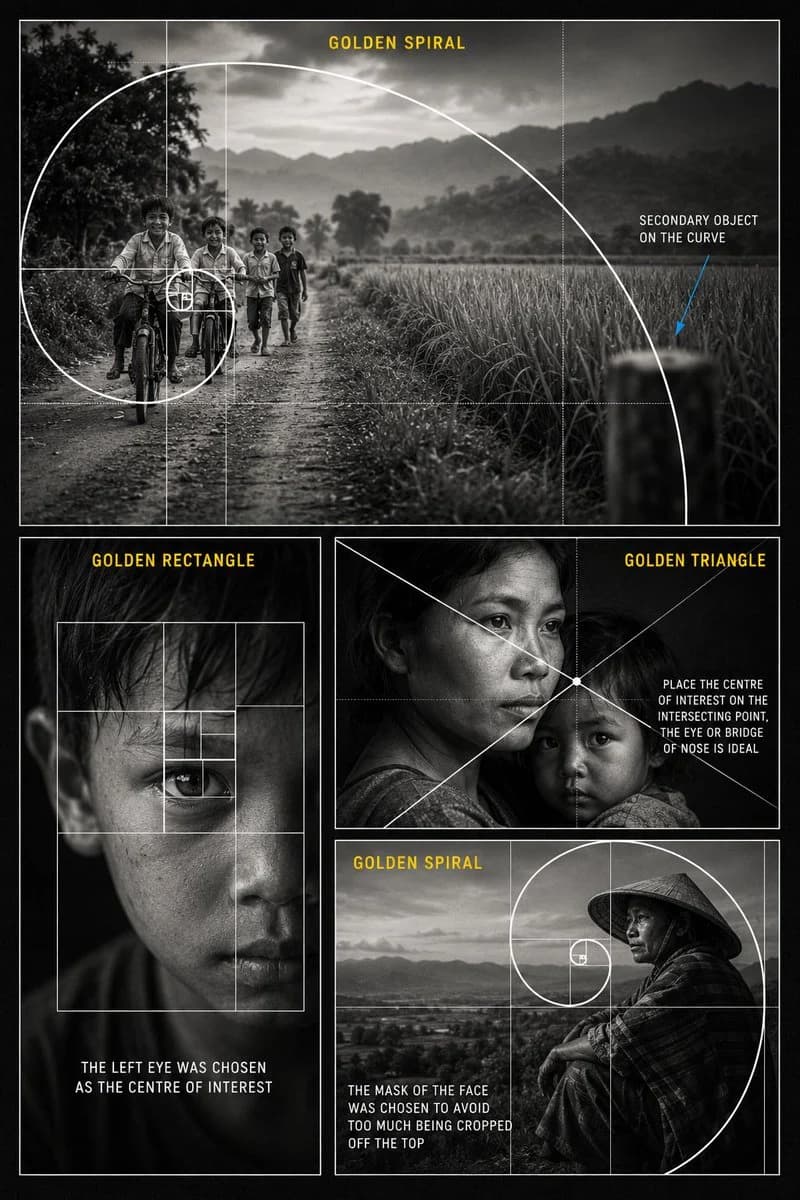
414 paroleCrea un {argument name="style" default="poster didattico premium in bianco e nero sulla composizione fotografica"} sul {argument name="subject" default="rapporto aureo nella narrazione visiva"}. Progetta il poster come un collage cinematografico verticale con sfondo grigio antracite scuro, sottili bordi bianchi, fotografia documentaristica realistica, morbida grana da pellicola, illuminazione monocromatica ad alto contrasto e una tipografia editoriale pulita. Usa quattro riquadri fotografici. Riquadro grande in alto: mostra dei bambini in bicicletta e a piedi su una strada sterrata di campagna, con campi, alberi, montagne e un cielo morbidamente nuvoloso sullo sfondo. Posiziona i bambini verso il lato sinistro dell’inquadratura. Sovrapponi una grande spirale aurea bianca e pulita e una griglia del rapporto aureo, con la spirale che si avvolge verso i bambini come punto focale principale. Aggiungi il titolo in giallo: “GOLDEN SPIRAL”. Aggiungi a destra un’annotazione in bianco: “SECONDARY OBJECT ON THE CURVE”, con una sottile freccia blu che indica un oggetto sfocato sulla curva della spirale. Riquadro in basso a sinistra: mostra un primo piano in bianco e nero del volto di un ragazzino con un’illuminazione drammatica e un occhio come fulcro principale. Sovrapponi una griglia bianca di rettangoli aurei con rettangoli annidati intorno all’occhio. Aggiungi il titolo in giallo: “GOLDEN RECTANGLE”. Aggiungi la didascalia in bianco: “THE LEFT EYE WAS CHOSEN AS THE CENTRE OF INTEREST”. Riquadro superiore in basso a destra: mostra un emozionante ritratto in bianco e nero di una madre che tiene in braccio un bambino. Usa un’illuminazione documentaristica cinematografica. Sovrapponi linee di composizione bianche diagonali del triangolo aureo che si incrociano vicino all’occhio della madre o alla radice del naso. Aggiungi il titolo in giallo: “GOLDEN TRIANGLE”. Aggiungi l’annotazione in bianco: “PLACE THE CENTRE OF INTEREST ON THE INTERSECTING POINT, THE EYE OR BRIDGE OF NOSE IS IDEAL”. Riquadro inferiore in basso a destra: mostra un ritratto in bianco e nero di una persona con un tradizionale cappello conico, seduta vicino a un paesaggio o a una valle aperta. Posiziona il volto vicino al punto focale della spirale aurea. Sovrapponi una spirale aurea bianca e una griglia del rapporto aureo. Aggiungi il titolo in giallo: “GOLDEN SPIRAL”. Aggiungi la didascalia in bianco: “THE FACE WAS PLACED INSIDE THE SPIRAL TO AVOID CROPPING TOO MUCH OFF THE TOP”. Stile generale: poster da masterclass di fotografia professionale, foto realistiche in bianco e nero, sovrapposizioni compositive bianche e pulite, titoli delle sezioni in giallo, testo didattico leggibile, sottili linee della griglia, layout elegante, nessun logo, nessuna filigrana, design del poster ad alta risoluzione.Informazioni su questo prompt
Poster di Composizione Fotografica in Rapporto Aureo è un prompt infografica pronto da usare con GPT Image 2 su Image 2. Copia le 414 parole qui sotto, incollale nel form Create e otterrai un risultato vicino all’anteprima. Modifica i tag Infografica, Poster, Storyboard se vuoi portarlo in una direzione diversa.
Usalo come base, poi adatta soggetto, luce o composizione al risultato che cerchi. Il costo in crediti resta lo stesso, sia usandolo così com’è sia personalizzandolo.
Caso d’uso
Un buon punto di partenza per Infografica
Parti da qui se vuoi un’immagine in stile infografica ispirata a Poster di Composizione Fotografica in Rapporto Aureo. Il prompt imposta già stile e struttura; sostituisci soggetto, prodotto, colori o dettagli della scena in base al progetto.
Cosa vale la pena modificare
- Soggetto Sostituisci persona, prodotto, luogo o oggetto principale senza perdere la composizione.
- Stile Regola luce, palette, angolo di ripresa o materiali per allinearlo al brand.
- Formato Definisci formato, sfondo, testo o note di layout prima di generare.
Altre direzioni da esplorare
Trova altri prompt GPT Image 2 con stile, uso o soggetto simile.
Come usarlo
- Passo 1
Copia il prompt
Premi il pulsante Copia qui sopra per ottenere il testo completo.
- Passo 2
Apri Image 2 Create
Vai al form Create e incollalo.
- Passo 3
Genera
Premi Generate. La tua versione arriva in pochi secondi.
Rendilo tuo
Carica il prompt nel form Create con un clic e inizia a modificarlo.