プロンプト
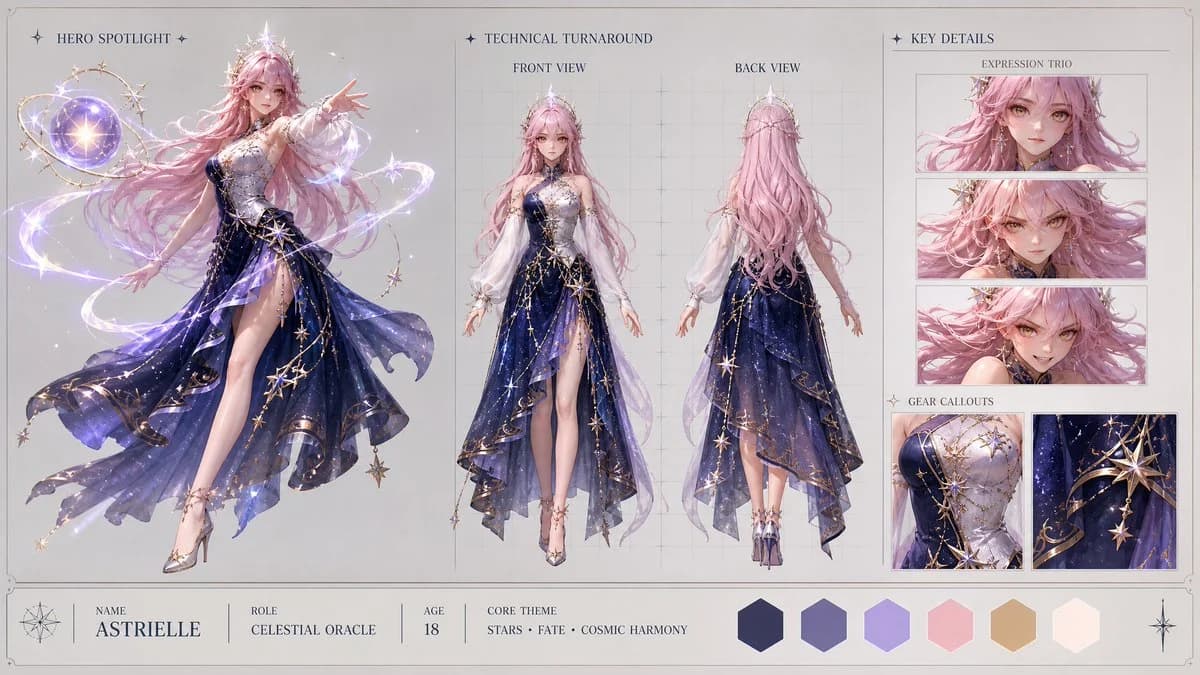
1690 語Create a high-end, asymmetric editorial CHARACTER CONCEPT SHOWCASE from these inputs: [STYLE]: highly polished stylized 3D CGI anime style, modern cinematic 3D magical girl aesthetic with clean soft-shading, vibrant magical reflections, and shimmering particle effects [SUBJECT_DESCRIPTION]: A beautiful celestial magical girl with cosmic powers. She wears an elegant, asymmetric mid-length dress made of deep midnight-blue fabric that subtly mimics a night sky filled with drifting constellations. The dress is detailed with intricate gold filigree along the hem, a single flowing white sleeve, and a delicate silver corset woven with stellar patterns. Softly glowing, semi-translucent ribbons of pure light gently wrap around her arms. She has long, shimmering pastel-pink hair styled in soft waves, expressive golden-amber eyes, and a graceful crown of small star crystals. Her design is highly elegant and unique, radiating a gentle but immense stellar power without traditional sailor motifs. Create the layout in a clean 16:9 widescreen format on a neutral studio gray or warm off-white background with a minimal technical border. The design must look like a premium production visual bible, using clean typography, no clutter, no watermarks, and no logos. Apply [STYLE] only to the character and visual elements, keeping the presentation layout clean, structured, and minimal. Infer all missing details from the subject description, including name, role, brief background specs, and a cohesive color palette. Use this tri-fold layout: 1. HERO SPOTLIGHT (Left 40% of the board) - Show one large, highly detailed full-body dynamic action pose of the subject. - This pose should showcase the character's primary personality, attitude, and silhouette. 2. TECHNICAL TURNAROUND (Center 35% of the board) - Show exactly two clean full-body views: Front View and Back View. - The subject should be in a relaxed, neutral stance. - Place these views over very subtle vertical and horizontal
このプロンプトについて
アニメキャラクター設定ショーケース は Image 2 で GPT Image 2 にそのまま使えるポスタープロンプトです。下の 1690 語をコピーして作成フォームに貼り付けると、上のプレビューに近い結果を生成できます。 ポスター, キャラクターデザイン, ファッション タグを調整すると、別の方向性にも展開できます。
出発点として使い、被写体、ライティング、構図を変えながら仕上げてください。そのまま使ってもリミックスしても、生成コストは同じです。
用途
ポスター制作の起点に使いやすいプロンプト
アニメキャラクター設定ショーケース に近い ポスター の画像を作りたいときは、この GPT Image 2 プロンプトから始めるとスムーズです。画面の方向性と構成はすでに整っているので、被写体、商品、色、シーンの細部だけを自分の内容に差し替えられます。
まず調整しやすいところ
- 被写体 人物、商品、場所、オブジェクトを自分の内容に差し替え、構図はそのまま活かします。
- 雰囲気 ライティング、配色、カメラ角度、質感をブランドや用途に合わせます。
- 仕上がり 生成前にアスペクト比、背景、文字、レイアウト指定を整えます。
近いテーマのプロンプトを探す
スタイル、用途、テーマが近い GPT Image 2 プロンプトを続けて確認できます。
使い方
- ステップ 1
プロンプトをコピー
上のコピー ボタンで全文を取得します。
- ステップ 2
Image 2 Create を開く
作成フォームに移動して貼り付けます。
- ステップ 3
生成する
Generate を押すと、数秒であなたのバージョンが完成します。
自分用に調整
ワンクリックで作成フォームに読み込み、すぐに調整を始められます。