Prompt
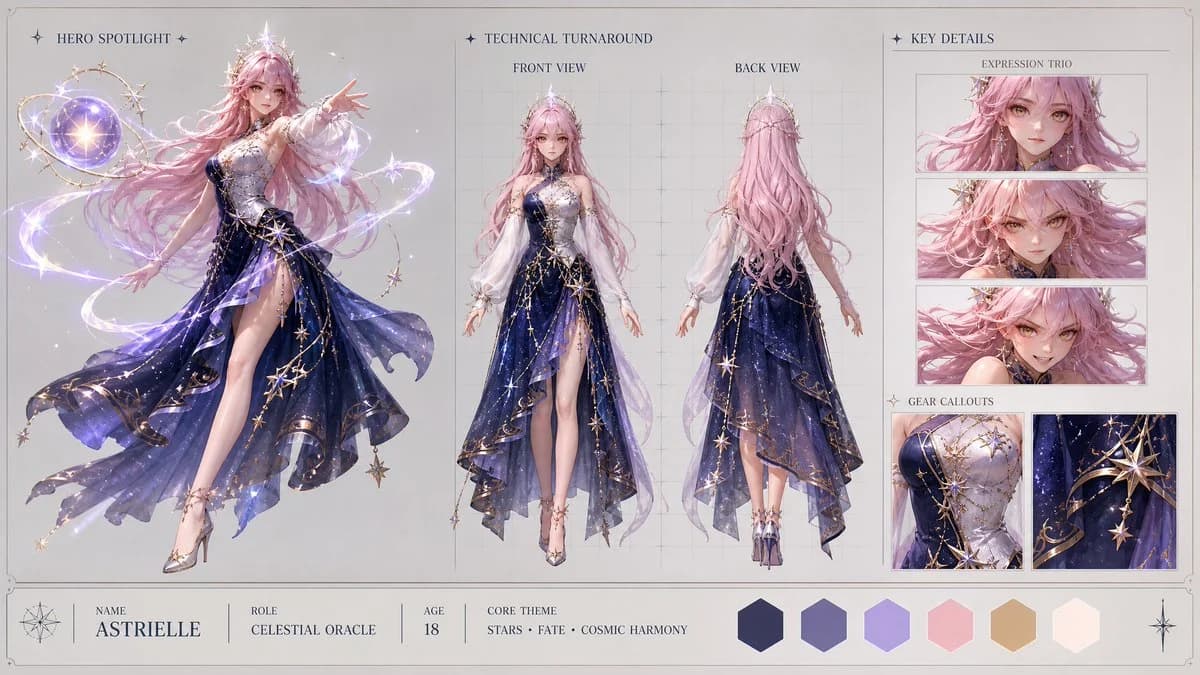
298 motsCreate a high-end, asymmetric editorial CHARACTER CONCEPT SHOWCASE from these inputs: [STYLE]: highly polished stylized 3D CGI anime style, modern cinematic 3D magical girl aesthetic with clean soft-shading, vibrant magical reflections, and shimmering particle effects [SUBJECT_DESCRIPTION]: A beautiful celestial magical girl with cosmic powers. She wears an elegant, asymmetric mid-length dress made of deep midnight-blue fabric that subtly mimics a night sky filled with drifting constellations. The dress is detailed with intricate gold filigree along the hem, a single flowing white sleeve, and a delicate silver corset woven with stellar patterns. Softly glowing, semi-translucent ribbons of pure light gently wrap around her arms. She has long, shimmering pastel-pink hair styled in soft waves, expressive golden-amber eyes, and a graceful crown of small star crystals. Her design is highly elegant and unique, radiating a gentle but immense stellar power without traditional sailor motifs. Create the layout in a clean 16:9 widescreen format on a neutral studio gray or warm off-white background with a minimal technical border. The design must look like a premium production visual bible, using clean typography, no clutter, no watermarks, and no logos. Apply [STYLE] only to the character and visual elements, keeping the presentation layout clean, structured, and minimal. Infer all missing details from the subject description, including name, role, brief background specs, and a cohesive color palette. Use this tri-fold layout: 1. HERO SPOTLIGHT (Left 40% of the board) - Show one large, highly detailed full-body dynamic action pose of the subject. - This pose should showcase the character's primary personality, attitude, and silhouette. 2. TECHNICAL TURNAROUND (Center 35% of the board) - Show exactly two clean full-body views: Front View and Back View. - The subject should be in a relaxed, neutral stance. - Place these views over very subtle vertical and horizontal
À propos de ce prompt
Showcase de concept de personnage anime est un prompt Affiche prêt à l’emploi pour GPT Image 2 sur Image 2. Copiez les 298 mots ci-dessous, collez-les dans le formulaire Create et vous obtiendrez un résultat proche de l’aperçu. Ajustez les tags Affiche, Design de personnage, Mode si vous voulez l’orienter autrement.
Utilisez-le comme point de départ et continuez à itérer : changez le sujet, la lumière ou la composition jusqu’au bon rendu. Le coût en crédits reste le même, que vous l’utilisiez tel quel ou que vous le remixiez.
Cas d’usage
Un bon point de départ pour Affiche
Partez de ce prompt si vous voulez une image Affiche dans l’esprit de Showcase de concept de personnage anime. Le style et la structure sont déjà posés ; remplacez simplement le sujet, le produit, les couleurs ou les détails de scène selon votre projet.
À ajuster en priorité
- Sujet Remplacez la personne, le produit, le lieu ou l’objet principal sans casser la composition.
- Style Ajustez la lumière, la palette, l’angle de caméra ou les matières pour l’adapter à votre marque.
- Format Précisez le ratio, le fond, le texte ou les consignes de mise en page avant de générer.
D’autres pistes de prompts
Trouvez d’autres prompts GPT Image 2 avec un style, un usage ou un sujet proche.
Comment l’utiliser
- Étape 1
Copier le prompt
Cliquez sur le bouton Copier ci-dessus pour récupérer le texte complet.
- Étape 2
Ouvrir Image 2 Create
Accédez au formulaire Create et collez-le.
- Étape 3
Générer
Cliquez sur Generate. Votre version arrive en quelques secondes.
Adaptez-le
Chargez le prompt dans le formulaire Create en un clic, puis commencez les ajustements.