프롬프트
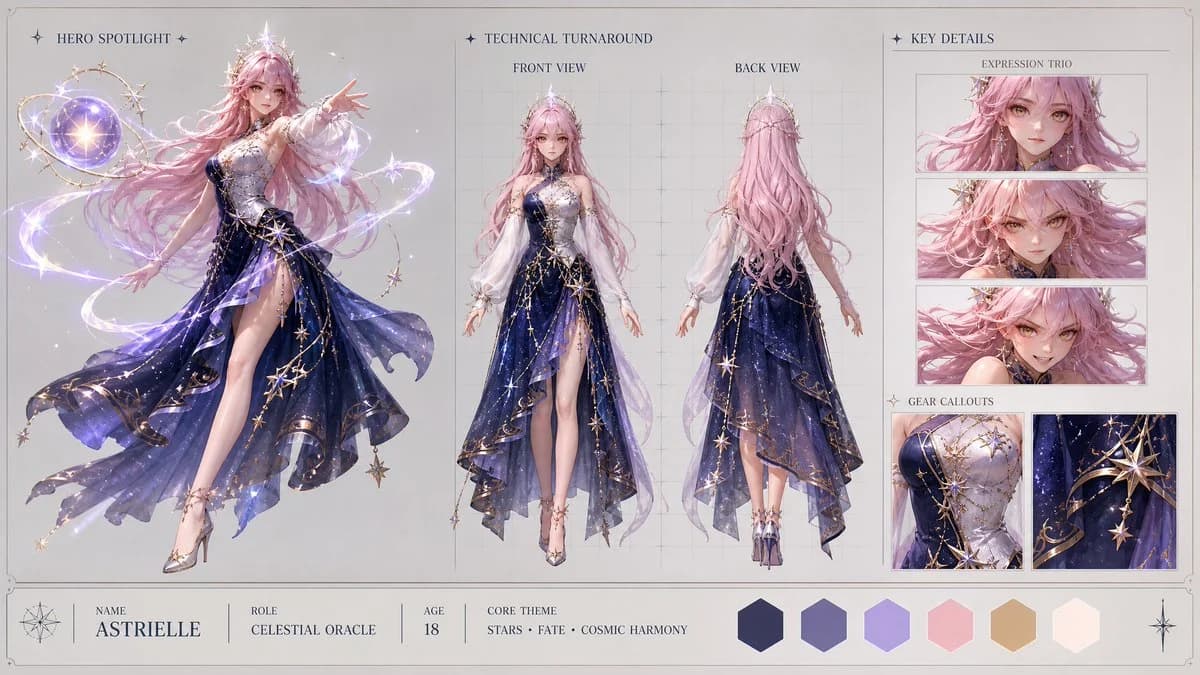
단어 1690개Create a high-end, asymmetric editorial CHARACTER CONCEPT SHOWCASE from these inputs: [STYLE]: highly polished stylized 3D CGI anime style, modern cinematic 3D magical girl aesthetic with clean soft-shading, vibrant magical reflections, and shimmering particle effects [SUBJECT_DESCRIPTION]: A beautiful celestial magical girl with cosmic powers. She wears an elegant, asymmetric mid-length dress made of deep midnight-blue fabric that subtly mimics a night sky filled with drifting constellations. The dress is detailed with intricate gold filigree along the hem, a single flowing white sleeve, and a delicate silver corset woven with stellar patterns. Softly glowing, semi-translucent ribbons of pure light gently wrap around her arms. She has long, shimmering pastel-pink hair styled in soft waves, expressive golden-amber eyes, and a graceful crown of small star crystals. Her design is highly elegant and unique, radiating a gentle but immense stellar power without traditional sailor motifs. Create the layout in a clean 16:9 widescreen format on a neutral studio gray or warm off-white background with a minimal technical border. The design must look like a premium production visual bible, using clean typography, no clutter, no watermarks, and no logos. Apply [STYLE] only to the character and visual elements, keeping the presentation layout clean, structured, and minimal. Infer all missing details from the subject description, including name, role, brief background specs, and a cohesive color palette. Use this tri-fold layout: 1. HERO SPOTLIGHT (Left 40% of the board) - Show one large, highly detailed full-body dynamic action pose of the subject. - This pose should showcase the character's primary personality, attitude, and silhouette. 2. TECHNICAL TURNAROUND (Center 35% of the board) - Show exactly two clean full-body views: Front View and Back View. - The subject should be in a relaxed, neutral stance. - Place these views over very subtle vertical and horizontal
이 프롬프트 소개
애니 캐릭터 콘셉트 쇼케이스은(는) Image 2에서 GPT Image 2에 바로 사용할 수 있는 포스터 프롬프트입니다. 아래 단어 1690개를 복사해 Create 폼에 붙여 넣으면 위 미리보기와 가까운 결과를 얻을 수 있습니다. 포스터, 캐릭터 디자인, 패션 태그를 조정하면 새로운 방향으로 확장할 수 있습니다.
출발점으로 사용하고 피사체, 조명, 구도를 바꾸며 원하는 결과에 맞춰 반복하세요. 그대로 쓰거나 리믹스해도 생성 비용은 동일합니다.
사용 사례
포스터 작업의 좋은 출발점
애니 캐릭터 콘셉트 쇼케이스과(와) 비슷한 포스터 이미지를 만들고 싶다면 이 GPT Image 2 프롬프트에서 시작하면 됩니다. 기본 스타일과 구도는 잡혀 있으니 인물, 제품, 색상, 장면 디테일만 내 작업에 맞게 바꿔 보세요.
먼저 손보기 좋은 부분
- 피사체 인물, 제품, 장소, 오브젝트를 내 내용으로 바꾸고 전체 구도는 유지합니다.
- 분위기 조명, 색감, 카메라 각도, 소재 디테일을 브랜드나 용도에 맞춥니다.
- 결과 형식 생성 전에 비율, 배경, 텍스트, 레이아웃 지시를 정리합니다.
비슷한 프롬프트 더 보기
스타일, 용도, 피사체가 가까운 GPT Image 2 프롬프트를 이어서 확인해 보세요.
사용 방법
- 1단계
프롬프트 복사
위의 복사 버튼을 눌러 전체 텍스트를 가져옵니다.
- 2단계
Image 2 Create 열기
Create 폼으로 이동해 붙여 넣습니다.
- 3단계
생성
Generate를 누르면 몇 초 안에 내 버전이 완성됩니다.
내 버전으로 만들기
한 번의 클릭으로 Create 폼에 불러오고 바로 조정하세요.