Prompt
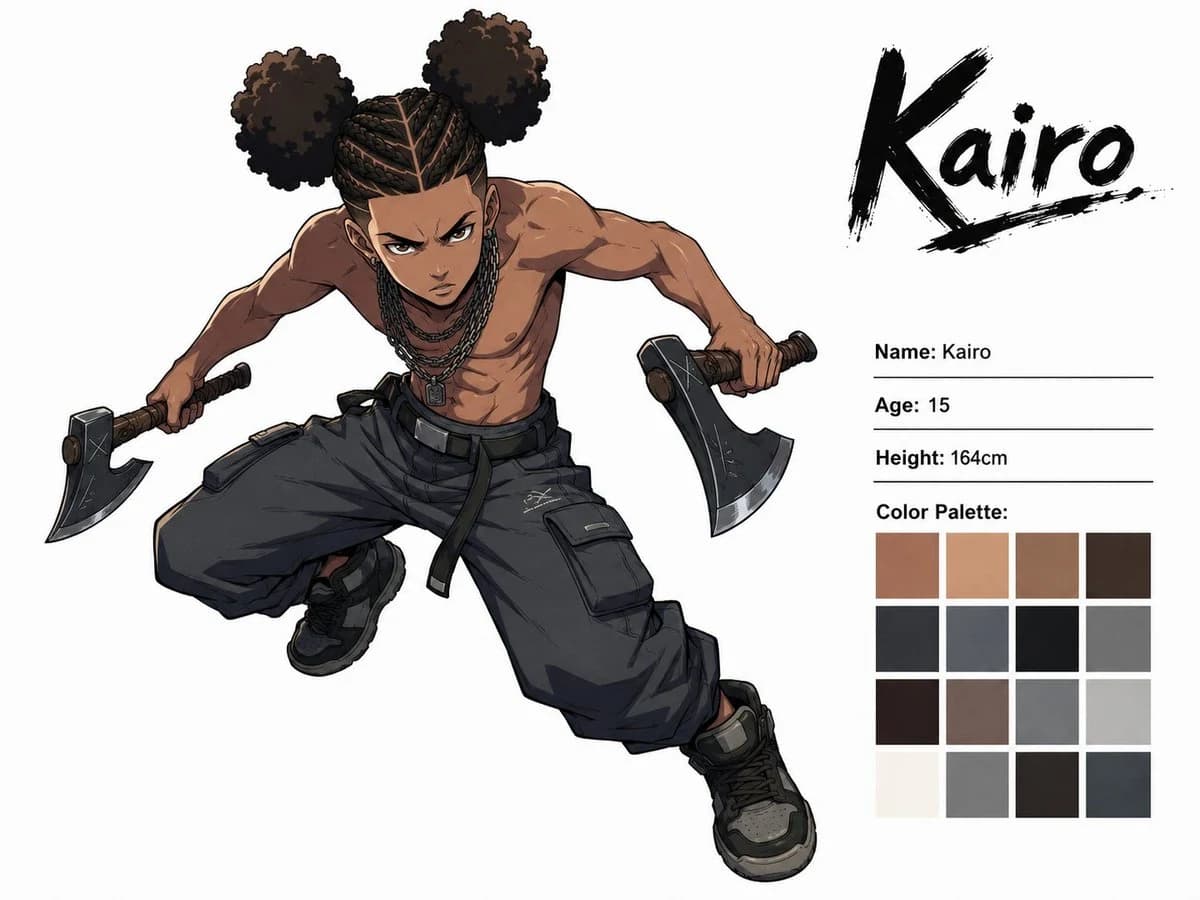
407 WörterZiel: Create a dynamic anime character concept sheet for {argument name="character name" default="Kairo"}, showing one angry teenage boy in a dramatic action pose.
Format: Landscape 4:3 white studio background, clean character-sheet presentation, high-resolution digital anime illustration with crisp ink lines, cel-shaded rendering, strong anatomy, and subtle gray shadows.
Aufbau: Place the full-body character large on the left and center, lunging diagonally toward the viewer from upper left to lower right. Place the character information panel on the right. At the top right, write the large brushstroke logo text “Kairo” in black, with a rough underline and ink splatter texture. Beneath it, add three thin horizontal rule lines with profile text, then a color palette grid.
Subject details: The character is a 15-year-old Black teenage boy with medium-brown skin, an intense angry expression, furrowed brows, narrowed eyes, and a focused forward stare. He is shirtless, lean but muscular, with defined shoulders, arms, chest, and abs. His hair is styled as tight cornrow braids across the scalp, splitting into exactly two large round afro puff buns, one on each side of the head. Add several dark chain necklaces with a small rectangular pendant. He is mid-leap or crouch-lunging, torso tilted forward, one knee bent high and the other leg stretched downward, both arms extended outward. He holds exactly two hatchets, one in each hand, with dark metal axe heads and brown wrapped handles. Outfit pieces: exactly 3 main clothing pieces visible — oversized dark charcoal cargo pants with belt straps and large flap pockets, black high-top sneakers with gray panels, and dark wrist/hand grip wraps around the hatchet handles. Keep him shirtless.
Right-side text content: Use the following visible labels and values exactly: “Name: Kairo”, “Age: 15”, “Height: 164cm”, and “Color Palette:”. The logo at the top right must read “Kairo”.
Farbpalette: Under “Color Palette:” show exactly 16 square swatches in a neat 4 by 4 grid. Include warm skin browns, tan, muted brown, dark espresso, charcoal black, slate gray, near-black, medium gray, deep brown, mauve-gray, cool gray, pale gray, off-white, neutral gray, black-brown, and dark blue-gray.
Bildstil: Modern shonen anime concept art, edgy street-fighter energy, dynamic foreshortening, clean white negative space, detailed fabric folds, subtle scratches on the axe heads, heavy black outlines, muted urban palette of browns, blacks, grays, and warm skin tones.
Vorgaben: Include only one character. Do not add extra weapons, extra characters, scenery, logos, watermarks, or additional text beyond the specified character sheet information.Über diesen Prompt
Kairo Anime-Charakterbogen ist ein sofort nutzbarer Storyboard-Prompt für GPT Image 2 in Image 2. Kopiere die 407 Wörter unten, füge sie in das Create-Formular ein und du erhältst ein Ergebnis nahe an der Vorschau. Passe die Tags Comic, Storyboard, Produkt an, wenn du ihn in eine neue Richtung schieben möchtest.
Nutze ihn als Vorlage und passe Motiv, Licht oder Komposition an dein Projekt an. Die Credit-Kosten bleiben gleich, egal ob du ihn direkt verwendest oder bearbeitest.
Einsatzbereich
Guter Startpunkt für Storyboard
Starte hier, wenn du ein Storyboard-Bild ähnlich wie Kairo Anime-Charakterbogen erstellen möchtest. Look und Aufbau stehen bereits fest; ersetze nur Motiv, Produkt, Farben oder Szenendetails passend zu deinem Projekt.
Was sich schnell anpassen lässt
- Motiv Tausche Person, Produkt, Ort oder Objekt aus und behalte die Grundkomposition bei.
- Look Passe Licht, Farbwelt, Kamerawinkel oder Materialdetails an deine Marke an.
- Format Lege Seitenverhältnis, Hintergrund, Text und Layout-Hinweise vor dem Generieren fest.
Ähnliche Prompt-Richtungen
Entdecke weitere GPT Image 2 Prompts mit ähnlichem Stil, Einsatzbereich oder Motiv.
So nutzt du ihn
- Schritt 1
Prompt kopieren
Klicke oben auf Kopieren, um den vollständigen Text zu übernehmen.
- Schritt 2
Image 2 Create öffnen
Wechsle zum Create-Formular und füge ihn ein.
- Schritt 3
Generieren
Klicke auf Generate. Deine Version ist in Sekunden fertig.
Mach ihn zu deinem
Lade den Prompt mit einem Klick ins Create-Formular und passe ihn direkt an.