Prompt
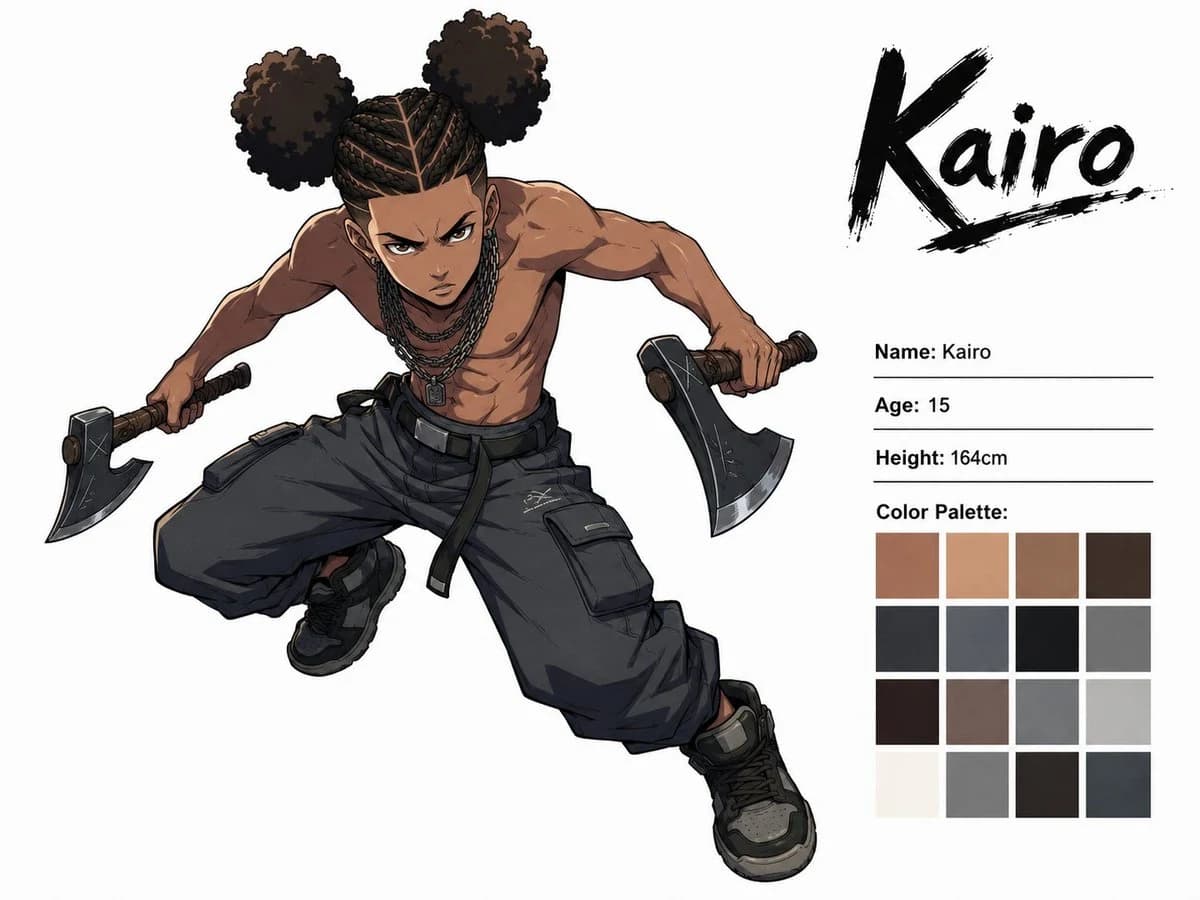
410 palabrasObjetivo: Create a dynamic anime character concept sheet for {argument name="character name" default="Kairo"}, showing one angry teenage boy in a dramatic action pose.
Formato: Landscape 4:3 white studio background, clean character-sheet presentation, high-resolution digital anime illustration with crisp ink lines, cel-shaded rendering, strong anatomy, and subtle gray shadows.
Composición: Place the full-body character large on the left and center, lunging diagonally toward the viewer from upper left to lower right. Place the character information panel on the right. At the top right, write the large brushstroke logo text “Kairo” in black, with a rough underline and ink splatter texture. Beneath it, add three thin horizontal rule lines with profile text, then a color palette grid.
Subject details: The character is a 15-year-old Black teenage boy with medium-brown skin, an intense angry expression, furrowed brows, narrowed eyes, and a focused forward stare. He is shirtless, lean but muscular, with defined shoulders, arms, chest, and abs. His hair is styled as tight cornrow braids across the scalp, splitting into exactly two large round afro puff buns, one on each side of the head. Add several dark chain necklaces with a small rectangular pendant. He is mid-leap or crouch-lunging, torso tilted forward, one knee bent high and the other leg stretched downward, both arms extended outward. He holds exactly two hatchets, one in each hand, with dark metal axe heads and brown wrapped handles. Outfit pieces: exactly 3 main clothing pieces visible — oversized dark charcoal cargo pants with belt straps and large flap pockets, black high-top sneakers with gray panels, and dark wrist/hand grip wraps around the hatchet handles. Keep him shirtless.
Right-side text content: Use the following visible labels and values exactly: “Name: Kairo”, “Age: 15”, “Height: 164cm”, and “Color Palette:”. The logo at the top right must read “Kairo”.
Paleta de colores: Under “Color Palette:” show exactly 16 square swatches in a neat 4 by 4 grid. Include warm skin browns, tan, muted brown, dark espresso, charcoal black, slate gray, near-black, medium gray, deep brown, mauve-gray, cool gray, pale gray, off-white, neutral gray, black-brown, and dark blue-gray.
Estilo visual: Modern shonen anime concept art, edgy street-fighter energy, dynamic foreshortening, clean white negative space, detailed fabric folds, subtle scratches on the axe heads, heavy black outlines, muted urban palette of browns, blacks, grays, and warm skin tones.
Restricciones: Include only one character. Do not add extra weapons, extra characters, scenery, logos, watermarks, or additional text beyond the specified character sheet information.Sobre este prompt
Hoja de personaje de anime de Kairo es un prompt de storyboard listo para usar con GPT Image 2 en Image 2. Copia las 410 palabras de abajo, pégalas en el formulario Create y obtendrás un resultado cercano a la vista previa. Ajusta las etiquetas Cómic, Storyboard, Producto si quieres llevarlo hacia otra dirección.
Úsalo como punto de partida y ajusta el sujeto, la iluminación o la composición hasta conseguir el resultado que buscas. El coste en créditos es el mismo si lo usas tal cual o lo personalizas.
Caso de uso
Buen punto de partida para Storyboard
Empieza aquí si quieres una imagen de storyboard en la línea de Hoja de personaje de anime de Kairo. El prompt ya marca el estilo y la estructura; solo cambia el sujeto, el producto, los colores o los detalles de la escena según tu idea.
Qué conviene ajustar primero
- Sujeto Sustituye la persona, el producto, el lugar o el objeto principal sin perder la composición.
- Estilo Ajusta la luz, la paleta, el ángulo de cámara o los materiales para que encaje con tu marca.
- Formato Define la proporción, el fondo, el texto o las notas de composición antes de generar.
Más rutas de prompts para explorar
Encuentra más prompts de GPT Image 2 con un estilo, uso o tema parecido.
Cómo usarlo
- Paso 1
Copia el prompt
Pulsa el botón Copiar de arriba para obtener el texto completo.
- Paso 2
Abre Image 2 Create
Ve al formulario Create y pégalo.
- Paso 3
Genera
Pulsa Generate. Tu versión estará lista en segundos.
Hazlo tuyo
Carga el prompt en el formulario Create con un clic y empieza a ajustarlo.