プロンプト
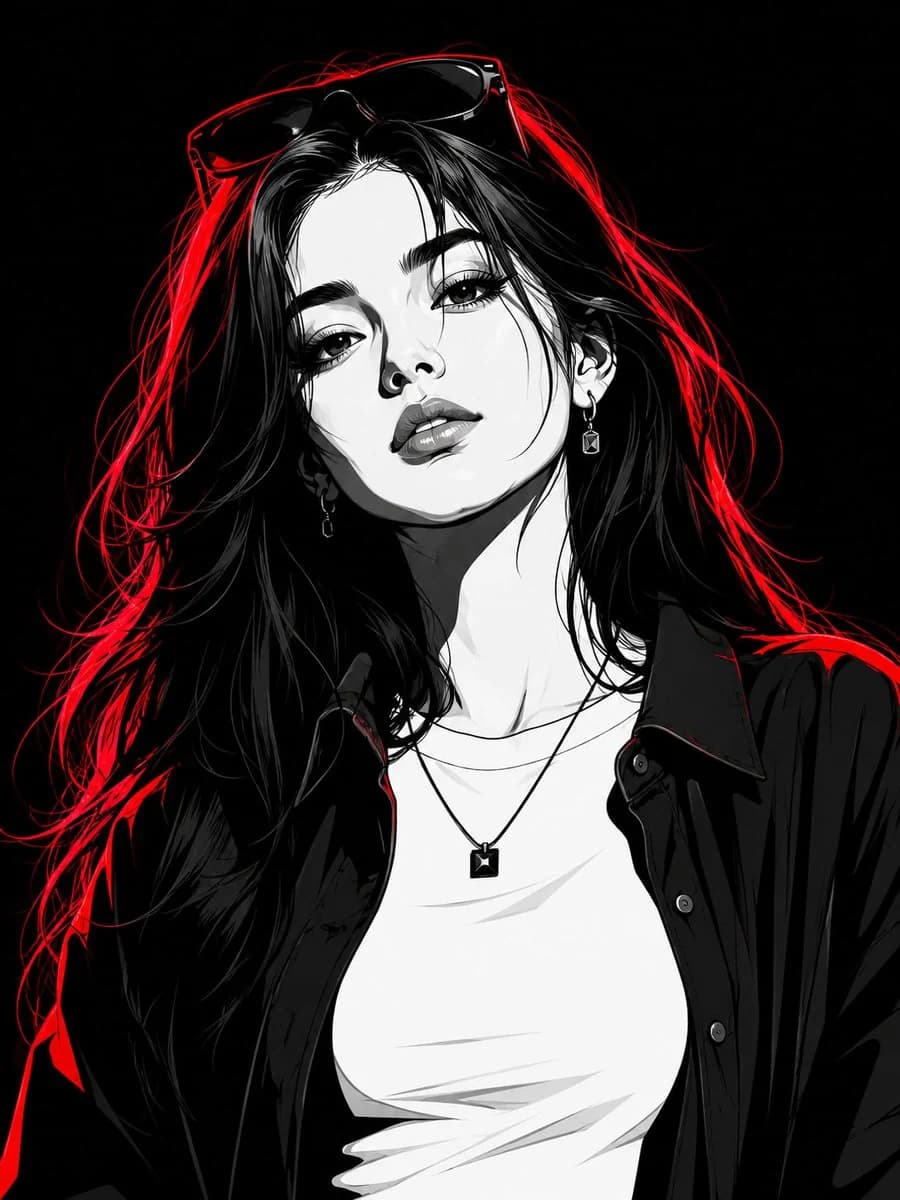
1275 文字Transform the subject into a striking high-contrast monochrome vector portrait, rendered in a premium black-and-white comic book illustration style with crisp cel-shading, bold geometric shapes, and ultra-clean vector linework. Preserve the subject's facial features, hairstyle, expression, and overall likeness with high accuracy. The subject is a stylish young woman with long flowing hair, wearing an open dark oversized shirt layered over a fitted white crew-neck T-shirt. She accessorizes with a minimalist square pendant necklace, elegant earrings, and a pair of fashionable sunglasses resting naturally on top of her head, seamlessly integrated into her hairstyle. Illuminate the portrait with intense red neon rim lighting that traces the contours of her hair, face, shoulders, and clothing, creating a dramatic glow against the monochrome artwork. The red highlights should add depth, separation, and a futuristic cinematic atmosphere without overpowering the black-and-white design. Set against a pure black background, emphasizing strong contrast and visual impact. Style the artwork with sharp vector edges, bold shadows, clean negative space, graphic-novel aesthetics, modern streetwear fashion energy, and premium poster-quality composition. Ultra-detailed yet minimalist, edgy, contemporary, visually powerful, and magazine-cover worthy. Strong confident female presence, cinematic attitude, luxury editorial feel, and flawless vector illustration quality.
このプロンプトについて
モノクロベクターのファッションポートレート は、Image 2でGPT Image 2にそのまま使えるポートレートプロンプトです。下の1275文字をコピーして作成フォームに貼り付けると、上のプレビューに近い画像を生成できます。 ポートレート, ファッション, ビューティー タグを調整すると、別の方向性にも展開できます。
出発点として使い、被写体、ライティング、構図を変えながら仕上げてください。そのまま使ってもリミックスしても、生成コストは同じです。
用途
ポートレート制作の起点に使いやすいプロンプト
モノクロベクターのファッションポートレート に近い ポートレート の画像を作りたいときは、この GPT Image 2 プロンプトから始めるとスムーズです。画面の方向性と構成はすでに整っているので、被写体、商品、色、シーンの細部だけを自分の内容に差し替えられます。
まず調整しやすいところ
- 被写体 人物、商品、場所、オブジェクトを自分の内容に差し替え、構図はそのまま活かします。
- 雰囲気 ライティング、配色、カメラ角度、質感をブランドや用途に合わせます。
- 仕上がり 生成前にアスペクト比、背景、文字、レイアウト指定を整えます。
近いテーマのプロンプトを探す
スタイル、用途、テーマが近い GPT Image 2 プロンプトを続けて確認できます。
使い方
- ステップ 1
プロンプトをコピー
上のコピー ボタンで全文を取得します。
- ステップ 2
Image 2 Create を開く
作成フォームに移動して貼り付けます。
- ステップ 3
生成する
Generate を押すと、数秒であなたのバージョンが完成します。
自分用に調整
ワンクリックで作成フォームに読み込み、すぐに調整を始められます。