Prompt
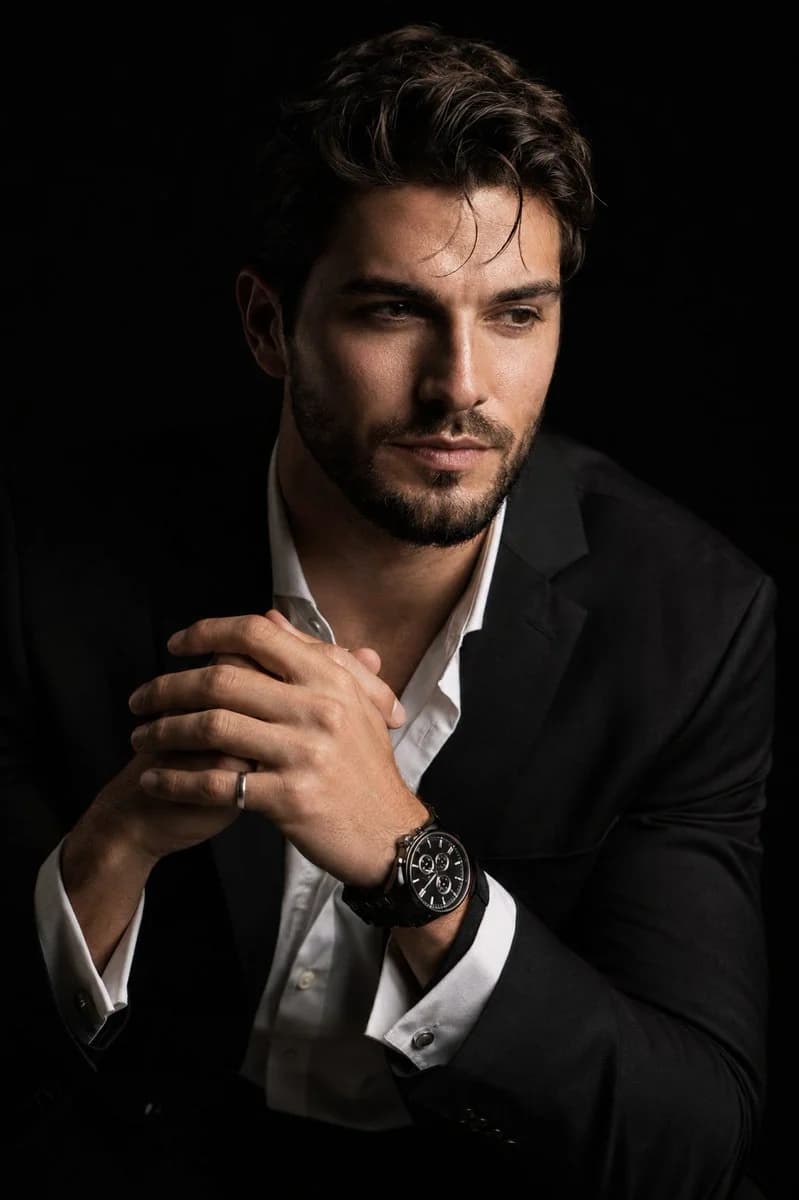
183 WörterErstelle ein hyperrealistisches, cineastisches 8K-Porträt der hochgeladenen Person in einem dramatischen Chiaroscuro-Stil. Das Motiv sitzt im Dreiviertelprofil, leicht nach vorn gebeugt, in einer entspannten und doch souveränen Haltung. Sein Gesicht ist leicht von der Kamera abgewandt und blickt nicht ins Objektiv; eine Gesichtshälfte ist scharf ausgeleuchtet, die andere verschwindet in tiefem, samtigem schwarzem Schatten. Sein Ausdruck ist nachdenklich. Seine Hände befinden sich in einer natürlichen, präzisen Haltung nahe der Brust, die Finger sanft und korrekt ineinander verschränkt. An einem Handgelenk ist deutlich eine luxuriöse schwarze Chronographenuhr mit detailliertem Metallgliederarmband zu sehen, und an einer Hand trägt er einen dezenten Silberring. Er trägt ein scharf geschnittenes schwarzes Sakko über einem weißen Hemd mit geöffneten oberen Knöpfen, mit edler Stoffstruktur und natürlichen Falten. Der Hintergrund ist durchgehend nahtlos schwarz. Verwende starkes, gerichtetes Studiolicht mit sattem Kontrast, sauberem Schattenverlauf und realistischer Hautstruktur. Betone feine Details wie Haarsträhnen, Bartstoppeln, feuchte Augen, Gesichtstextur, das Zifferblatt, Reflexionen im Metallarmband und den Silberring. Look eines 85-mm-Porträtobjektivs, geringe Schärfentiefe, hochwertige Werbefotografie, gestochen scharfer Fokus, sanfte natürliche Hautübergänge, cineastischer Kontrast, keine künstliche Plastikhaut, keine zusätzlichen Finger, keine verzerrten Hände, keine fehlerhafte Anatomie.
Über diesen Prompt
Hyperrealistisches Chiaroscuro-Porträt ist ein sofort nutzbarer Porträt-Prompt für GPT Image 2 in Image 2. Kopiere die 183 Wörter unten, füge sie in das Create-Formular ein und du erhältst ein Ergebnis nahe an der Vorschau. Passe die Tags Produktanzeige, Porträt, Mode an, wenn du ihn in eine neue Richtung schieben möchtest.
Nutze ihn als Vorlage und passe Motiv, Licht oder Komposition an dein Projekt an. Die Credit-Kosten bleiben gleich, egal ob du ihn direkt verwendest oder bearbeitest.
Einsatzbereich
Guter Startpunkt für Porträt
Starte hier, wenn du ein Porträt-Bild ähnlich wie Hyperrealistisches Chiaroscuro-Porträt erstellen möchtest. Look und Aufbau stehen bereits fest; ersetze nur Motiv, Produkt, Farben oder Szenendetails passend zu deinem Projekt.
Was sich schnell anpassen lässt
- Motiv Tausche Person, Produkt, Ort oder Objekt aus und behalte die Grundkomposition bei.
- Look Passe Licht, Farbwelt, Kamerawinkel oder Materialdetails an deine Marke an.
- Format Lege Seitenverhältnis, Hintergrund, Text und Layout-Hinweise vor dem Generieren fest.
Ähnliche Prompt-Richtungen
Entdecke weitere GPT Image 2 Prompts mit ähnlichem Stil, Einsatzbereich oder Motiv.
So nutzt du ihn
- Schritt 1
Prompt kopieren
Klicke oben auf Kopieren, um den vollständigen Text zu übernehmen.
- Schritt 2
Image 2 Create öffnen
Wechsle zum Create-Formular und füge ihn ein.
- Schritt 3
Generieren
Klicke auf Generate. Deine Version ist in Sekunden fertig.
Mach ihn zu deinem
Lade den Prompt mit einem Klick ins Create-Formular und passe ihn direkt an.