提示词
1527 个字Subject:
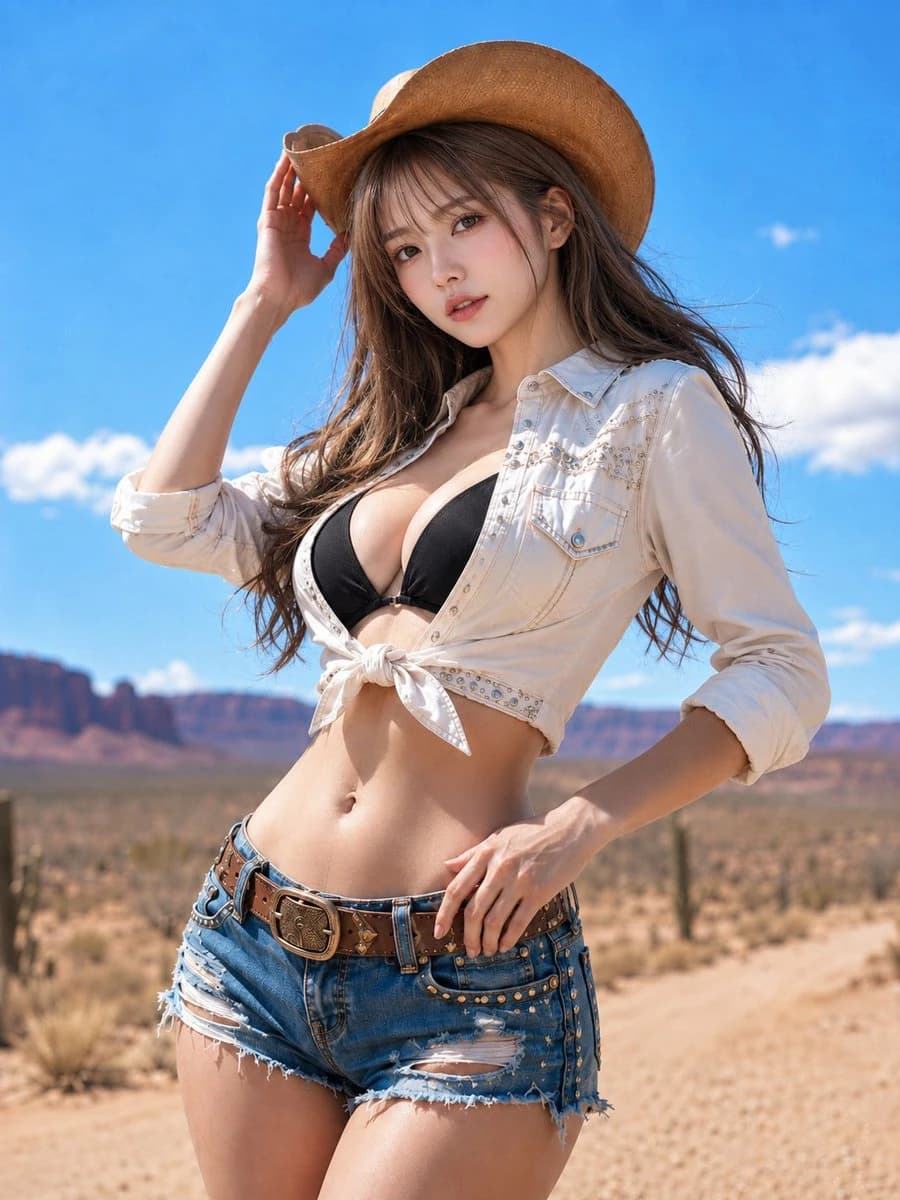
{argument name="subject" default="Desert White Wind"}
Person/Expression:
{argument name="character" default="A woman in her 20s. Bright ivory-beige skin with natural texture and a hint of pink. Soft highlights on cheeks, nose tip, shoulders, and collarbones. Pale rose-pink blush, champagne beige and pink-brown eyeshadow, long thin lashes, natural undereye bags, light brown eyebrows, and sheer pink-beige lip gloss. Eyes with small, clear catchlights. Looking at the camera with a calm, confident, and slightly cool gaze."}
Clothing/Pose:
{argument name="outfit" default="Light milk-tea ash-brown medium-long hair with see-through bangs, layers, and ends curled inward, with fine wisps blowing in the wind. A light brown straw cowboy hat. A white to ivory cropped western shirt tied in the front, with delicate stitching, small metal studs, and a decorative yoke line. A black bikini top underneath. Blue denim shorts with fringe, subtle distressing, side studs, a thick brown leather belt, and a large engraved buckle. Standing coolly with the body angled and hips shifted. Touching the brim of the hat with the right hand and resting the left hand near the belt."}
Background/Light:
一条笔直的道路在干旱的沙漠中。前景是沙土和低矮的草;中景有稀疏的仙人掌和灌木;背景是红棕色的台地和岩石山脉。生动的蓝天上漂浮着白云。强烈的正午阳光从左上方照射,帽檐投下细长的阴影在脸上。衬衫、肌肤和牛仔布上有明亮的反射。阴影朝向右下方;背景有明亮、干燥的氛围。
Composition/Camera:
纵向3:4的宽高比。从大腿中部到头部的时尚肖像。人物稍微偏右,形成对角线的流动。帽子上方留有一些空间,底部包括腰部和皮带。相机略低,约在胸部高度,向上拍摄。浅景深柔和地模糊背景,聚焦于脸部和服装细节。
Texture/Style:
现实主义摄影风格。优雅而酷炫的效果,像是海外拍摄的时尚杂志。肌肤没有过度修饰,保留自然毛孔和柔和光泽。细致描绘每根发丝、衬衫缝线、牛仔布磨损和皮带的皮革与金属质感。强调蓝天、干燥沙土、白衬衫、黑色上衣和奶茶棕色头发之间的对比。
Negative:
看起来未成年人的表情,不自然的面部或目光,过度曝光,过度修饰的肌肤,塑料般的肌肤,多余或缺失的手指,融合的手指,断裂的关节,与帽子或衣物接触不良,漂浮的手,扭曲的皮带,破损的牛仔布,阴影与光源不一致,不自然的视角,不想要的人,文字,标志,水印。关于这个提示词
沙漠西部时尚肖像 是一条可直接使用的 GPT Image 2 社交媒体提示词。复制下方 1527 个字,粘贴到创建表单,即可生成接近预览图的效果。 你也可以调整 社交媒体, 人像, 时尚 标签,让结果走向新的风格。
可以先用它生成初稿,再按需要调整主体、光线或构图。直接使用或自行改写,生成消耗保持一致。
适用场景
适合作为社交媒体创作起点
想生成接近 沙漠西部时尚肖像 的社交媒体画面时,可以直接从这条 GPT Image 2 提示词开始。它已经设定好构图和风格,只需替换主体、产品、颜色或场景细节。
最适合先改的地方
- 主体 把人物、产品、地点或物体换成自己的内容,整体构图先保留。
- 画面氛围 按品牌或用途调整光线、配色、镜头角度和材质细节。
- 输出形式 生成前先定好比例、背景、文字和版式要求。
如何使用
- 第 1 步
复制提示词
点击上方复制按钮,获取完整提示词。
- 第 2 步
打开 Image 2 创建页
进入创建表单,并把提示词粘贴进去。
- 第 3 步
生成图像
点击生成,几秒后即可得到你的版本。
改成你的版本
一键把提示词载入创建表单,然后开始调整。