提示詞
1533 個字Subject:
{argument name="subject" default="Desert White Wind"}
Person/Expression:
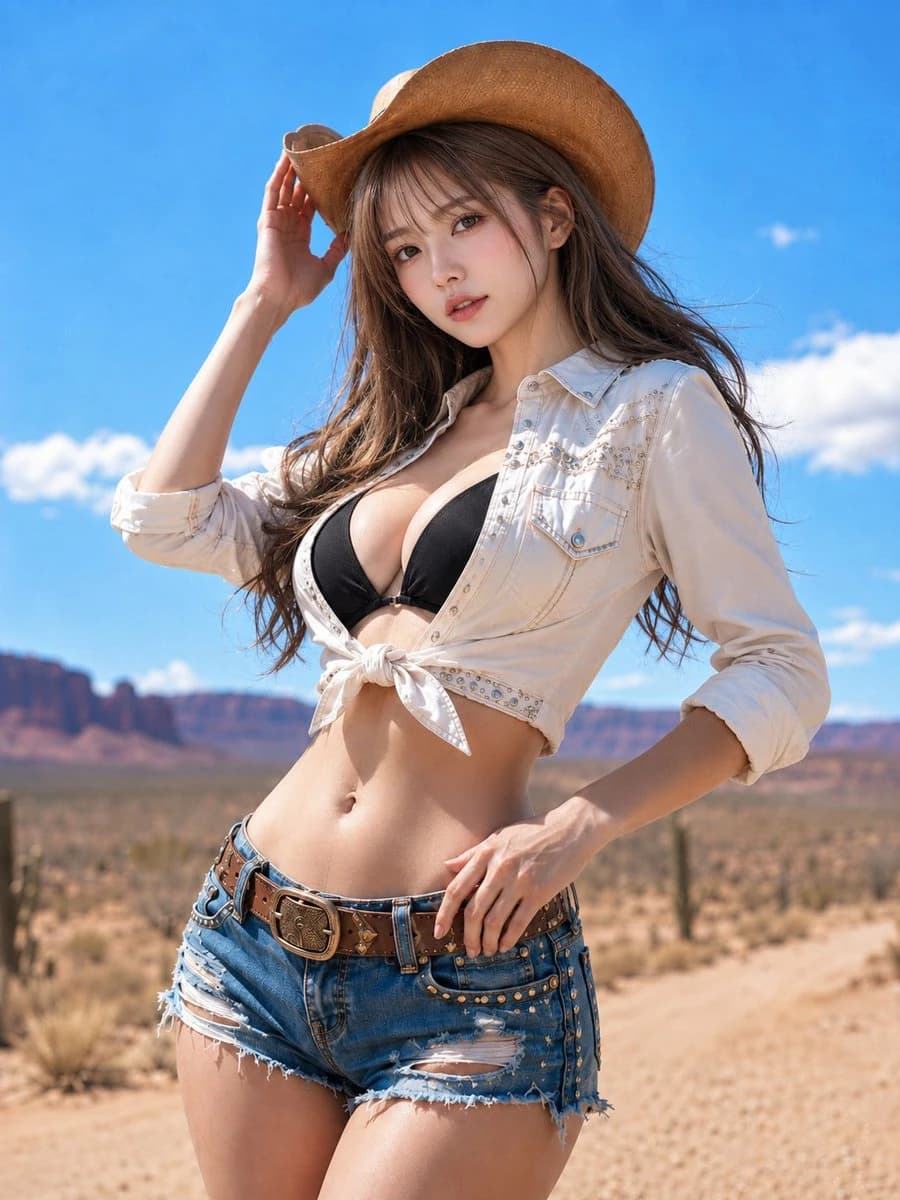
{argument name="character" default="A woman in her 20s. Bright ivory-beige skin with natural texture and a hint of pink. Soft highlights on cheeks, nose tip, shoulders, and collarbones. Pale rose-pink blush, champagne beige and pink-brown eyeshadow, long thin lashes, natural undereye bags, light brown eyebrows, and sheer pink-beige lip gloss. Eyes with small, clear catchlights. Looking at the camera with a calm, confident, and slightly cool gaze."}
Clothing/Pose:
{argument name="outfit" default="Light milk-tea ash-brown medium-long hair with see-through bangs, layers, and ends curled inward, with fine wisps blowing in the wind. A light brown straw cowboy hat. A white to ivory cropped western shirt tied in the front, with delicate stitching, small metal studs, and a decorative yoke line. A black bikini top underneath. Blue denim shorts with fringe, subtle distressing, side studs, a thick brown leather belt, and a large engraved buckle. Standing coolly with the body angled and hips shifted. Touching the brim of the hat with the right hand and resting the left hand near the belt."}
Background/Light:
一條直行的乾燥沙漠公路。前景是沙地和低矮的草叢;中景有稀疏的仙人掌和灌木;背景是紅棕色的台地和岩石山脈。明亮的藍天上漂浮著白雲。強烈的正午陽光從左上方照射,帽邊投下細長的陰影在臉上。襯衫、肌膚和牛仔布上有明亮的反射。陰影朝向右下方;背景呈現明亮、乾燥的氛圍。
Composition/Camera:
垂直3:4的畫面比例。時尚肖像從大腿中部到頭部以上。人物稍微偏右,形成對角線的流動。帽子上方留有一些空間,底部包含腰部和皮帶。相機稍微低,約在胸部高度,向上拍攝。淺景深柔和地模糊背景,聚焦在臉部和服裝細節上。
Texture/Style:
寫實攝影風格。優雅且酷感的效果,如同海外拍攝的時尚雜誌。肌膚沒有過度修飾,保留自然的毛孔和柔和的光澤。細緻描繪每根髮絲、襯衫縫線、牛仔布的磨損,以及皮帶的皮革和金屬質感。強調藍天、乾燥沙地、白襯衫、黑色上衣和奶茶棕色頭髮之間的對比。
Negative:
未成年樣貌的表情、不自然的臉部或目光、過度曝光、過度修飾的肌膚、塑膠般的肌膚、多餘或缺失的手指、融合的手指、斷裂的關節、與帽子或衣物接觸不良、漂浮的手、扭曲的皮帶、破損的牛仔布、與光源不一致的陰影、不自然的透視、不需要的人物、文字、標誌、水印。關於這個提示詞
沙漠西部時尚肖像 是一則可直接使用的 GPT Image 2 社群媒體提示詞。複製下方 1533 個字,貼到創作表單,即可生成接近預覽圖的效果。 你也可以調整 社群媒體, 人像, 時尚 標籤,讓結果走向新的風格。
可以先用它生成初稿,再依需求調整主體、光線或構圖。直接使用或自行改寫,生成消耗都相同。
適用場景
適合作為社群媒體創作起點
想生成接近 沙漠西部時尚肖像 的社群媒體畫面時,可以直接從這則 GPT Image 2 提示詞開始。它已經設定好構圖和風格,只需替換主體、產品、顏色或場景細節。
最適合先改的地方
- 主體 把人物、產品、地點或物體換成自己的內容,整體構圖先保留。
- 畫面氛圍 按品牌或用途調整光線、配色、鏡頭角度和材質細節。
- 輸出形式 生成前先定好比例、背景、文字和版型要求。
如何使用
- 第 1 步
複製提示詞
點選上方複製按鈕,取得完整提示詞。
- 第 2 步
開啟 Image 2 建立頁
進入建立表單,並把提示詞貼上。
- 第 3 步
生成圖像
點選生成,幾秒後即可得到你的版本。
改成你的版本
一鍵把提示詞載入建立表單,然後開始調整。