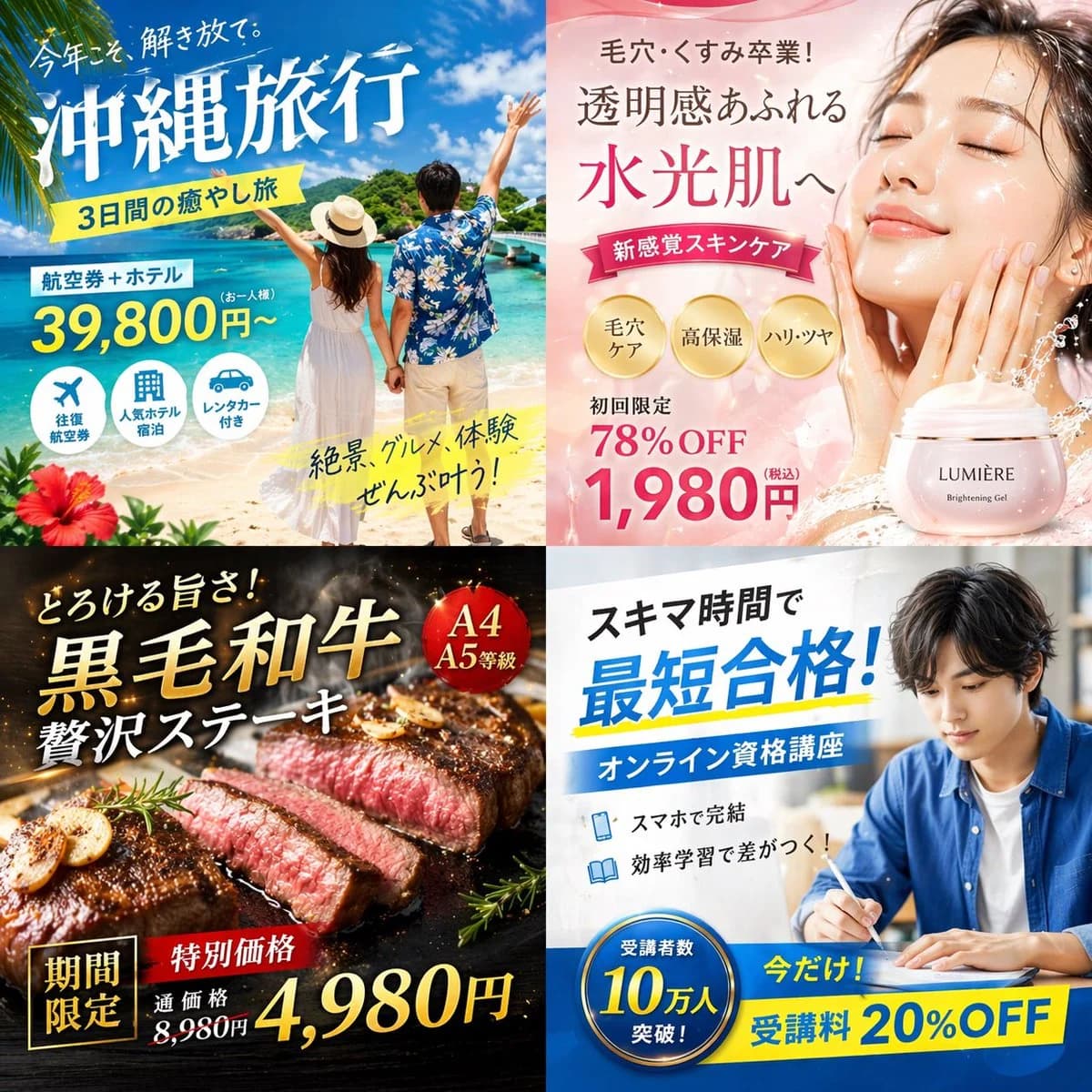
프롬프트
1056자{
"type": "일본풍 디지털 광고 배너 2x2 그리드",
"layout": {
"structure": "균등한 4분할",
"quadrants": [
{
"position": "왼쪽 위",
"theme": "여행",
"subject": "선명한 파란 하늘 아래, 손을 잡고 하얀 모래사장을 걸으며 수정처럼 맑은 터키석빛 바다를 바라보는 커플.",
"elements": ["왼쪽 아래 모서리의 빨간 히비스커스 꽃"],
"text_labels": [
"This year, break free.",
"{argument name=\"travel destination\" default=\"Okinawa Trip\"}",
"3-day relaxation getaway",
"Flights + Hotel",
"Starting from ¥39,800",
"Views, food, and experiences — all covered!"
],
"icons": {
"count": 3,
"descriptions": ["비행기", "호텔 건물", "자동차"]
}
},
{
"position": "오른쪽 위",
"theme": "스킨케어",
"subject": "빛나는 물광 피부의 젊은 여성 클로즈업, 눈을 살며시 감고 두 손을 볼에 가볍게 대고 있다.",
"elements": [
"부드러운 핑크 그라데이션 배경",
"역동적인 물 튀김 효과",
"'{argument name=\"skincare product name\" default=\"LUMIÈRE\"} Brightening Gel' 라벨이 붙은 핑크색 화장품 용기"
],
"text_labels": [
"Bye bye pores and dullness!",
"Radiance overflowing",
"Achieve glass-like dewy skin",
"Next-level skincare sensation",
"First order 78% OFF",
"{argument name=\"discount price\" default=\"¥1,980\"}"
],
"badges": {
"count": 3,
"style": "골드 원형",
"labels": ["Pore care", "Deep hydration", "Firmness & luminosity"]
}
},
{
"position": "왼쪽 아래",
"theme": "미식",
"subject": "검은 무쇠 그릴 플레이트 위에서 지글지글 익어 가는 두툼한 미디엄 레어 스테이크 슬라이스.",
"elements": [
"바삭한 g이 프롬프트 소개
Image 2에서 GPT Image 2에 바로 사용할 수 있는 광고 크리에이티브 프롬프트 ‘일본풍 광고 배너 2x2 그리드’입니다. 아래 1056자를 복사해 Create 폼에 붙여 넣으면 위 미리보기와 비슷한 이미지를 만들 수 있습니다. 제품 광고, 광고 크리에이티브, 소셜 미디어 태그를 조정하면 새로운 방향으로 확장할 수 있습니다.
먼저 그대로 사용해 본 뒤 피사체, 조명, 구도를 작업에 맞게 조정해 보세요. 원문을 그대로 쓰거나 수정해도 생성 비용은 같습니다.
사용 사례
광고 크리에이티브 작업의 좋은 출발점
‘일본풍 광고 배너 2x2 그리드’처럼 표현한 광고 크리에이티브 이미지를 만들고 싶다면 이 GPT Image 2 프롬프트로 시작해 보세요. 스타일과 구도는 이미 잡혀 있으므로 인물, 제품, 색상, 장면 요소만 작업에 맞게 바꾸면 됩니다.
먼저 손보기 좋은 부분
- 피사체 인물, 제품, 장소, 오브젝트를 내 내용으로 바꾸고 전체 구도는 유지합니다.
- 분위기 조명, 색감, 카메라 각도, 소재 디테일을 브랜드나 용도에 맞춥니다.
- 결과 형식 생성 전에 비율, 배경, 텍스트, 레이아웃 지시를 정리합니다.
비슷한 프롬프트 더 보기
스타일, 용도, 피사체가 가까운 GPT Image 2 프롬프트를 이어서 확인해 보세요.
사용 방법
- 1단계
프롬프트 복사
위의 복사 버튼을 눌러 전체 텍스트를 가져옵니다.
- 2단계
Image 2 Create 열기
Create 폼으로 이동해 붙여 넣습니다.
- 3단계
생성
Generate를 누르면 몇 초 안에 내 버전이 완성됩니다.
내 버전으로 만들기
한 번의 클릭으로 Create 폼에 불러오고 바로 조정하세요.