프롬프트
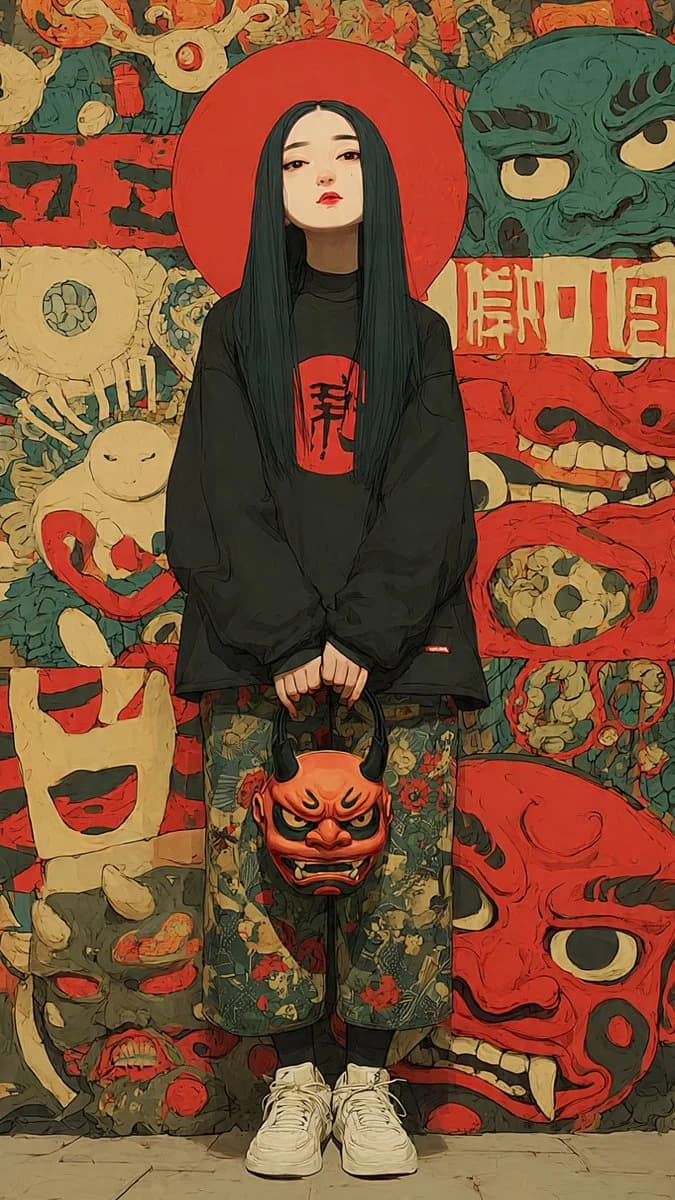
1680자Create a vertical full-body anime streetwear identity portrait of {argument name="character name" default="a mysterious young woman"} standing centered and facing forward, with a deliberately soft blurred rectangular face for anonymity. She has very long straight {argument name="hair color" default="black hair with deep teal highlights"} falling past her chest, and a large flat red circular halo/disc directly behind her head. Outfit: oversized black long-sleeve sweatshirt with a red square chest patch containing bold black Japanese calligraphy, loose cropped floral-pattern pants in muted green with red and beige flowers, black socks, and chunky white sneakers. Her hands hang together in front, holding one orange-red oni demon mask by its black horns; the handheld mask has angry eyes, black brows, tusks, and a grimacing mouth. Background: a dense Japanese yokai/oni mask mural in a hand-painted graphic style, using muted red, cream, teal-green, black, and tan. Include exactly eight large visible background mask/face motifs: 1 teal-green snarling mask at upper right, 2 cream cyclops mask at middle left, 3 pale rabbit-like figure with red ring at lower left, 4 cream square grinning face at left lower middle, 5 gray demon head at bottom left, 6 red skull-like panel face at middle right, 7 huge red oni face at bottom right, and 8 a crowded top strip of small red and cream grotesque masks. Add a horizontal cream sign with red Japanese-style characters behind the subject on the right, and rough black brush marks on red panels on the left. Visual style: moody editorial fashion illustration mixed with cel-shaded anime, thick ink outlines, painterly texture, slightly distressed poster surface, high detail, subdued vintage colors, symmetrical composition, low-angle full-body framing, no photorealism, no extra people, no watermark. Use {argument name="canvas ratio" default="9:16 vertical"} composition and a gritty Japanese folklore streetwear aesthetic.이 프롬프트 소개
Image 2에서 GPT Image 2에 바로 사용할 수 있는 캐릭터 디자인 프롬프트 ‘요괴 스트리트웨어 초상화’입니다. 아래 1680자를 복사해 Create 폼에 붙여 넣으면 위 미리보기와 비슷한 이미지를 만들 수 있습니다. 스토리보드, 인물, 캐릭터 디자인 태그를 조정하면 새로운 방향으로 확장할 수 있습니다.
먼저 그대로 사용해 본 뒤 피사체, 조명, 구도를 작업에 맞게 조정해 보세요. 원문을 그대로 쓰거나 수정해도 생성 비용은 같습니다.
사용 사례
캐릭터 디자인 작업의 좋은 출발점
‘요괴 스트리트웨어 초상화’처럼 표현한 캐릭터 디자인 이미지를 만들고 싶다면 이 GPT Image 2 프롬프트로 시작해 보세요. 스타일과 구도는 이미 잡혀 있으므로 인물, 제품, 색상, 장면 요소만 작업에 맞게 바꾸면 됩니다.
먼저 손보기 좋은 부분
- 피사체 인물, 제품, 장소, 오브젝트를 내 내용으로 바꾸고 전체 구도는 유지합니다.
- 분위기 조명, 색감, 카메라 각도, 소재 디테일을 브랜드나 용도에 맞춥니다.
- 결과 형식 생성 전에 비율, 배경, 텍스트, 레이아웃 지시를 정리합니다.
비슷한 프롬프트 더 보기
스타일, 용도, 피사체가 가까운 GPT Image 2 프롬프트를 이어서 확인해 보세요.
사용 방법
- 1단계
프롬프트 복사
위의 복사 버튼을 눌러 전체 텍스트를 가져옵니다.
- 2단계
Image 2 Create 열기
Create 폼으로 이동해 붙여 넣습니다.
- 3단계
생성
Generate를 누르면 몇 초 안에 내 버전이 완성됩니다.
내 버전으로 만들기
한 번의 클릭으로 Create 폼에 불러오고 바로 조정하세요.