Prompt
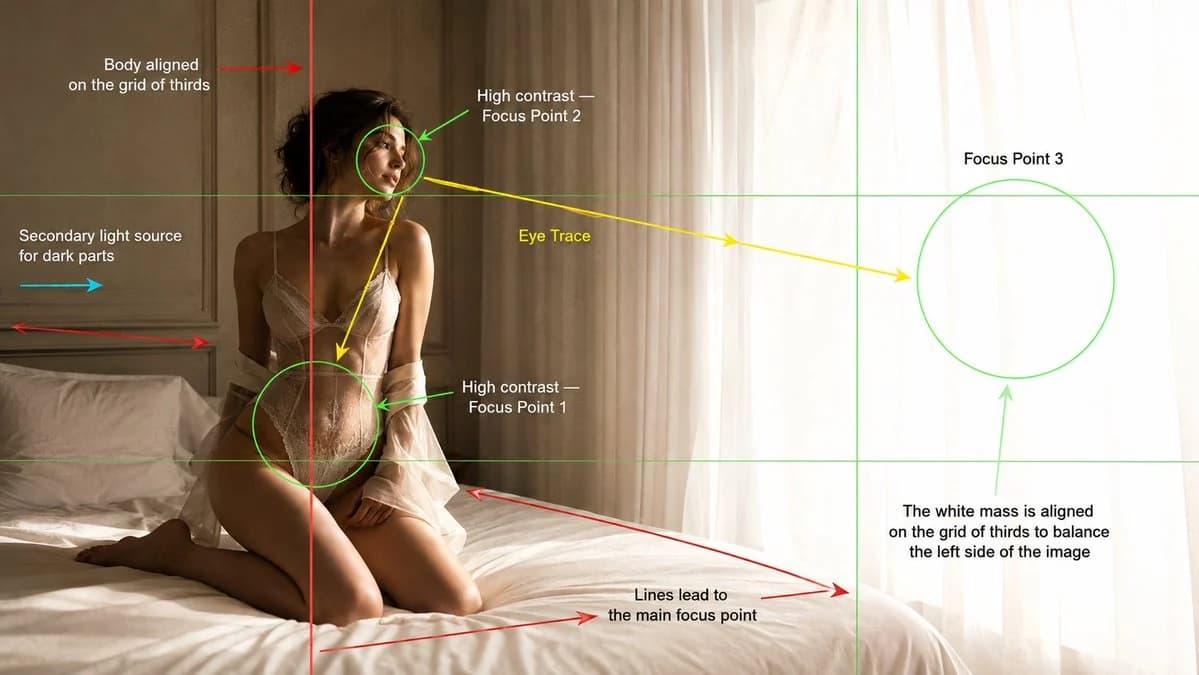
323 WörterErstelle ein cineastisches Mode-Editorial-Foto in einem hellen, minimalistischen Schlafzimmer, präsentiert als Analysebild zur kinematografischen Komposition. Hauptbild: Ein junges erwachsenes weibliches Model kniet auf einem weichen weißen Bett neben einem großen Fenster mit durchscheinenden weißen Vorhängen. Sie befindet sich im linken Drittel des Bildes, der Körper an der senkrechten Drittellinie ausgerichtet. Ihr Körper neigt sich leicht nach hinten, dem leuchtenden Fensterlicht zugewandt, mit ruhigem, entrücktem, nach innen gekehrtem Ausdruck. Die rechte Bildseite füllt eine große, hell leuchtende weiße Fläche aus überbelichtetem Tageslicht durch die durchscheinenden Vorhänge, die das dunklere Motiv links ausbalanciert. Licht: Starkes natürliches Fensterlicht von rechts erzeugt hohen Kontrast auf Gesicht, Oberkörper, Taille und Silhouette des Models. Füge dezentes sekundäres Aufhelllicht von links hinzu, um Schattenbereiche zu zeigen, ohne den Kontrast abzuflachen. Warme, dunstige Morgenatmosphäre, weiche Spitzlichter, realistische Hautstruktur, sanfte Schatten, leichtes Überstrahlen nahe den Vorhängen. Kompositions-Overlay: Füge sichtbare Hilfsgrafiken zur kinematografischen Komposition über dem Bild hinzu, wie bei einem Analysebild einer Filmschule. Enthalten: - Drittel-Rasterlinien in dünnem Grün. - Eine rote senkrechte Linie, die zeigt, dass der Körper des Models an der linken Drittellinie ausgerichtet ist. - Grüne kreisförmige Fokusmarkierungen um: 1. Taille und Hüfte als Fokuspunkt 1. 2. Das Gesicht als Fokuspunkt 2. 3. Die helle Vorhang-/Fensterfläche als Fokuspunkt 3. - Gelbe Blickverlaufspfeile vom Gesicht zu Taille/Hüfte und dann zum leuchtenden Fenster. - Rote Führungslinienpfeile entlang der Bettkante und der Wandpaneele zum Hauptfokuspunkt. - Ein cyanfarbener Pfeil, der das sekundäre Aufhelllicht von links zeigt. - Textbeschriftungen, sauber rund um das Bild platziert: „Körper an der Drittellinie ausgerichtet“ „Hoher Kontrast Fokuspunkt 2“ „Blickverlauf“ „Fokuspunkt 3“ „Hoher Kontrast Fokuspunkt 1“ „Sekundäre Lichtquelle für dunkle Bereiche“ „Linien führen zum Hauptfokuspunkt“ „Die weiße Fläche liegt auf der Drittellinie und balanciert die linke Bildseite aus“ Stil: Luxuriöse Mode-Editorial-Fotografie, weicher cineastischer Realismus, warme Farbpalette aus Beige und Weiß, minimalistisches Schlafzimmer, cremefarbene Wandpaneele, weiße Bettwäsche, durchscheinende Vorhänge, dezentes Filmkorn, geringe Schärfentiefe, elegante Komposition, lehrreiches Overlay zur kinematografischen Analyse. Kamera: 35-mm-Objektiv, halbtotaler Bildausschnitt, Kamera auf Augenhöhe, Breitbild 16:9.
Über diesen Prompt
Kinematografie-Analyseframe ist ein sofort nutzbarer Poster-Prompt für GPT Image 2 in Image 2. Kopiere die 323 Wörter unten, füge sie in das Create-Formular ein und du erhältst ein Ergebnis nahe an der Vorschau. Passe die Tags Produktanzeige, Poster, Storyboard an, wenn du ihn in eine neue Richtung schieben möchtest.
Nutze ihn als Vorlage und passe Motiv, Licht oder Komposition an dein Projekt an. Die Credit-Kosten bleiben gleich, egal ob du ihn direkt verwendest oder bearbeitest.
Einsatzbereich
Guter Startpunkt für Poster
Starte hier, wenn du ein Poster-Bild ähnlich wie Kinematografie-Analyseframe erstellen möchtest. Look und Aufbau stehen bereits fest; ersetze nur Motiv, Produkt, Farben oder Szenendetails passend zu deinem Projekt.
Was sich schnell anpassen lässt
- Motiv Tausche Person, Produkt, Ort oder Objekt aus und behalte die Grundkomposition bei.
- Look Passe Licht, Farbwelt, Kamerawinkel oder Materialdetails an deine Marke an.
- Format Lege Seitenverhältnis, Hintergrund, Text und Layout-Hinweise vor dem Generieren fest.
Ähnliche Prompt-Richtungen
Entdecke weitere GPT Image 2 Prompts mit ähnlichem Stil, Einsatzbereich oder Motiv.
So nutzt du ihn
- Schritt 1
Prompt kopieren
Klicke oben auf Kopieren, um den vollständigen Text zu übernehmen.
- Schritt 2
Image 2 Create öffnen
Wechsle zum Create-Formular und füge ihn ein.
- Schritt 3
Generieren
Klicke auf Generate. Deine Version ist in Sekunden fertig.
Mach ihn zu deinem
Lade den Prompt mit einem Klick ins Create-Formular und passe ihn direkt an.