Prompt
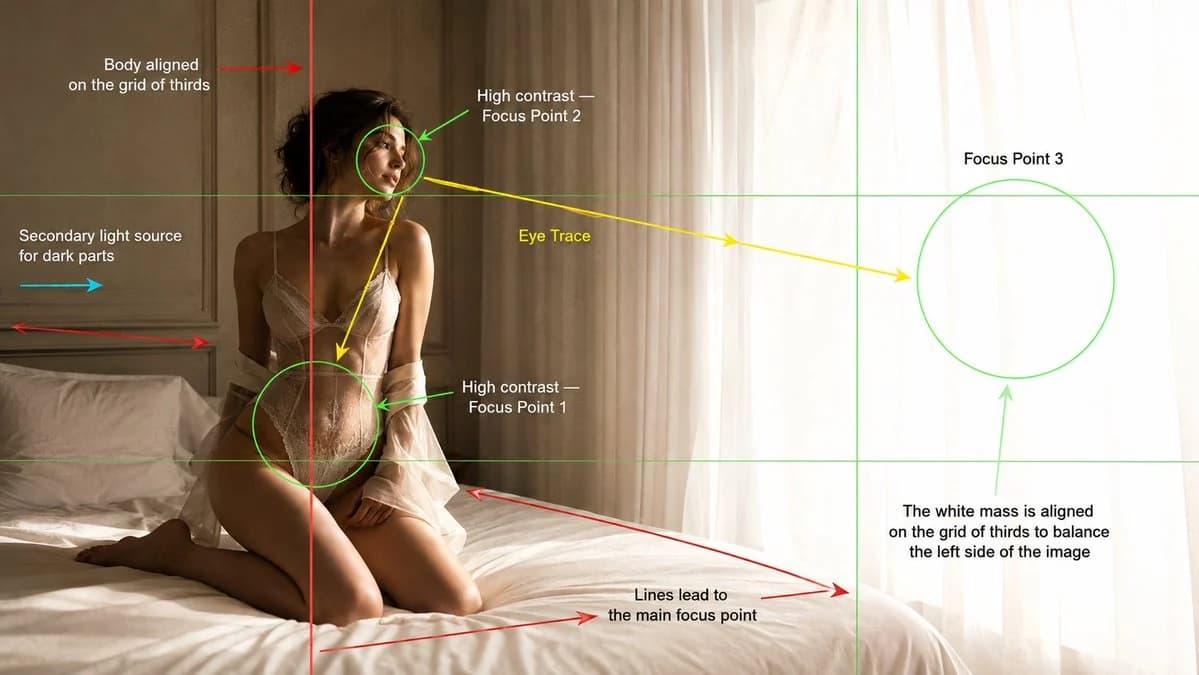
483 motsCréez une photographie éditoriale de mode au rendu cinématographique dans une chambre minimaliste et lumineuse, présentée comme une planche d’analyse de composition cinématographique. Image principale : Une jeune femme mannequin agenouillée sur un lit blanc moelleux à côté d’une grande fenêtre aux voilages blancs. Elle est placée sur le tiers gauche du cadre, le corps aligné sur la ligne verticale de la grille des tiers. Son corps se penche légèrement en arrière, tourné vers la lumière éclatante de la fenêtre, avec une expression calme, lointaine et introspective. Le côté droit de l’image est occupé par une grande masse lumineuse d’un blanc éclatant, due à la lumière du jour surexposée à travers les voilages, qui équilibre le sujet plus sombre à gauche. Éclairage : Une forte lumière naturelle de fenêtre venant de la droite crée un fort contraste sur le visage, le haut du corps, la taille et la silhouette du mannequin. Ajoutez une légère lumière d’appoint secondaire venant de la gauche pour révéler les zones d’ombre sans aplatir le contraste. Atmosphère matinale chaude et vaporeuse, hautes lumières douces, texture de peau réaliste, ombres légères, léger halo près des rideaux. Superposition de composition : Ajoutez par-dessus l’image des repères graphiques de composition cinématographique visibles, comme sur une image d’analyse d’école de cinéma. Inclure : - Les lignes de la grille des tiers en vert fin. - Une ligne verticale rouge montrant le corps du mannequin aligné sur la ligne gauche de la grille des tiers. - Des repères de point focal circulaires verts autour de : 1. La taille et les hanches comme point focal 1. 2. Le visage comme point focal 2. 3. La masse lumineuse du rideau/de la fenêtre comme point focal 3. - Des flèches jaunes de parcours du regard allant du visage à la taille/aux hanches, puis vers la fenêtre lumineuse. - Des flèches rouges de lignes directrices suivant le bord du lit et les lignes des panneaux muraux vers le point focal principal. - Une flèche cyan montrant la lumière d’appoint secondaire venant de la gauche. - Des étiquettes de texte placées proprement autour du cadre : « Corps aligné sur la grille des tiers » « Point focal 2 à fort contraste » « Parcours du regard » « Point focal 3 » « Point focal 1 à fort contraste » « Source de lumière secondaire pour les zones sombres » « Les lignes mènent au point focal principal » « La masse blanche est alignée sur la grille des tiers pour équilibrer le côté gauche de l’image » Style : Photographie éditoriale de mode de luxe, réalisme cinématographique doux, palette de couleurs beige chaud et blanc, chambre minimaliste, panneaux muraux crème, linge de lit blanc, voilages, grain de film subtil, faible profondeur de champ, composition élégante, superposition pédagogique d’analyse cinématographique. Prise de vue : objectif 35 mm, cadrage moyen-large, angle à hauteur des yeux, format panoramique 16:9.
À propos de ce prompt
Cadre d’analyse cinématographique est un prompt affiche prêt à l’emploi pour GPT Image 2 sur Image 2. Copiez les 483 mots ci-dessous, collez-les dans le formulaire Create et vous obtiendrez un résultat proche de l’aperçu. Ajustez les tags Publicité produit, Affiche, Storyboard si vous voulez l’orienter autrement.
Servez-vous-en comme base, puis adaptez le sujet, la lumière ou la composition au résultat recherché. Le coût en crédits reste le même, que vous l’utilisiez tel quel ou que vous le personnalisiez.
Cas d’usage
Un bon point de départ pour Affiche
Partez de ce prompt si vous voulez une image affiche dans l’esprit de Cadre d’analyse cinématographique. Le style et la structure sont déjà posés ; remplacez simplement le sujet, le produit, les couleurs ou les détails de scène selon votre projet.
À ajuster en priorité
- Sujet Remplacez la personne, le produit, le lieu ou l’objet principal sans casser la composition.
- Style Ajustez la lumière, la palette, l’angle de caméra ou les matières pour l’adapter à votre marque.
- Format Précisez le ratio, le fond, le texte ou les consignes de mise en page avant de générer.
D’autres pistes de prompts
Trouvez d’autres prompts GPT Image 2 avec un style, un usage ou un sujet proche.
Comment l’utiliser
- Étape 1
Copier le prompt
Cliquez sur le bouton Copier ci-dessus pour récupérer le texte complet.
- Étape 2
Ouvrir Image 2 Create
Accédez au formulaire Create et collez-le.
- Étape 3
Générer
Cliquez sur Generate. Votre version arrive en quelques secondes.
Adaptez-le
Chargez le prompt dans le formulaire Create en un clic, puis commencez les ajustements.