Prompt
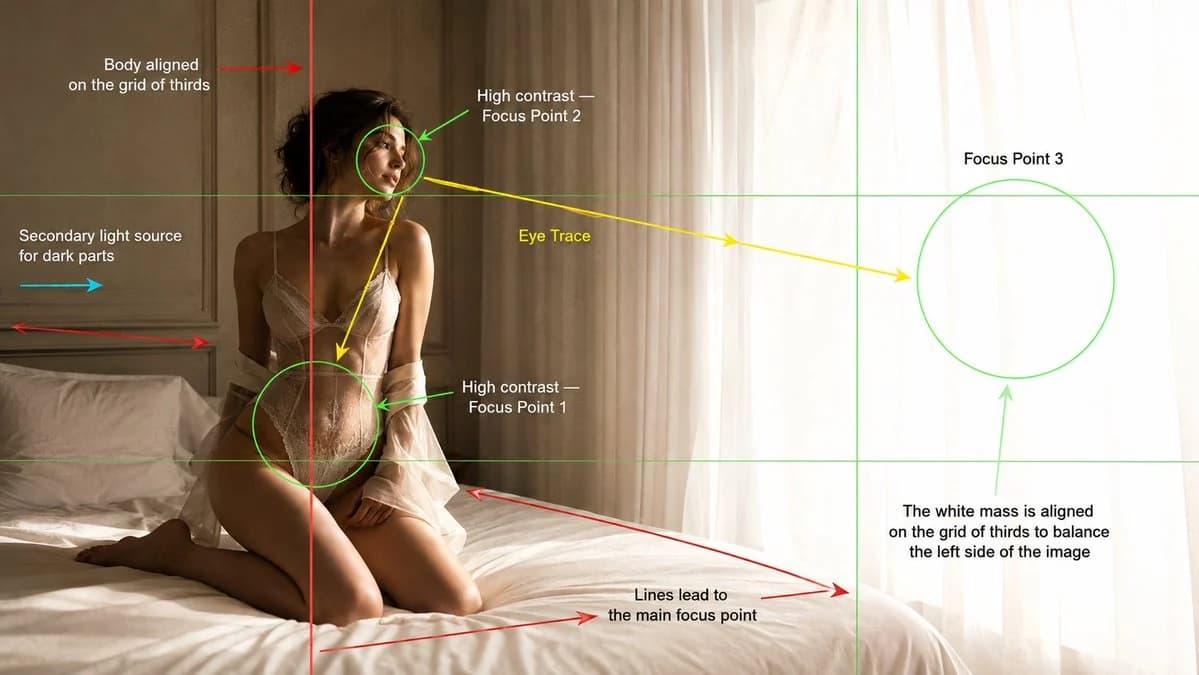
476 palabrasCrea una fotografía editorial de moda cinematográfica en un dormitorio luminoso y minimalista, presentada como un fotograma de análisis de composición cinematográfica. Imagen principal: Una modelo joven adulta arrodillada sobre una cama blanca y mullida junto a un gran ventanal con cortinas blancas translúcidas. Está situada en el tercio izquierdo del encuadre, con el cuerpo alineado con la línea vertical de la regla de los tercios. Su cuerpo se inclina ligeramente hacia atrás, de cara a la luz brillante de la ventana, con una expresión tranquila, distante e introspectiva. El lado derecho de la imagen está ocupado por una gran masa blanca y luminosa de luz diurna sobreexpuesta a través de las cortinas, que equilibra al sujeto más oscuro de la izquierda. Iluminación: Una intensa luz natural de ventana desde la derecha crea un alto contraste en el rostro, el torso, la cintura y la silueta de la modelo. Añade una sutil luz de relleno secundaria desde la izquierda para revelar las zonas de sombra sin aplanar el contraste. Atmósfera cálida y brumosa de mañana, altas luces suaves, textura de piel realista, sombras delicadas y un ligero resplandor cerca de las cortinas. Superposición de composición: Añade sobre la imagen gráficos guía de composición cinematográfica visibles, como en un fotograma de análisis de una escuela de cine. Incluye: - Líneas finas verdes de la cuadrícula de tercios. - Una línea vertical roja que muestre el cuerpo de la modelo alineado con la línea izquierda de los tercios. - Marcadores circulares verdes de foco alrededor de: 1. La cintura y la cadera como punto de foco 1. 2. El rostro como punto de foco 2. 3. La masa luminosa de la cortina/ventana como punto de foco 3. - Flechas amarillas de recorrido visual que van del rostro a la cintura/cadera y luego hacia la ventana luminosa. - Flechas rojas de líneas guía que siguen el borde de la cama y las líneas de los paneles de la pared hacia el punto de foco principal. - Una flecha cian que muestre la luz de relleno secundaria procedente de la izquierda. - Etiquetas de texto colocadas con limpieza alrededor del encuadre: “Cuerpo alineado con la cuadrícula de tercios” “Alto contraste: punto de foco 2” “Recorrido visual” “Punto de foco 3” “Alto contraste: punto de foco 1” “Fuente de luz secundaria para las zonas oscuras” “Las líneas conducen al punto de foco principal” “La masa blanca está alineada con la cuadrícula de tercios para equilibrar el lado izquierdo de la imagen” Estilo: fotografía editorial de moda de lujo, realismo cinematográfico suave, paleta cálida de beige y blanco, dormitorio minimalista, paneles de pared color crema, ropa de cama blanca, cortinas translúcidas, grano de película sutil, poca profundidad de campo, composición elegante, superposición didáctica de análisis cinematográfico. Cámara: objetivo de 35 mm, encuadre medio-amplio, cámara a la altura de los ojos, panorámico 16:9.
Sobre este prompt
Fotograma de análisis cinematográfico es un prompt de póster listo para usar con GPT Image 2 en Image 2. Copia las 476 palabras de abajo, pégalas en el formulario Create y obtendrás un resultado cercano a la vista previa. Ajusta las etiquetas Anuncio de producto, Póster, Storyboard si quieres llevarlo hacia otra dirección.
Úsalo como punto de partida y ajusta el sujeto, la iluminación o la composición hasta conseguir el resultado que buscas. El coste en créditos es el mismo si lo usas tal cual o lo personalizas.
Caso de uso
Buen punto de partida para Póster
Empieza aquí si quieres una imagen de póster en la línea de Fotograma de análisis cinematográfico. El prompt ya marca el estilo y la estructura; solo cambia el sujeto, el producto, los colores o los detalles de la escena según tu idea.
Qué conviene ajustar primero
- Sujeto Sustituye la persona, el producto, el lugar o el objeto principal sin perder la composición.
- Estilo Ajusta la luz, la paleta, el ángulo de cámara o los materiales para que encaje con tu marca.
- Formato Define la proporción, el fondo, el texto o las notas de composición antes de generar.
Más rutas de prompts para explorar
Encuentra más prompts de GPT Image 2 con un estilo, uso o tema parecido.
Cómo usarlo
- Paso 1
Copia el prompt
Pulsa el botón Copiar de arriba para obtener el texto completo.
- Paso 2
Abre Image 2 Create
Ve al formulario Create y pégalo.
- Paso 3
Genera
Pulsa Generate. Tu versión estará lista en segundos.
Hazlo tuyo
Carga el prompt en el formulario Create con un clic y empieza a ajustarlo.