프롬프트
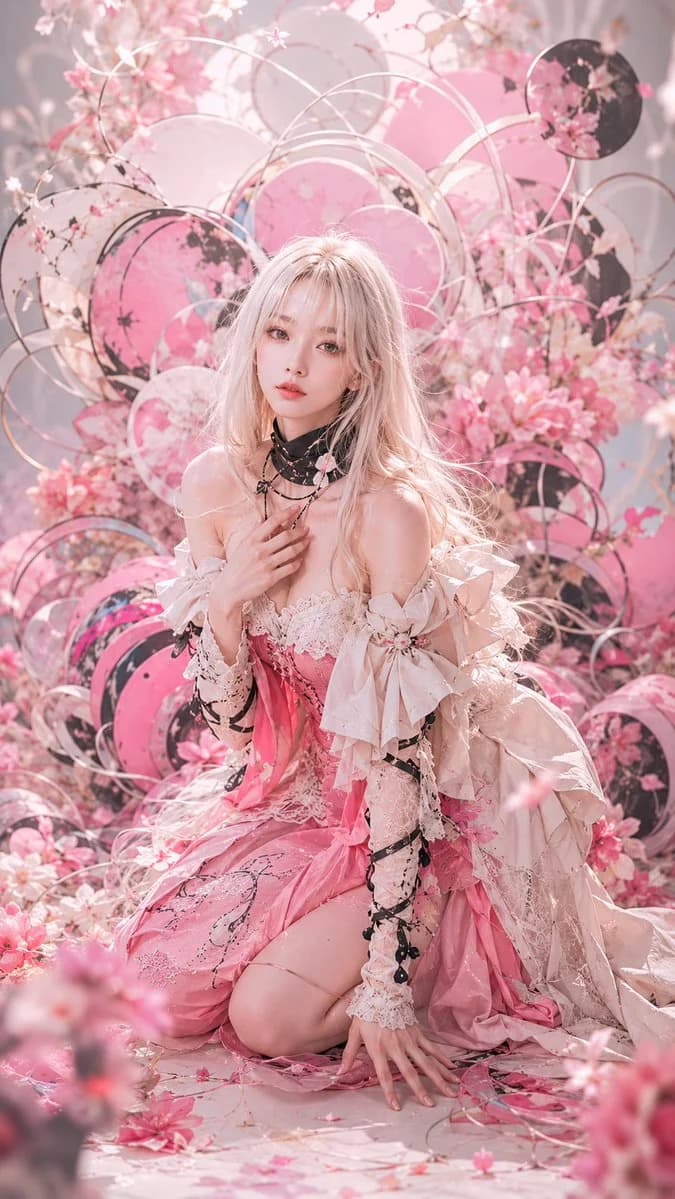
1291자Create a vertical 2:3 high-fashion fantasy portrait of {argument name="character name" default="a young woman"} kneeling in an elaborate cherry-blossom installation, with a deliberately featureless face covered by a centered matte dusty-pink rectangular mask. She has very long, tousled {argument name="hair color" default="pale platinum-blonde hair"} and fair glowing skin, posed with one hand touching layered black necklaces at her chest and the other hand resting on the floor. Dress her in an ornate off-shoulder {argument name="dress color" default="pink and ivory"} couture gown with lace bodice, ruffled sleeves, oversized ribbon bows on both arms, sheer lace gloves or sleeves, black ribbon wrapping accents, dangling black bead details, and a voluminous skirt pooling around her knees. Surround her with a dense romantic background of cherry blossoms, petals, and circular hoop structures resembling mizuhiki cords: count exactly 14 visible circular hoops and disks, including 9 thin metallic white or rose-gold rings, 3 large pink floral disks, and 2 dark black floral disks. Add scattered pink petals on the floor, soft foreground blossom blur at the bottom edge, and a dreamy pastel palette of blush pink, cream, ivory, rose gold, and soft gray. Lighting should be bright, ethereal, backlit, and diffused, with shallow depth of field, glossy skin highlights, delicate fabric texture, cinematic editorial composition, ultra-detailed photorealistic rendering, no text, no watermark, no extra people.이 프롬프트 소개
Image 2에서 GPT Image 2에 바로 사용할 수 있는 광고 크리에이티브 프롬프트 ‘벚꽃 꾸뛰르 초상화’입니다. 아래 1291자를 복사해 Create 폼에 붙여 넣으면 위 미리보기와 비슷한 이미지를 만들 수 있습니다. 제품 광고, 광고 크리에이티브, 인물 태그를 조정하면 새로운 방향으로 확장할 수 있습니다.
먼저 그대로 사용해 본 뒤 피사체, 조명, 구도를 작업에 맞게 조정해 보세요. 원문을 그대로 쓰거나 수정해도 생성 비용은 같습니다.
사용 사례
광고 크리에이티브 작업의 좋은 출발점
‘벚꽃 꾸뛰르 초상화’처럼 표현한 광고 크리에이티브 이미지를 만들고 싶다면 이 GPT Image 2 프롬프트로 시작해 보세요. 스타일과 구도는 이미 잡혀 있으므로 인물, 제품, 색상, 장면 요소만 작업에 맞게 바꾸면 됩니다.
먼저 손보기 좋은 부분
- 피사체 인물, 제품, 장소, 오브젝트를 내 내용으로 바꾸고 전체 구도는 유지합니다.
- 분위기 조명, 색감, 카메라 각도, 소재 디테일을 브랜드나 용도에 맞춥니다.
- 결과 형식 생성 전에 비율, 배경, 텍스트, 레이아웃 지시를 정리합니다.
비슷한 프롬프트 더 보기
스타일, 용도, 피사체가 가까운 GPT Image 2 프롬프트를 이어서 확인해 보세요.
사용 방법
- 1단계
프롬프트 복사
위의 복사 버튼을 눌러 전체 텍스트를 가져옵니다.
- 2단계
Image 2 Create 열기
Create 폼으로 이동해 붙여 넣습니다.
- 3단계
생성
Generate를 누르면 몇 초 안에 내 버전이 완성됩니다.
내 버전으로 만들기
한 번의 클릭으로 Create 폼에 불러오고 바로 조정하세요.