Prompt
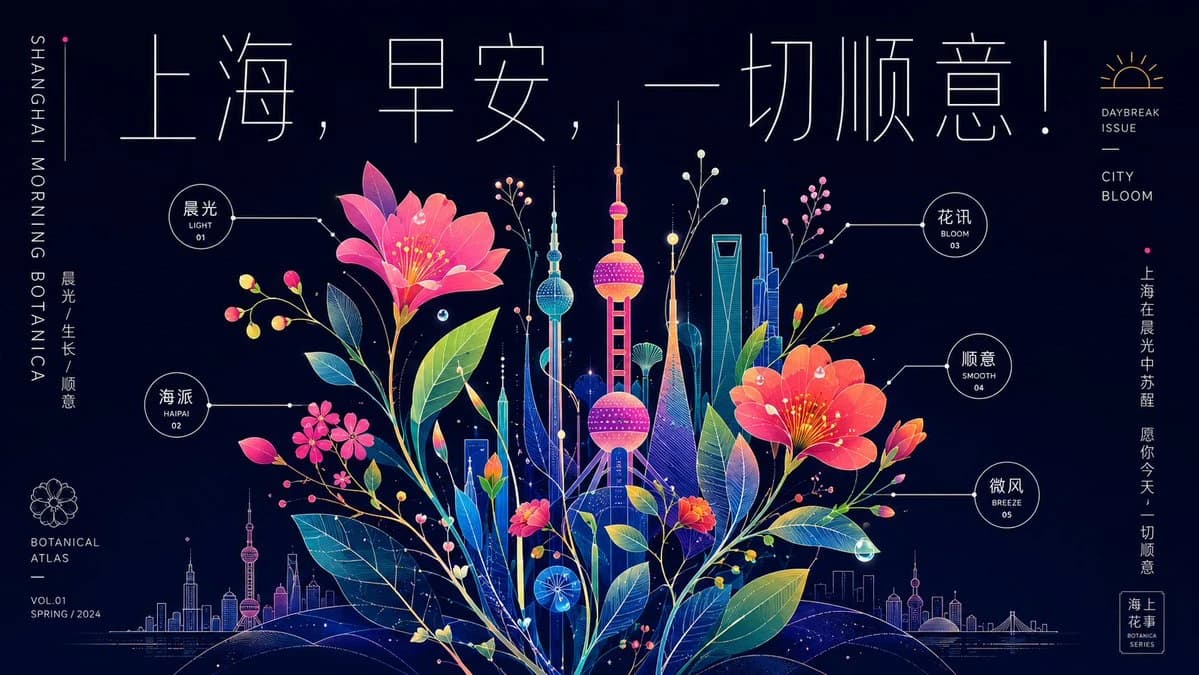
558 paroleObiettivo: Crea un biglietto d'auguri in forma di poster da atlante botanico al neon per {argument name="city name" default="Shanghai"}, che unisca uno skyline urbano futuristico a fiori in piena fioritura e precise annotazioni infografiche, trasmettendo un fresco augurio del mattino.
Formato: Poster orizzontale ampio 16:9, sfondo blu notte profondo, line art al neon luminosa, precisione vettoriale nitida, alto contrasto, layout editoriale elegante.
Composizione principale: Centra l'immagine su un bouquet ibrido luminoso tra botanica e città. Fai emergere dai fiori uno skyline stilizzato di Shanghai, con al centro la Oriental Pearl Tower in magenta e ciano brillanti, i grattacieli circostanti in blu, verde acqua, viola e oro, e una sottile silhouette della città lungo l'orizzonte in basso. Dal centro in basso, fai crescere attorno allo skyline grandi foglie traslucide, steli, boccioli e fiori, formando un “sistema di crescita al neon” denso ma ordinato e leggibile. Usa ovunque sottili linee di collegamento bianche, punti, etichette circolari e piccoli segni da diagramma.
Fiori e piante: Includi esattamente 2 grandi fiori principali rosso-rosa, uno in alto a sinistra verso il centro e uno al centro a destra, entrambi con stami gialli luminosi. Includi esattamente 3 grappoli di fiori rosa più piccoli in basso a sinistra/al centro, oltre a molti steli sottili con piccoli boccioli tondi rosa, gialli, arancioni e bianchi. Le foglie devono essere grandi, stratificate, semitrasparenti, con nervature ben visibili disegnate in sfumature di verde acqua, verde, blu e giallo.
Layout del testo: Nella parte superiore, componi un grandissimo titolo cinese a linea sottile: “上海,早安,一切顺意!”, con spaziatura ariosa ed eleganti tratti geometrici. Lungo il bordo sinistro estremo, inserisci il testo inglese verticale: “SHANGHAI MORNING BOTANICA”. Sotto, colloca il testo cinese verticale “晨光 / 生长 / 顺意”. In basso a sinistra, aggiungi una piccola icona di fiore e i testi “BOTANICAL ATLAS”, “VOL.01”, “SPRING / 2024”. In alto a destra, aggiungi una piccola icona di alba con i testi “DAYBREAK ISSUE” e “CITY BLOOM”. Lungo il bordo destro, inserisci il testo cinese verticale di augurio: “上海在晨光中苏醒 愿你今天,一切顺意”. In basso a destra, aggiungi un piccolo sigillo incorniciato con le scritte “海上花事” e “BOTANICA SERIES”.
Etichette infografiche: Includi esattamente 5 etichette di annotazione circolari collegate da sottili linee guida bianche: 1) “晨光 / LIGHT / 01” vicino al fiore in alto a sinistra, 2) “海派 / HAIPAI / 02” al centro a sinistra, 3) “花讯 / BLOOM / 03” vicino allo skyline in alto a destra, 4) “顺意 / SMOOTH / 04” al centro a destra, 5) “微风 / BREEZE / 05” in basso a destra. Mantieni le etichette leggibili ed essenziali.
Stile visivo: Raffinata illustrazione botanica al neon, prosperità grafica, abbondanza ordinata, sfumature luminose, sottili linee da disegno tecnico, particelle luminose, minuscole stelle, riflessi simili a gocce di rugiada, leggeri retini a punti sulle torri, delicate linee botaniche. L'atmosfera è fresca, umida e ottimista, come una città che si risveglia all'alba dopo la pioggia.
Personalizzazione: Usa {argument name="headline text" default="上海,早安,一切顺意!"} come titolo in alto, {argument name="left vertical title" default="SHANGHAI MORNING BOTANICA"} sul bordo sinistro, {argument name="right blessing text" default="上海在晨光中苏醒 愿你今天,一切顺意"} sul bordo destro e {argument name="issue label" default="VOL.01 SPRING / 2024"} nell'area editoriale in basso a sinistra.
Vincoli: Mantieni lo sfondo scuro, la tipografia sottile ed elegante, il layout simmetrico ma organico e il numero di annotazioni esattamente pari a 5. Non aggiungere persone, animali, texture fotorealistiche, paragrafi affollati, filigrane o loghi aggiuntivi.Informazioni su questo prompt
Poster Botanico Neon di Shanghai è un prompt infografica pronto da usare con GPT Image 2 su Image 2. Copia le 558 parole qui sotto, incollale nel form Create e otterrai un risultato vicino all’anteprima. Modifica i tag Infografica, Poster, Prodotto se vuoi portarlo in una direzione diversa.
Usalo come base, poi adatta soggetto, luce o composizione al risultato che cerchi. Il costo in crediti resta lo stesso, sia usandolo così com’è sia personalizzandolo.
Caso d’uso
Un buon punto di partenza per Infografica
Parti da qui se vuoi un’immagine in stile infografica ispirata a Poster Botanico Neon di Shanghai. Il prompt imposta già stile e struttura; sostituisci soggetto, prodotto, colori o dettagli della scena in base al progetto.
Cosa vale la pena modificare
- Soggetto Sostituisci persona, prodotto, luogo o oggetto principale senza perdere la composizione.
- Stile Regola luce, palette, angolo di ripresa o materiali per allinearlo al brand.
- Formato Definisci formato, sfondo, testo o note di layout prima di generare.
Altre direzioni da esplorare
Trova altri prompt GPT Image 2 con stile, uso o soggetto simile.
Come usarlo
- Passo 1
Copia il prompt
Premi il pulsante Copia qui sopra per ottenere il testo completo.
- Passo 2
Apri Image 2 Create
Vai al form Create e incollalo.
- Passo 3
Genera
Premi Generate. La tua versione arriva in pochi secondi.
Rendilo tuo
Carica il prompt nel form Create con un clic e inizia a modificarlo.