Prompt
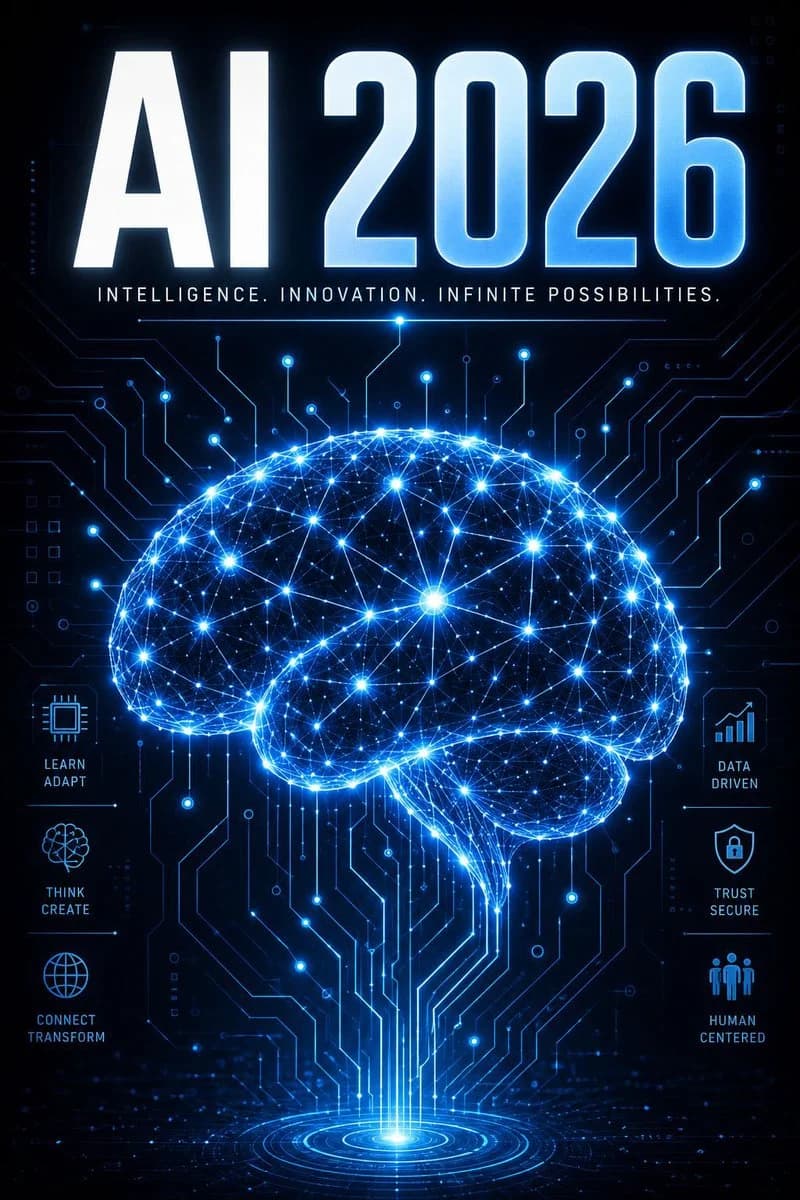
360 palabrasGoal: Create a futuristic vertical tech poster announcing {argument name="headline text" default="AI 2026"}, centered on a glowing artificial-intelligence brain made of neural network lines and circuit traces.
Canvas: Portrait poster, 2:3 aspect ratio, dark navy-to-black background, high contrast, crisp sci-fi lighting, no border or watermark.
Layout: Put an enormous bold uppercase headline at the top reading {argument name="headline text" default="AI 2026"}. Use a heavy condensed sans-serif font with white-to-icy-blue gradient fill, bevel-like highlights, and electric blue outer glow. Directly below it, add a thin glowing divider line and the small spaced uppercase tagline: {argument name="tagline" default="INTELLIGENCE. INNOVATION. INFINITE POSSIBILITIES."}
Main subject: In the center and lower half, draw one large side-view human brain silhouette formed from hundreds of luminous blue nodes and connecting lines, like a digital neural constellation. The brain should glow intensely with cyan, electric blue, and white points of light, with denser bright nodes scattered throughout. From the bottom of the brain, vertical circuit pathways descend into a circular holographic portal or target-like light source at the bottom center.
Background: Fill the entire background with subtle printed-circuit-board traces, microchip paths, small dots, tiny squares, and faint interface markings. The circuitry should radiate around and behind the brain, mostly thin neon-blue lines on black, with some brighter connection points.
Side feature panels: Include exactly 6 small icon-and-label feature blocks, three on the left and three on the right, aligned vertically beside the brain. Left side from top to bottom: 1) microchip icon labeled “LEARN ADAPT”, 2) abstract brain/flower network icon labeled “THINK CREATE”, 3) globe icon labeled “CONNECT TRANSFORM”. Right side from top to bottom: 4) rising bar chart icon labeled “DATA DRIVEN”, 5) shield with lock icon labeled “TRUST SECURE”, 6) three-person group icon labeled “HUMAN CENTERED”. Use small cyan line icons with uppercase stacked labels and thin horizontal divider lines.
Visual style: Premium cyberpunk infographic poster, sharp vector-meets-3D rendering, glowing blue holographic effects, radiant lens flares, detailed circuitry, symmetrical composition, clean readable typography, ultra-detailed, high resolution.
Constraints: Keep all visible text spelled exactly as specified, make the headline very legible, use only the 6 side feature blocks listed, avoid extra labels, avoid logos, avoid photographic people.Sobre este prompt
Póster Tecnológico Futurista AI 2026 es un prompt de infografía listo para usar con GPT Image 2 en Image 2. Copia las 360 palabras de abajo, pégalas en el formulario Create y obtendrás un resultado cercano a la vista previa. Ajusta las etiquetas Infografía, Mockup, Póster si quieres llevarlo hacia otra dirección.
Úsalo como punto de partida y ajusta el sujeto, la iluminación o la composición hasta conseguir el resultado que buscas. El coste en créditos es el mismo si lo usas tal cual o lo personalizas.
Caso de uso
Buen punto de partida para Infografía
Empieza aquí si quieres una imagen de infografía en la línea de Póster Tecnológico Futurista AI 2026. El prompt ya marca el estilo y la estructura; solo cambia el sujeto, el producto, los colores o los detalles de la escena según tu idea.
Qué conviene ajustar primero
- Sujeto Sustituye la persona, el producto, el lugar o el objeto principal sin perder la composición.
- Estilo Ajusta la luz, la paleta, el ángulo de cámara o los materiales para que encaje con tu marca.
- Formato Define la proporción, el fondo, el texto o las notas de composición antes de generar.
Más rutas de prompts para explorar
Encuentra más prompts de GPT Image 2 con un estilo, uso o tema parecido.
Cómo usarlo
- Paso 1
Copia el prompt
Pulsa el botón Copiar de arriba para obtener el texto completo.
- Paso 2
Abre Image 2 Create
Ve al formulario Create y pégalo.
- Paso 3
Genera
Pulsa Generate. Tu versión estará lista en segundos.
Hazlo tuyo
Carga el prompt en el formulario Create con un clic y empieza a ajustarlo.