Prompt
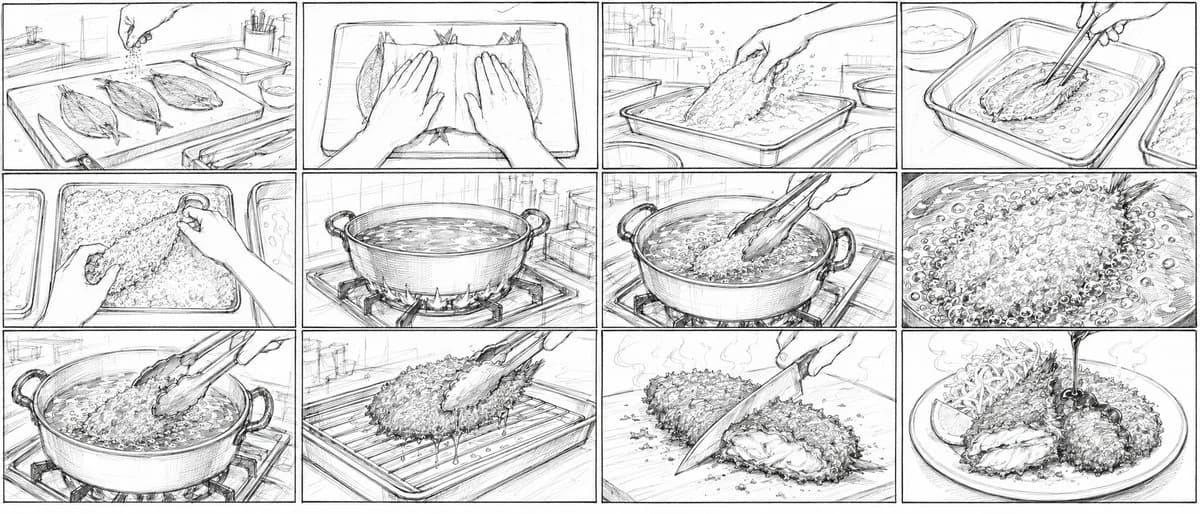
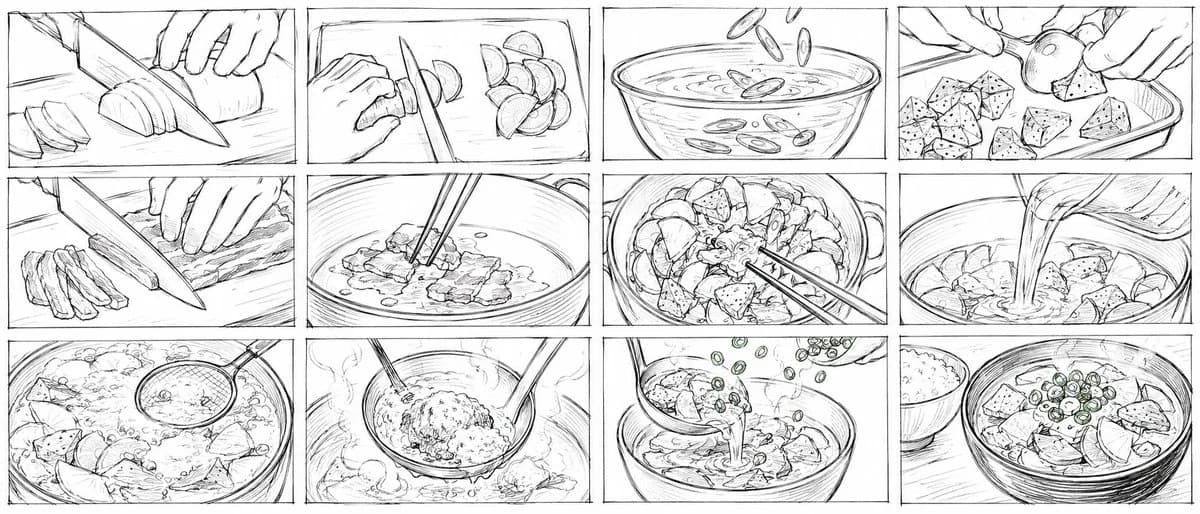
453 palabrasGoal: Create a wide 21:9 storyboard image for a 15-second Japanese 2D anime cooking short about making {argument name="dish name" default="tonjiru set meal"}. The image should look like a very rough pencil storyboard drawn quickly by hand, messy and unfinished, with black graphite lines on a white background, no color, no clean inking, no shading beyond loose scribbles, and visible sketch construction marks.
Canvas: Ultra-wide horizontal 21:9 composition, divided into exactly 12 rectangular storyboard panels arranged in a 3-row by 4-column grid. Use thin hand-drawn panel borders with slight wobble. Keep the whole sheet monochrome and rough.
Layout and panel count: Show exactly 12 discrete cooking shots, left to right, top to bottom:
1. Close-up of hands slicing a daikon radish or large white root vegetable on a cutting board with a chef knife; several round slices on the left.
2. Close-up of a hand and knife cutting small crescent slices of another vegetable, with chopped pieces piled to the right.
3. Bowl of water or stock seen from the side/top, with sliced green onions or vegetable rings falling into the liquid.
4. Hands placing irregular cubes of konjac or tofu-like ingredients into a rectangular tray; one round vegetable piece held above the tray.
5. Close-up of thin pork strips being sliced on a cutting board with a large knife; cut strips stacked on the left.
6. Pot or pan close-up with pork being stirred by chopsticks in a shallow layer of liquid or oil.
7. Top view of a handled pot filled with chunky vegetables and meat, chopsticks stirring through the mixture.
8. Close-up of liquid broth being poured from a pitcher into a pot full of ingredients.
9. Simmering pot with visible bubbles, steam, root vegetables and tofu/konjac chunks; a ladle or skimmer enters from the upper right.
10. Ladle lifting a mound of miso paste or seasoning over the steaming pot while chopsticks or a spoon help dissolve it.
11. Soup being ladled into a bowl, with chopped green onions falling from above as garnish.
12. Final serving shot: a bowl of finished tonjiru topped with green onion rings and chunky ingredients, with a small bowl of white rice placed to the left rear.
Visual style: Extremely rough Japanese animation storyboard pencil sketch, rushed human drawing, dirty construction lines, uneven perspective, loose energetic strokes, simple anatomy for hands, minimal background, no polished illustration. Use cinematic close-ups and cooking-action framing. The overall feeling should be like production storyboard thumbnails for an anime food scene.
Constraints: No captions, no speech bubbles, no printed text, no color, no photorealism, no clean line art, no watercolor, no 3D render. Keep all 12 panels clearly separated and preserve the exact 3 by 4 storyboard grid.Sobre este prompt
Storyboard de Cocina Tonjiru es un prompt de póster listo para usar con GPT Image 2 en Image 2. Copia las 453 palabras de abajo, pégalas en el formulario Create y obtendrás un resultado cercano a la vista previa. Ajusta las etiquetas Póster, Cómic, Storyboard si quieres llevarlo hacia otra dirección.
Úsalo como punto de partida y ajusta el sujeto, la iluminación o la composición hasta conseguir el resultado que buscas. El coste en créditos es el mismo si lo usas tal cual o lo personalizas.
Caso de uso
Buen punto de partida para Póster
Empieza aquí si quieres una imagen de póster en la línea de Storyboard de Cocina Tonjiru. El prompt ya marca el estilo y la estructura; solo cambia el sujeto, el producto, los colores o los detalles de la escena según tu idea.
Qué conviene ajustar primero
- Sujeto Sustituye la persona, el producto, el lugar o el objeto principal sin perder la composición.
- Estilo Ajusta la luz, la paleta, el ángulo de cámara o los materiales para que encaje con tu marca.
- Formato Define la proporción, el fondo, el texto o las notas de composición antes de generar.
Más rutas de prompts para explorar
Encuentra más prompts de GPT Image 2 con un estilo, uso o tema parecido.
Cómo usarlo
- Paso 1
Copia el prompt
Pulsa el botón Copiar de arriba para obtener el texto completo.
- Paso 2
Abre Image 2 Create
Ve al formulario Create y pégalo.
- Paso 3
Genera
Pulsa Generate. Tu versión estará lista en segundos.
Hazlo tuyo
Carga el prompt en el formulario Create con un clic y empieza a ajustarlo.