Prompt
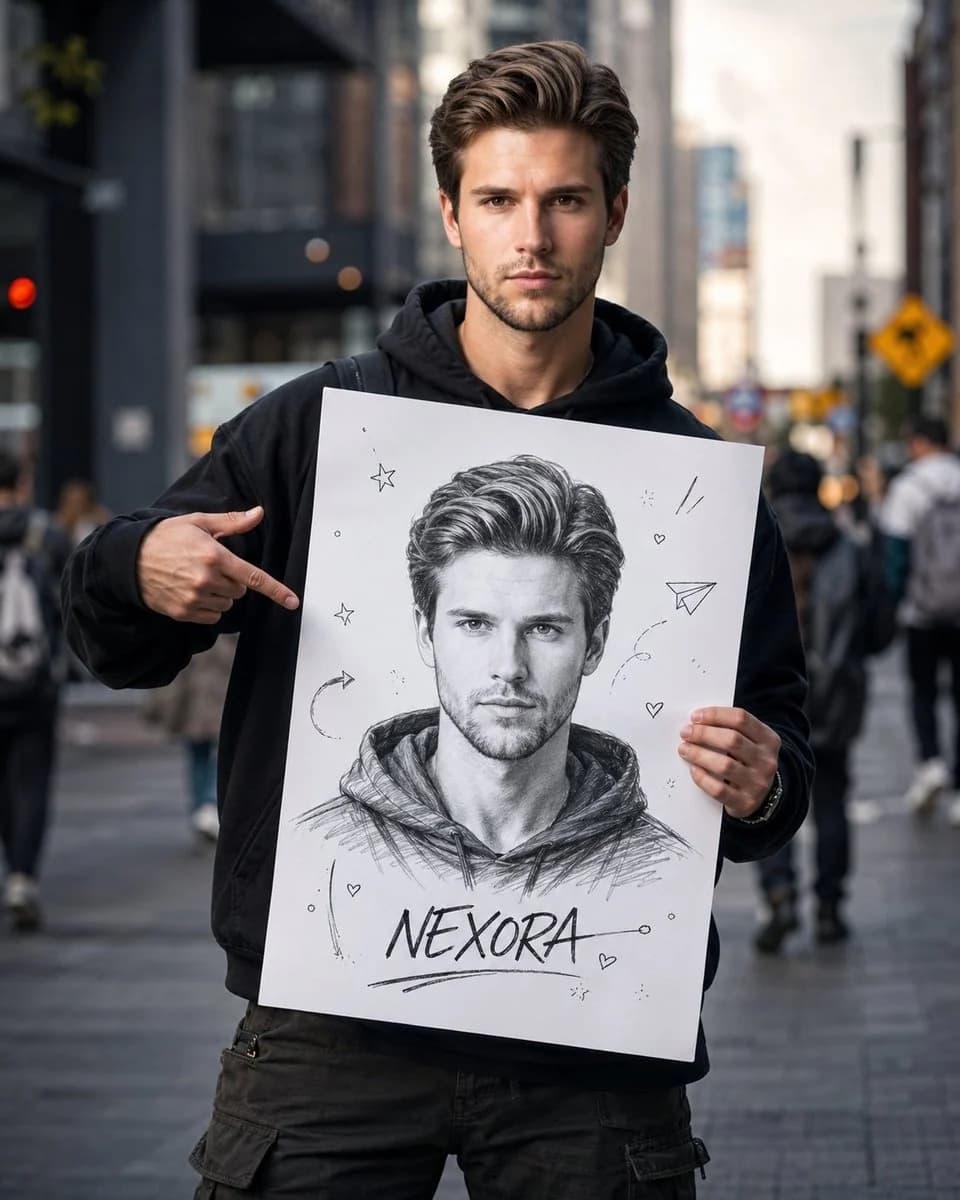
307 palabrasCrea un retrato de fotografía callejera cinematográfico y ultrarrealista de mí en una calle concurrida de la ciudad. Mantén mi rostro exactamente igual que en la foto de referencia: la misma estructura facial, ojos, nariz, labios, peinado, tono de piel, proporciones e identidad general. No alteres, embellezcas ni reinterpretes mi aspecto de ningún modo. Estoy de pie con seguridad en el centro del encuadre, con una sudadera negra oversize con capucha, pantalones cargo holgados y ropa urbana informal. Mi expresión es divertida, un poco traviesa y natural, como si mostrara con orgullo mi lado creativo. Sostengo delante de mí un gran cartel blanco. El cartel debe contener solo UN boceto de mí dibujado a mano. Nada de varios retratos ni variaciones. El boceto debe ser: Dibujo a lápiz en blanco y negro Muy detallado Parecido facial realista Trazo expresivo Estilo de cuaderno de artista Fondo blanco limpio Sombreado sutil Trazos de lápiz visibles hechos a mano Energía de creador seguro de sí mismo En la parte inferior del boceto, escribe: [Nombre] Alrededor del boceto, añade solo unos pocos garabatos mínimos: Estrellas diminutas Corazones pequeños Avión de papel Flechas de boceto ligeras Marcas creativas sutiles Mantén el cartel sencillo, limpio y potente. El ambiente debe sentirse creativo, inspirador, auténtico, artístico y documental, como si formara parte de la campaña de un movimiento de creadores. Estilo: retrato callejero ultrarrealista, luz natural, poca profundidad de campo, fondo suavemente desenfocado, fotografía editorial premium, imagen de calidad de revista, narrativa cinematográfica, estética Pinterest, campaña de marca de creador, emotiva y cercana, fotografía profesional, obra maestra en 8K. El contraste entre mi yo real y la versión de mí dibujada a mano debe ser el foco visual principal, creando un potente efecto de artista frente a obra. El único boceto del cartel debe seguir siendo el claro punto focal. Relación de aspecto: 4:5
Sobre este prompt
Retrato cinematográfico de fotografía urbana es un prompt de retrato listo para usar con GPT Image 2 en Image 2. Copia las 307 palabras de abajo, pégalas en el formulario Create y obtendrás un resultado cercano a la vista previa. Ajusta las etiquetas Anuncio de producto, Retrato, Moda si quieres llevarlo hacia otra dirección.
Úsalo como punto de partida y ajusta el sujeto, la iluminación o la composición hasta conseguir el resultado que buscas. El coste en créditos es el mismo si lo usas tal cual o lo personalizas.
Caso de uso
Buen punto de partida para Retrato
Empieza aquí si quieres una imagen de retrato en la línea de Retrato cinematográfico de fotografía urbana. El prompt ya marca el estilo y la estructura; solo cambia el sujeto, el producto, los colores o los detalles de la escena según tu idea.
Qué conviene ajustar primero
- Sujeto Sustituye la persona, el producto, el lugar o el objeto principal sin perder la composición.
- Estilo Ajusta la luz, la paleta, el ángulo de cámara o los materiales para que encaje con tu marca.
- Formato Define la proporción, el fondo, el texto o las notas de composición antes de generar.
Más rutas de prompts para explorar
Encuentra más prompts de GPT Image 2 con un estilo, uso o tema parecido.
Cómo usarlo
- Paso 1
Copia el prompt
Pulsa el botón Copiar de arriba para obtener el texto completo.
- Paso 2
Abre Image 2 Create
Ve al formulario Create y pégalo.
- Paso 3
Genera
Pulsa Generate. Tu versión estará lista en segundos.
Hazlo tuyo
Carga el prompt en el formulario Create con un clic y empieza a ajustarlo.