Prompt
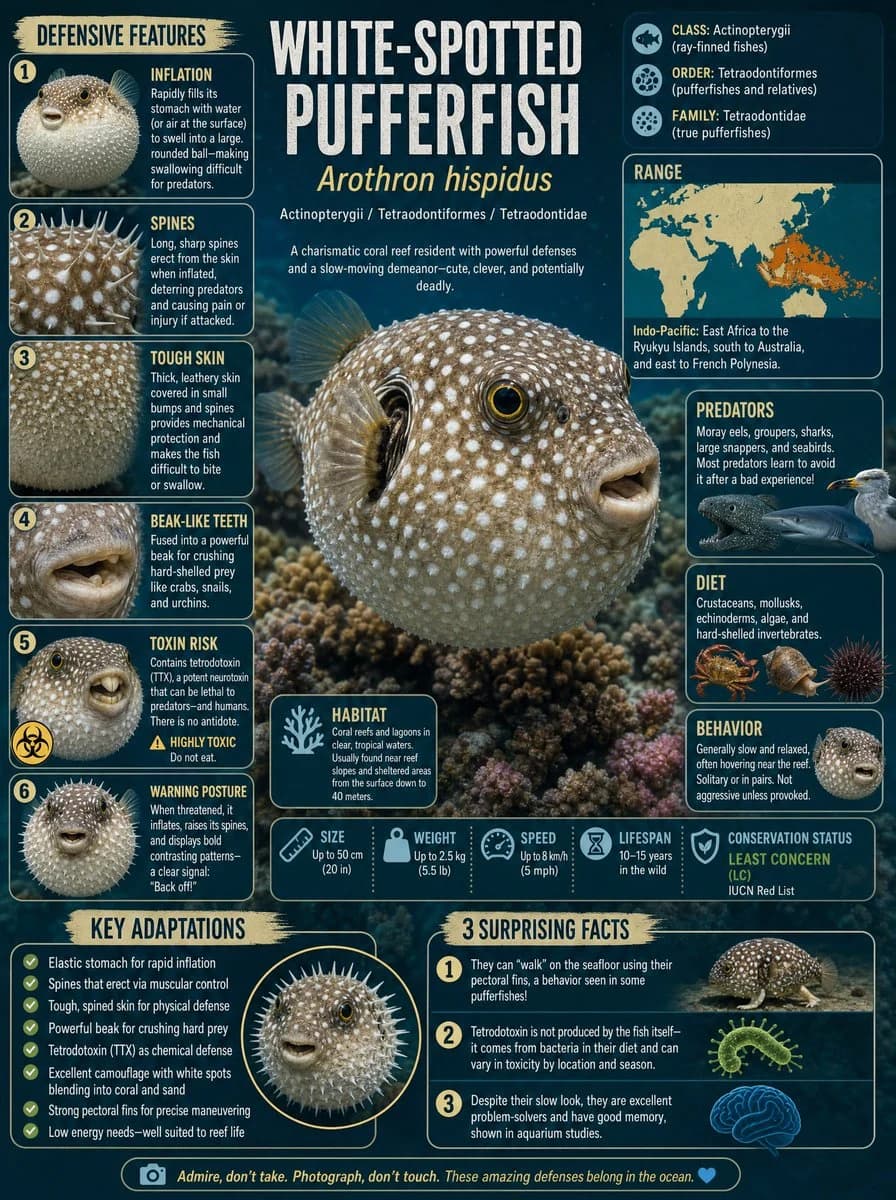
863 paroleObiettivo: Crea un’infografica verticale 4:5 in stile tavola scientifica con dettagli macro su {argument name="animal name" default="pesce palla a macchie bianche"}, presentando l’animale come uno spettacolare paesaggio di barriera corallina a tutta pagina con un layout da rivista ricco di informazioni.
Tela: Formato verticale 4:5, sfondo oceanico verde petrolio scuro, fotografia naturalistica macro fotorealistica ad alta risoluzione unita a pannelli infografici vettoriali puliti. Usa accenti crema, sabbia, giallo tenue, verde acqua e arancio corallo. Aggiungi bolle sottili, texture di barriera corallina e bordi dei pannelli arrotondati.
Soggetto principale: Un grande pesce palla a macchie bianche fotorealistico, {argument name="scientific name" default="Arothron hispidus"}, posizionato leggermente in basso a destra rispetto al centro, rivolto verso destra, gonfio in un corpo rotondo coperto di fitte macchie bianche, con un occhio lucido cerchiato di giallo, una piccola bocca increspata, pinne traslucide e la barriera corallina visibile alle spalle. Il pesce deve dominare il centro come un esemplare-paesaggio.
Area del titolo in alto: Grande titolo maiuscolo condensato color crema con la scritta {argument name="headline text" default="WHITE-SPOTTED PUFFERFISH"}. Sotto, aggiungi il nome scientifico in corsivo giallo “Arothron hispidus”, poi una piccola riga tassonomica “Actinopterygii / Tetraodontiformes / Tetraodontidae” e una breve descrizione: “A charismatic coral reef resident with powerful defenses and a slow-moving demeanor—cute, clever, and potentially deadly.”
Colonna sinistra: Crea un pannello verticale intitolato “DEFENSIVE FEATURES” con esattamente 6 schede numerate, ciascuna con un piccolo ritaglio fotografico e del testo. Le 6 schede sono: 1) “INFLATION”, che mostra il muso di un pesce palla gonfio e spiega che riempie rapidamente lo stomaco d’acqua o d’aria per gonfiarsi in una grande palla rotonda; 2) “SPINES”, che mostra in primo piano le spine cutanee aguzze sollevate e spiega che si ergono dalla pelle quando il pesce si gonfia; 3) “TOUGH SKIN”, che mostra la pelle coriacea maculata e spiega che la pelle spessa, con protuberanze e scaglie, offre una protezione meccanica; 4) “BEAK-LIKE TEETH”, che mostra la bocca e spiega che i potenti denti fusi frantumano prede dal guscio duro come granchi, lumache e ricci di mare; 5) “TOXIN RISK”, che mostra il pesce palla con un simbolo di rischio biologico e un triangolo di avvertimento giallo e spiega che la tetrodotossina può essere letale e non ha antidoto; 6) “WARNING POSTURE”, che mostra un pesce completamente gonfio e spinoso e spiega che l’animale minacciato si gonfia, solleva le spine e mostra motivi a forte contrasto.
Colonna destra: Crea pannelli scientifici arrotondati impilati. In alto, una scheda tassonomica con esattamente 3 righe e icone: “CLASS: Actinopterygii (ray-finned fishes)”, “ORDER: Tetraodontiformes (pufferfishes and relatives)” e “FAMILY: Tetraodontidae (true pufferfishes)”. Sotto, un pannello “RANGE” con una mappa del mondo beige su sfondo verde petrolio e la distribuzione indo-pacifica evidenziata in arancione, con la didascalia “Indo-Pacific: East Africa to the Ryukyu Islands, south to Australia, and east to French Polynesia.” Più in basso, crea esattamente 3 schede ecologiche: “PREDATORS” con immagini di squalo, cernia, murena e uccello marino; “DIET” con immagini di granchio, lumaca e riccio di mare; e “BEHAVIOR” con un piccolo ritratto di pesce palla, che descrive un movimento lento e rilassato, spesso sospeso vicino alla barriera, solitario o in coppia, non aggressivo se non provocato.
Striscia informativa centrale inferiore: Aggiungi vicino al pesce una piccola scheda “HABITAT” con un’icona di corallo e un testo sulle barriere coralline e le lagune in acque tropicali limpide, di solito vicino a pendii e zone riparate, dalla superficie fino a 40 metri di profondità. Lungo il fondo dell’area centrale, aggiungi esattamente 5 riquadri di dati con icone: “SIZE Up to 50 cm (20 in)”, “WEIGHT Up to 2.5 kg (5.5 lb)”, “SPEED Up to 8 km/h (5 mph)”, “LIFESPAN 10–15 years in the wild” e “CONSERVATION STATUS LEAST CONCERN (LC), IUCN Red List”.
Sezione inferiore: Crea due grandi pannelli arrotondati. Il pannello sinistro, intitolato “KEY ADAPTATIONS”, con esattamente 7 punti elenco con spunta verde: stomaco elastico per un rapido gonfiamento; spine che si ergono grazie al controllo muscolare; pelle spinosa e resistente come difesa fisica; becco potente per frantumare prede dure; tetrodotossina come difesa chimica; eccellente mimetismo, con le macchie bianche che si fondono con corallo e sabbia; robuste pinne pettorali per manovre precise. Includi un riquadro circolare con un pesce palla gonfio e spinoso. Il pannello destro, intitolato “3 SURPRISING FACTS”, con esattamente 3 fatti numerati: 1) possono “camminare” sul fondale usando le pinne pettorali; 2) la tetrodotossina non è prodotta dal pesce stesso, ma deriva dai batteri presenti nella sua dieta e varia in base al luogo e alla stagione; 3) nonostante l’aspetto lento, sono bravissimi a risolvere problemi e hanno una buona memoria. Aggiungi tre piccole illustrazioni di supporto: un pesce palla che cammina, un batterio verde e un cervello blu.
Piè di pagina: Aggiungi uno stretto banner arrotondato con un’icona di fotocamera e il messaggio di conservazione {argument name="footer message" default="Admire, don’t take. Photograph, don’t touch. These amazing defenses belong in the ocean."} seguito da un piccolo cuore blu.
Vincoli: Usa esattamente il numero di pannelli e di elementi numerati indicato. Mantieni tutto il testo in inglese, leggibile e allineato a una griglia da poster didattico curato. Evita animali aggiuntivi o etichette non pertinenti. Nessuna filigrana, nessun codice QR, nessun logo.Informazioni su questo prompt
Piastra Scientifica del Pesce Palla Maculato è un prompt infografica pronto da usare con GPT Image 2 su Image 2. Copia le 863 parole qui sotto, incollale nel form Create e otterrai un risultato vicino all’anteprima. Modifica i tag Infografica, Poster, Storyboard se vuoi portarlo in una direzione diversa.
Usalo come base, poi adatta soggetto, luce o composizione al risultato che cerchi. Il costo in crediti resta lo stesso, sia usandolo così com’è sia personalizzandolo.
Caso d’uso
Un buon punto di partenza per Infografica
Parti da qui se vuoi un’immagine in stile infografica ispirata a Piastra Scientifica del Pesce Palla Maculato. Il prompt imposta già stile e struttura; sostituisci soggetto, prodotto, colori o dettagli della scena in base al progetto.
Cosa vale la pena modificare
- Soggetto Sostituisci persona, prodotto, luogo o oggetto principale senza perdere la composizione.
- Stile Regola luce, palette, angolo di ripresa o materiali per allinearlo al brand.
- Formato Definisci formato, sfondo, testo o note di layout prima di generare.
Altre direzioni da esplorare
Trova altri prompt GPT Image 2 con stile, uso o soggetto simile.
Come usarlo
- Passo 1
Copia il prompt
Premi il pulsante Copia qui sopra per ottenere il testo completo.
- Passo 2
Apri Image 2 Create
Vai al form Create e incollalo.
- Passo 3
Genera
Premi Generate. La tua versione arriva in pochi secondi.
Rendilo tuo
Carica il prompt nel form Create con un clic e inizia a modificarlo.