Prompt
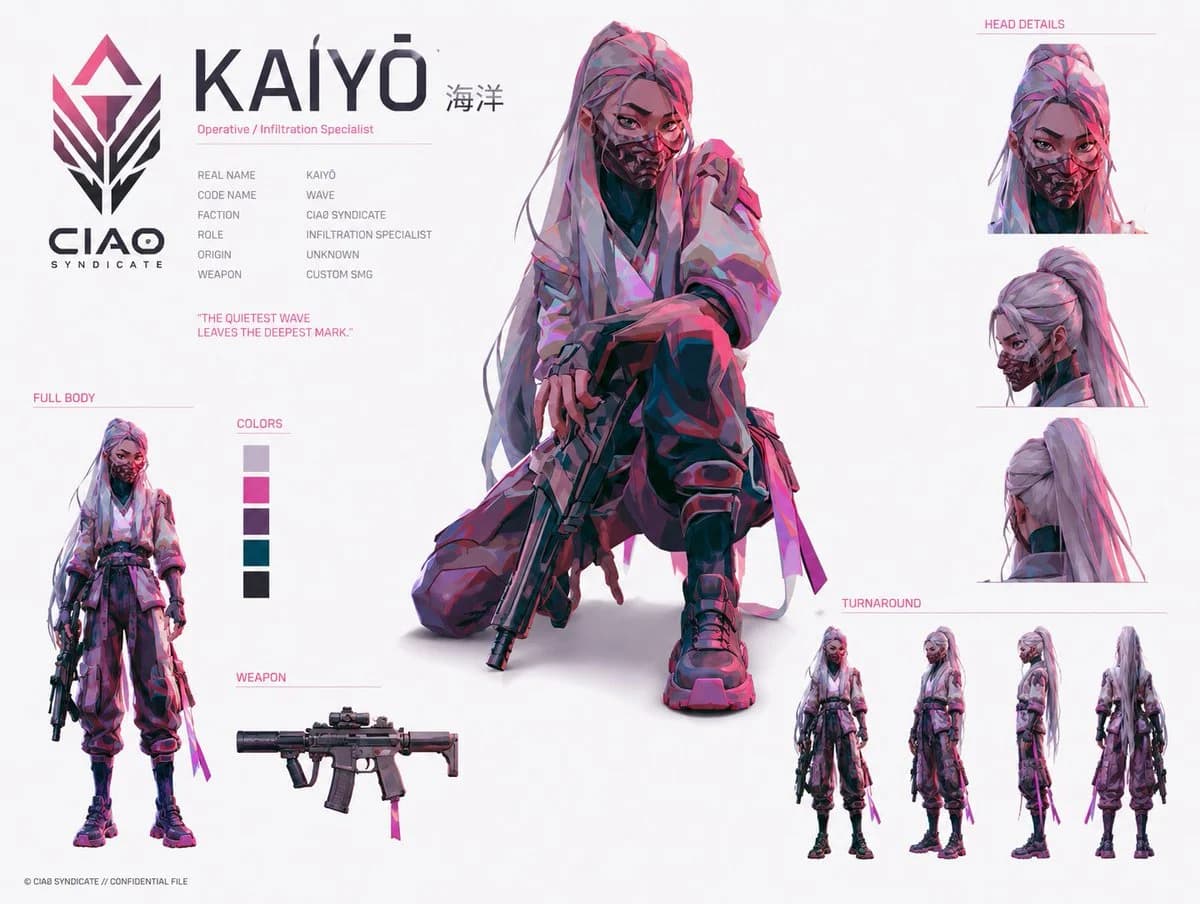
484 palavrasGoal: Create a futuristic anime/cyberpunk character identity board for {argument name="character name" default="KAIYŌ"}, an operative from a covert faction, presented like a clean confidential concept-art sheet.
Canvas: Landscape 4:3 white studio background, high-resolution digital illustration, lots of negative space, thin pale pink divider lines, dark charcoal typography with hot-pink accent labels.
Layout: Large faction logo on the far left with the text “CIAO SYNDICATE” beneath it. Top-left identity block with the huge title “KAIYŌ” and small Japanese text “海洋” to the right, subtitle “Operative / Infiltration Specialist,” then six compact dossier rows: Real Name: KAIYŌ; Code Name: WAVE; Faction: CIAO SYNDICATE; Role: INFILTRATION SPECIALIST; Origin: UNKNOWN; Weapon: CUSTOM SMG. Add the quote “THE QUIETEST WAVE LEAVES THE DEEPEST MARK.” in pink below the dossier.
Main subject: Center-dominant full-color illustration of a young female infiltration specialist kneeling in a tense crouch, one knee up and one knee down, holding a compact custom SMG pointed downward. She has {argument name="hair color" default="long silver-lavender hair with pink highlights"}, a high ponytail with loose strands, sharp intense eyes, and a patterned tactical respirator mask covering the lower half of her face. Outfit is a layered loose tactical kimono-style jacket over dark undersuit pieces, baggy cargo pants, black knee pads and shin guards, chunky combat sneakers, fingerless gloves, side straps, belts, dangling fabric ribbons, and magenta tactical accents. Lighting and painting style are energetic concept art with angular brush strokes, cel-shaded anime realism, magenta/cyan rim lighting, deep violet shadows, and crisp edges.
Left-side detail panels: Include exactly 3 panels on the left below the identity block: 1) “FULL BODY” panel showing a small standing full-body version of the character holding the SMG at her side; 2) “COLORS” panel with exactly 5 vertical color swatches: pale lavender gray, hot magenta, dark purple, deep teal, and near-black charcoal; 3) “WEAPON” panel showing a side-view compact custom SMG with suppressor, optic, magazine, foregrip, collapsible stock, and a small magenta ribbon tag.
Right-side detail panels: Include exactly 4 cropped head-detail views under the pink label “HEAD DETAILS”: 1) front view with mask and direct stare, 2) three-quarter side view showing high ponytail and mask profile, 3) rear head view showing ponytail and jacket collar, 4) a small additional head crop integrated in the upper cluster if needed for balance. Below them, include the label “TURNAROUND” and exactly 4 full-body turnaround figures: front, three-quarter/front-side, side profile, and back view.
Visual style: Premium game-character concept sheet, inspired by modern tactical anime design and slick sci-fi identity boards, clean editorial layout, thin pink guide lines, subtle gray shadows under figures, no heavy background scenery. Use {argument name="accent color" default="hot magenta"} as the main graphic accent and rim-light color.
Constraints: Keep all visible text in English except the small “海洋” next to the character name. Use exactly the counted panels and detail views listed above. Do not add extra characters, logos, UI windows, watermarks, or background environments.Sobre este prompt
Ficha de Personagem Operativo Cyberpunk é um prompt de design de personagem pronto para usar com GPT Image 2 no Image 2. Copie as 484 palavras abaixo, cole no formulário Create e você terá um resultado próximo da prévia. Ajuste as tags UI, Storyboard, Personagem se quiser levar o resultado para outra direção.
Use-o como base e ajuste o tema, a luz ou a composição ao resultado que procura. O custo em créditos é o mesmo usando o texto original ou uma versão personalizada.
Caso de uso
Um bom ponto de partida para Design de personagem
Comece por aqui quando quiser uma imagem de design de personagem na mesma linha de Ficha de Personagem Operativo Cyberpunk. O prompt já define o estilo e a estrutura; troque o assunto, o produto, as cores ou os detalhes da cena para o seu projeto.
O que vale ajustar primeiro
- Assunto Troque a pessoa, o produto, o lugar ou o objeto principal sem perder a composição.
- Estilo Ajuste luz, paleta de cores, ângulo de câmera ou materiais para combinar com a sua marca.
- Formato Defina proporção, fundo, texto ou notas de layout antes de gerar.
Mais caminhos de prompts
Encontre outros prompts GPT Image 2 com estilo, uso ou tema parecido.
Como usar
- Passo 1
Copie o prompt
Clique no botão Copiar acima para pegar o texto completo.
- Passo 2
Abra o Image 2 Create
Vá para o formulário Create e cole o texto.
- Passo 3
Gere
Clique em Generate. Sua versão fica pronta em segundos.
Deixe com a sua cara
Carregue o prompt no formulário Create com um clique e comece a ajustar.